Goal
Add an AI assistant to WordPress that is fast, secure, and reliable under load. We’ll avoid long-running PHP, protect API keys, and support streaming. This is a production pattern we’ve deployed in client sites.
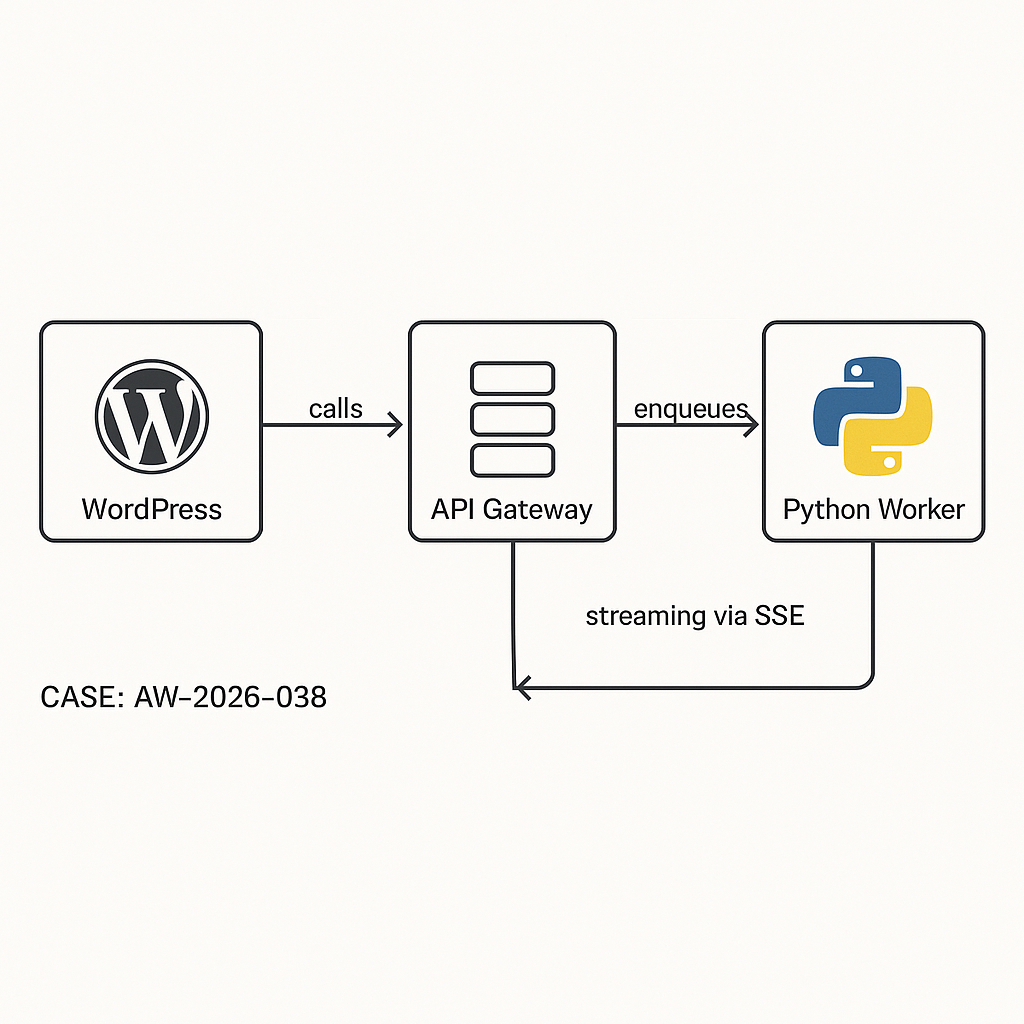
Architecture (high level)
– WP Plugin (PHP): UI + REST endpoints, stores minimal state, never holds LLM keys.
– API Gateway/Edge (Cloudflare/AWS): Auth, rate limiting, logging.
– Worker (Python/FastAPI): Orchestrates LLM calls (OpenAI/Azure/Anthropic), tools, retries; pushes results.
– Queue (Redis/SQS): Buffer workloads, smooth spikes.
– Storage: WordPress (postmeta/options) for user-visible data; object store/DB for logs.
– Optional Streaming: SSE via edge worker or reverse proxy, not from PHP-FPM.
Why this pattern
– Security: Keys never live in WP DB or theme code.
– Performance: No long PHP requests; async jobs run outside WordPress.
– Reliability: Queue + retries handle spikes/timeouts.
– Observability: Centralized logs/metrics for LLM latency and errors.
Data flow
1) Browser -> WP REST: user prompt + context (nonce + auth).
2) WP -> API Gateway: signed JWT; enqueue job.
3) Worker -> LLM/tools: executes, streams or finalizes.
4a) Streaming: Gateway proxies SSE to browser.
4b) Async: Worker posts result webhook back to WP; WP stores and notifies client via polling or webhooks.
Security hardening
– Cap checks: Only authenticated users, or signed public sessions with rate limits.
– Nonces for UI actions, WP REST permissions_callback.
– JWT from WP to gateway with short TTL; rotated HS256 secret in env, not DB.
– IP allowlist for worker->WP webhooks.
– Sanitize/escape all content rendered in WP.
– Log PII boundaries; redact before sending to LLM.
WordPress plugin skeleton (core pieces)
// Plugin header omitted for brevity
1) Settings (no LLM keys in WP):
– api_gateway_url
– jwt_issuer, jwt_kid
– public_rate_limit/window
– webhook_secret (HMAC shared with worker)
2) Admin settings + capability checks (manage_options).
3) REST routes:
– /ai/v1/chat (POST) -> enqueues
– /ai/v1/webhook (POST) -> receives results (IP + HMAC verified)
– /ai/v1/status (GET) -> poll job state (transients or custom table)
Minimal REST route example (enqueue)
“`
add_action(‘rest_api_init’, function() {
register_rest_route(‘ai/v1’, ‘/chat’, [
‘methods’ => ‘POST’,
‘callback’ => ‘ai_chat_enqueue’,
‘permission_callback’ => function($req){ return is_user_logged_in() || ai_allow_public(); }
]);
});
function ai_chat_enqueue(WP_REST_Request $req){
$prompt = wp_strip_all_tags($req->get_param(‘prompt’) ?? ”);
if (!$prompt) return new WP_Error(‘bad_request’, ‘Missing prompt’, [‘status’=>400]);
// Rate limit (user or IP)
if (!ai_rate_ok($req)) return new WP_Error(‘rate_limited’,’Try later’,[‘status’=>429]);
// Create job record (custom table or postmeta)
$job_id = ai_create_job([‘user_id’=>get_current_user_id(), ‘prompt’=>$prompt, ‘status’=>’queued’]);
// Sign JWT for gateway
$jwt = ai_sign_jwt([
‘iss’=>get_option(‘ai_jwt_issuer’),
‘sub’=> (string) get_current_user_id(),
‘jti’=> $job_id,
‘iat’=> time(),
‘exp’=> time()+60
]);
// Send to gateway
$resp = wp_remote_post(get_option(‘ai_gateway_url’).’/jobs’, [
‘timeout’=>5,
‘headers’=>[‘Authorization’=>”Bearer $jwt”, ‘Content-Type’=>’application/json’],
‘body’=> wp_json_encode([
‘job_id’=>$job_id,
‘prompt’=>$prompt,
‘context’=> ai_collect_context(),
‘webhook’=> home_url(‘/wp-json/ai/v1/webhook’)
])
]);
if (is_wp_error($resp) || wp_remote_retrieve_response_code($resp) >= 300) {
ai_update_job($job_id,[‘status’=>’error’,’error’=>’enqueue_failed’]);
return new WP_Error(‘upstream_error’,’Queue unavailable’,[‘status’=>502]);
}
return [‘job_id’=>$job_id, ‘status’=>’queued’];
}
“`
Webhook handler (worker -> WP)
“`
register_rest_route(‘ai/v1′,’/webhook’,[
‘methods’=>’POST’,
‘callback’=>’ai_webhook_handler’,
‘permission_callback’=>’__return_true’
]);
function ai_webhook_handler(WP_REST_Request $req){
// Verify HMAC and IP allowlist
if (!ai_verify_hmac($req)) return new WP_Error(‘forbidden’,’bad signature’,[‘status’=>403]);
$job_id = sanitize_text_field($req->get_param(‘job_id’));
$content = wp_kses_post($req->get_param(‘content’) ?? ”);
$usage = $req->get_param(‘usage’) ?? [];
ai_update_job($job_id, [‘status’=>’done’,’content’=>$content,’usage’=>$usage]);
// Optionally cache a hash of the prompt->response
set_transient(‘ai_job_’.$job_id, [‘status’=>’done’], 600);
return [‘ok’=>true];
}
“`
Frontend usage (enqueue + poll)
– Enqueue via wp.ajax or fetch to /wp-json/ai/v1/chat.
– Poll /status until done or use SSE channel if implemented at gateway.
– Render with esc_html or safe HTML subset.
Python worker (FastAPI outline)
– Validates JWT (issuer, exp, kid).
– Pushes to queue (Redis/SQS) with retry/backoff.
– Consumes jobs, calls LLM with tools/function-calls as needed.
– Optional SSE: Streams tokens through gateway to client.
– Posts final result to WP webhook with HMAC.
FastAPI snippets
“`
@app.post(“/jobs”)
def enqueue(job: Job, auth=Depends(verify_jwt)):
q.enqueue(job.dict())
return {“accepted”: True}
def process(job):
try:
resp = client.chat.completions.create(
model=os.getenv(“MODEL”),
messages=[{“role”:”user”,”content”: job[“prompt”]}],
timeout=30
)
content = resp.choices[0].message.content
usage = resp.usage.model_dump() if hasattr(resp,’usage’) else {}
post_webhook(job[“webhook”], job[“job_id”], content, usage)
except Exception as e:
post_webhook_error(job, str(e))
“`
Streaming via SSE (recommended)
– Don’t stream from PHP. Use edge worker that:
– Authenticates client cookie/session with a one-time token from WP.
– Opens SSE to Python worker that proxies LLM token stream.
– Applies per-user rate limits.
– WordPress only issues short-lived stream tokens; never touches LLM socket.
Rate limiting
– Per IP for anonymous, per user_id for logged-in.
– Server-side bucket at gateway (e.g., 30 requests/5m).
– UI throttle + backoff to avoid hammering.
Caching and cost control
– Cache deterministic prompts by normalized hash (strip whitespace, lowercased).
– Store minimal response + usage metrics for analytics.
– Deny-list high-cost paths; enforce max tokens and model allowlist at worker.
Observability
– Centralized logs with job_id correlation across WP, gateway, worker.
– Metrics: queue depth, LLM latency, error rate, token usage per user/site.
Database notes
– For scale, use a custom table ai_jobs (job_id PK, user_id, prompt_hash, status, content MEDIUMTEXT, usage JSON, created_at, updated_at).
– Index status, created_at for cleanup jobs.
– Cron: purge >30 days or anonymize prompt text.
Hardening checklist
– No LLM keys in WordPress DB or code.
– Short JWT TTL; rotate secrets; pin alg and kid.
– Webhook HMAC + IP allowlist.
– Escape output; sanitize HTML.
– Strict CORS only to site origin.
– Disable file edit in wp-config; limit plugin access.
When to choose what
– Small sites: WordPress + API Gateway + single worker (no queue) with short timeouts and SSE.
– Growing traffic: Add queue, retries, and circuit breakers.
– Enterprise: Multi-region gateway, KMS-managed secrets, private networking to WP origin.
Deliverables you can ship today
– WP plugin skeleton above + settings UI.
– FastAPI worker with JWT verify + enqueue + result postback.
– Cloudflare Worker for SSE proxy + rate limit.
– IaC to provision queue, logs, secrets.

This is an excellent, robust architecture for handling AI securely within WordPress. What has been the biggest maintenance challenge you’ve encountered when managing all of the decoupled services?
In practice, the biggest ongoing pain tends to be observability across the edge/gateway → worker → queue chain—correlating a single chat request across logs/traces and knowing where latency or failures were introduced. A close second is drift between services around auth/rate-limit rules and API/schema versioning (e.g., a worker change that subtly breaks an older plugin).
Roughly what scale are you thinking—single site with modest traffic, or multiple sites/tenants with higher concurrency and bursts?
Thanks, that’s very helpful insight; I’m planning for the latter, with multiple tenants experiencing higher concurrency and traffic bursts.