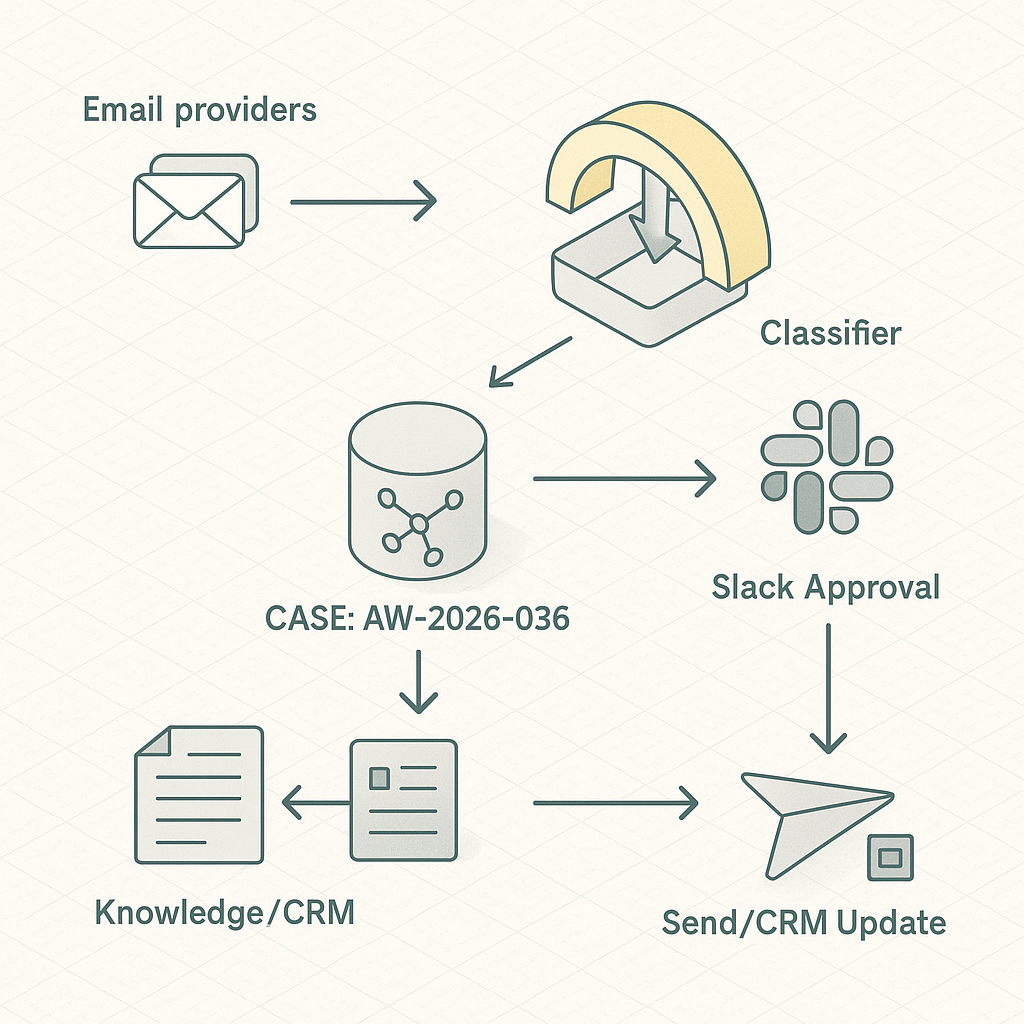
Why this matters
– Sales, support, and ops spend 2–3 hours/day on email sorting and repetitive replies.
– A triage layer can auto-classify, propose safe drafts, and push priority work into Slack with context—without replacing humans.
Reference architecture
– Ingest
– Gmail/Outlook via webhook or polling (Google Pub/Sub push or Graph change notifications).
– Normalize payloads to a unified Message schema.
– Queue
– Durable queue (AWS SQS, GCP Pub/Sub, or Redis Streams) for idempotent processing.
– Classification
– Lightweight zero-shot or small fine-tuned model (e.g., OpenAI gpt-4o-mini or local DistilBERT) to label: Sales Lead, Support, Billing, Vendor, Spam, Personal.
– Enrichment
– Entity extraction: company, contact, product, order number.
– CRM fetch: HubSpot/Salesforce lookup by email/domain.
– Knowledge grounding: retrieve SOP snippets from a vector DB (pgvector, Pinecone) or deterministic docs by tag.
– Drafting
– Response generator with tool-use: functions for CRM notes, ticket creation, calendar availability, pricing snippets.
– Human-in-the-loop: drafts posted to Slack thread or Helpdesk (Zendesk/Freshdesk) for one-click approve/edit/send.
– Routing
– Priority items to Slack with CTA buttons (Approve, Edit, Escalate).
– Auto-open tickets/deals and attach context.
– Storage and audit
– Postgres for message state and actions log.
– Object store for payloads/redactions.
– Security
– Service account with least privilege.
– Secrets in Vault/Secret Manager.
– PII redaction before logging and vectorization.
Data model (essentials)
– messages(id, provider_id, subject, from_email, to_email, received_at, hash, status)
– classifications(message_id, label, confidence, model, created_at)
– enrichments(message_id, crm_contact_id, account_id, entities_json)
– drafts(message_id, body_md, grounded_snippets, risk_flags, approver_id, status)
– actions(id, message_id, action_type, actor, meta_json, created_at)
Workflow
1) Receive email → dedupe by hash → enqueue.
2) Classify → if below threshold, route to “Needs Triage” Slack channel.
3) Enrich from CRM + knowledge base.
4) Generate draft with grounded snippets; flag risks (pricing, legal, refund).
5) Post to Slack thread:
– Summary + label + confidence.
– Top 3 knowledge citations.
– Buttons: Approve & Send, Edit in Helpdesk, Open Ticket, Snooze.
6) On approval, send via provider API; log outcomes; update CRM/ticket.
Implementation notes
– Gmail: Use domain-wide delegation + Pub/Sub push; retry with exponential backoff. Outlook: Graph subscriptions with delta tokens.
– Drafting: Constrain model outputs via JSON schema and system prompts with explicit policy (no promises, no discounts).
– Knowledge: Prefer deterministic mapping for regulated content (refunds) and RAG for FAQs. Store snippet IDs and versions.
– Idempotency: Use provider thread ID + message timestamp; mark processed in DB.
– Rate limits: Batch CRM lookups; cache by email/domain for 15 minutes.
– Observability: Traces per message (OpenTelemetry), token/cost meter, label drift dashboard.
Risk controls
– Never auto-send on first rollout. Require human approval until precision > 0.9 in target labels.
– Redact PII before vectorization; keep full text in encrypted store only.
– Separate prod vs. test mailboxes; shadow mode for 1–2 weeks.
Cost model (typical SMB, 1,500 emails/day)
– Model: ~$40–$90/month with mini models + selective larger calls for edge cases.
– Infra: $20–$60/month (DB, queue, functions).
– Helpdesk/CRM: no change.
– Net: <$150/month for 1.5–3 hours/day saved per team function.
KPIs to track
– Median time-to-first-response.
– Approval rate of AI drafts.
– Edit distance from draft to sent message.
– Misroute rate and reclassifications.
– Ticket deflection (answered without human rewrite).
– Cost/email and cost/opportunity.
Rollout plan (1 week)
– Day 1–2: Connect providers, set up queue, DB, and Slack app. Implement classification and Slack summaries only (no drafts).
– Day 3: Add enrichment and deterministic snippets. Enable draft generation in shadow mode.
– Day 4: Human-in-the-loop in Slack/Helpdesk. Collect edit deltas.
– Day 5: Tighten prompts, set confidence thresholds. Push to pilot team.
– Day 6–7: Analyze metrics. Enable auto-send for low-risk templates (e.g., “Received, we’ll reply soon”).
Example prompts (condensed)
– Classifier: “Label one of [Sales Lead, Support, Billing, Vendor, Spam, Personal]. Return JSON {label, confidence}. If <0.75 confidence → Needs Triage.”
– Drafter: “Using provided citations only. No legal/discount language. Produce Markdown reply with placeholders for missing facts. Return JSON {subject, body_md, citations, risk_flags}.”
Integration stubs (Python, pseudo)
– Classify: call_model(prompt, input) → parse JSON → store.
– Enrich: crm.lookup(email) → vector.retrieve(top_k=5, filters=label) → bundle context.
– Draft: call_model(functions=[create_ticket, fetch_availability]) with deterministic system prompt.
– Slack: post message + actions; on approve → provider.send(message_id, draft).
What “good” looks like after 30 days
– 60% faster median response time.
– 40–55% of inbound handled with minor edits.
– <3% misroutes, <1% high-risk flags reaching auto-send.
– Clear audit trail and per-label accuracy above 90%.
This is a small, safe step that compounds. Once stable, extend to lead scoring, meeting scheduling, and quote generation using the same event and approval pattern.

This is an excellent architectural breakdown; the detail on the classification step is very helpful. Have you found that a fine-tuned model provides a significant enough accuracy boost to justify the extra effort over a zero-shot approach?
Fine-tuning can give a meaningful accuracy bump when your labels are subtle, your emails are domain-heavy (product names, ticket codes, “billing vs renewals”), or you need very consistent routing—typically you’ll see fewer “almost right” misclassifications compared to zero-shot. Zero-shot is usually the best starting point: fastest to ship, no training pipeline, and costs are mostly just per-call inference; you can often get surprisingly solid results by tightening the label definitions and adding a few representative examples in the prompt. Fine-tuned models trade higher upfront effort (collect/clean labels, retrain when categories drift) for lower per-message latency/cost and more stable behavior over time, especially at higher volumes.
Two quick questions: roughly how many emails per day are you classifying, and are your labels clean and objective (e.g., “Billing”) or more judgment-based (e.g., “Urgent,” “High-value lead”)?
That’s a very helpful way to frame the trade-offs; we’re handling about 500 emails per day with mostly objective labels like “Billing.”
At ~500/day with objective labels like “Billing,” I’d usually start by measuring a solid zero-shot baseline before paying the fine-tune tax. What does “good enough” look like for you—are Billing false negatives (missed billing emails) much more costly than false positives, or is the cost roughly symmetric?
If you haven’t already, a light eval set (even 100–200 randomly sampled emails, double-labeled) plus a simple confusion matrix will tell you quickly where zero-shot breaks. In many cases, adding a few-shot prompt with 3–5 crisp examples per class + tighter label rules (and maybe a “Needs human review” fallback) closes most of the gap; then you can fine-tune only if the remaining errors are still expensive.
That’s excellent advice, thank you; a false negative on a billing email is far more costly for us, which makes your baseline-first approach a perfect fit.