Why this matters
– Sales, support, and ops spend 2–3 hours/day on email sorting and repetitive replies.
– A triage layer can auto-classify, propose safe drafts, and push priority work into Slack with context—without replacing humans.
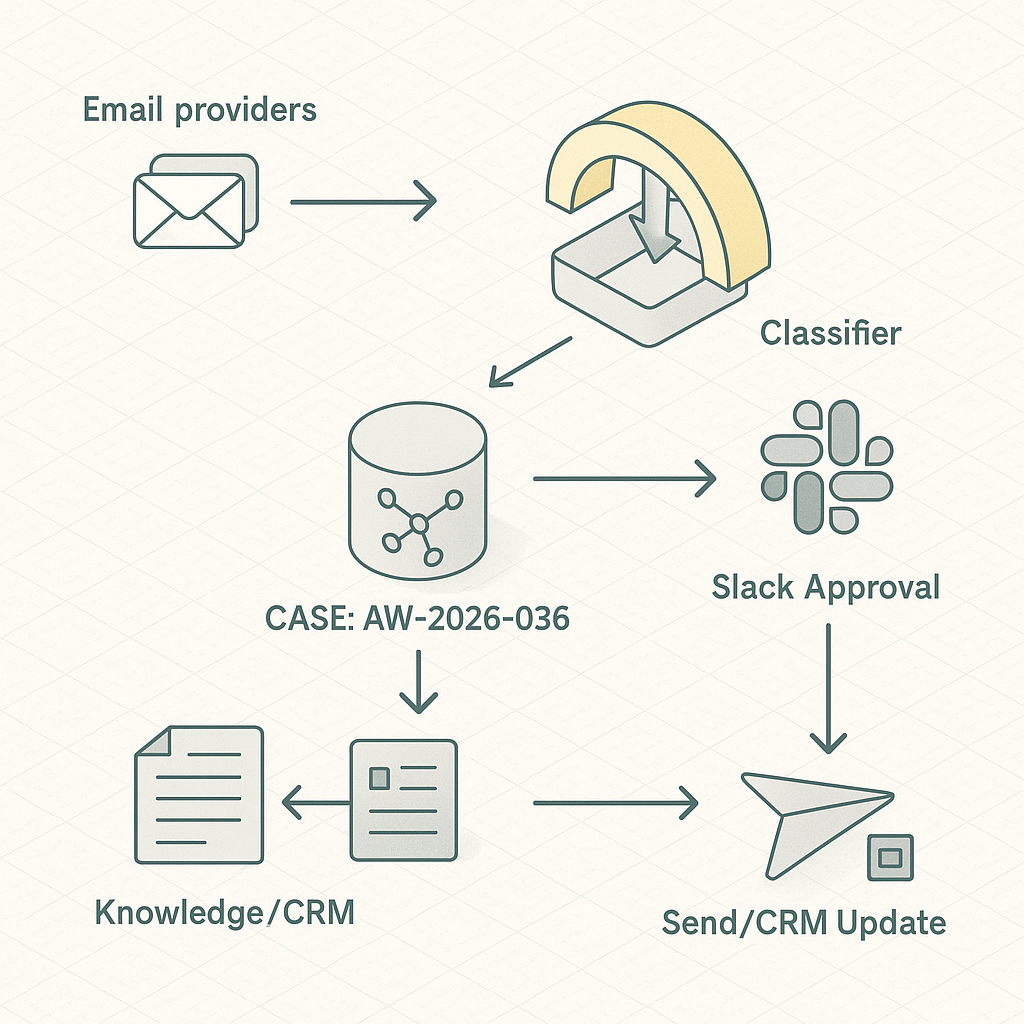
Reference architecture
– Ingest
– Gmail/Outlook via webhook or polling (Google Pub/Sub push or Graph change notifications).
– Normalize payloads to a unified Message schema.
– Queue
– Durable queue (AWS SQS, GCP Pub/Sub, or Redis Streams) for idempotent processing.
– Classification
– Lightweight zero-shot or small fine-tuned model (e.g., OpenAI gpt-4o-mini or local DistilBERT) to label: Sales Lead, Support, Billing, Vendor, Spam, Personal.
– Enrichment
– Entity extraction: company, contact, product, order number.
– CRM fetch: HubSpot/Salesforce lookup by email/domain.
– Knowledge grounding: retrieve SOP snippets from a vector DB (pgvector, Pinecone) or deterministic docs by tag.
– Drafting
– Response generator with tool-use: functions for CRM notes, ticket creation, calendar availability, pricing snippets.
– Human-in-the-loop: drafts posted to Slack thread or Helpdesk (Zendesk/Freshdesk) for one-click approve/edit/send.
– Routing
– Priority items to Slack with CTA buttons (Approve, Edit, Escalate).
– Auto-open tickets/deals and attach context.
– Storage and audit
– Postgres for message state and actions log.
– Object store for payloads/redactions.
– Security
– Service account with least privilege.
– Secrets in Vault/Secret Manager.
– PII redaction before logging and vectorization.
Data model (essentials)
– messages(id, provider_id, subject, from_email, to_email, received_at, hash, status)
– classifications(message_id, label, confidence, model, created_at)
– enrichments(message_id, crm_contact_id, account_id, entities_json)
– drafts(message_id, body_md, grounded_snippets, risk_flags, approver_id, status)
– actions(id, message_id, action_type, actor, meta_json, created_at)
Workflow
1) Receive email → dedupe by hash → enqueue.
2) Classify → if below threshold, route to “Needs Triage” Slack channel.
3) Enrich from CRM + knowledge base.
4) Generate draft with grounded snippets; flag risks (pricing, legal, refund).
5) Post to Slack thread:
– Summary + label + confidence.
– Top 3 knowledge citations.
– Buttons: Approve & Send, Edit in Helpdesk, Open Ticket, Snooze.
6) On approval, send via provider API; log outcomes; update CRM/ticket.
Implementation notes
– Gmail: Use domain-wide delegation + Pub/Sub push; retry with exponential backoff. Outlook: Graph subscriptions with delta tokens.
– Drafting: Constrain model outputs via JSON schema and system prompts with explicit policy (no promises, no discounts).
– Knowledge: Prefer deterministic mapping for regulated content (refunds) and RAG for FAQs. Store snippet IDs and versions.
– Idempotency: Use provider thread ID + message timestamp; mark processed in DB.
– Rate limits: Batch CRM lookups; cache by email/domain for 15 minutes.
– Observability: Traces per message (OpenTelemetry), token/cost meter, label drift dashboard.
Risk controls
– Never auto-send on first rollout. Require human approval until precision > 0.9 in target labels.
– Redact PII before vectorization; keep full text in encrypted store only.
– Separate prod vs. test mailboxes; shadow mode for 1–2 weeks.
Cost model (typical SMB, 1,500 emails/day)
– Model: ~$40–$90/month with mini models + selective larger calls for edge cases.
– Infra: $20–$60/month (DB, queue, functions).
– Helpdesk/CRM: no change.
– Net: <$150/month for 1.5–3 hours/day saved per team function.
KPIs to track
– Median time-to-first-response.
– Approval rate of AI drafts.
– Edit distance from draft to sent message.
– Misroute rate and reclassifications.
– Ticket deflection (answered without human rewrite).
– Cost/email and cost/opportunity.
Rollout plan (1 week)
– Day 1–2: Connect providers, set up queue, DB, and Slack app. Implement classification and Slack summaries only (no drafts).
– Day 3: Add enrichment and deterministic snippets. Enable draft generation in shadow mode.
– Day 4: Human-in-the-loop in Slack/Helpdesk. Collect edit deltas.
– Day 5: Tighten prompts, set confidence thresholds. Push to pilot team.
– Day 6–7: Analyze metrics. Enable auto-send for low-risk templates (e.g., “Received, we’ll reply soon”).
Example prompts (condensed)
– Classifier: “Label one of [Sales Lead, Support, Billing, Vendor, Spam, Personal]. Return JSON {label, confidence}. If <0.75 confidence → Needs Triage.”
– Drafter: “Using provided citations only. No legal/discount language. Produce Markdown reply with placeholders for missing facts. Return JSON {subject, body_md, citations, risk_flags}.”
Integration stubs (Python, pseudo)
– Classify: call_model(prompt, input) → parse JSON → store.
– Enrich: crm.lookup(email) → vector.retrieve(top_k=5, filters=label) → bundle context.
– Draft: call_model(functions=[create_ticket, fetch_availability]) with deterministic system prompt.
– Slack: post message + actions; on approve → provider.send(message_id, draft).
What “good” looks like after 30 days
– 60% faster median response time.
– 40–55% of inbound handled with minor edits.
– <3% misroutes, <1% high-risk flags reaching auto-send.
– Clear audit trail and per-label accuracy above 90%.
This is a small, safe step that compounds. Once stable, extend to lead scoring, meeting scheduling, and quote generation using the same event and approval pattern.
