Production-Ready Streaming AI Chat in WordPress: REST Endpoint, Nonces, and Redis Rate Limits
What we’re building
– A WordPress plugin that streams AI responses to the browser using Server-Sent Events (SSE)
– Front-end shortcode + minimal JS
– Backend REST endpoint with nonce validation, rate limits in Redis, and provider key isolation
– Works with any SSE-capable model provider (OpenAI, Anthropic, etc.)
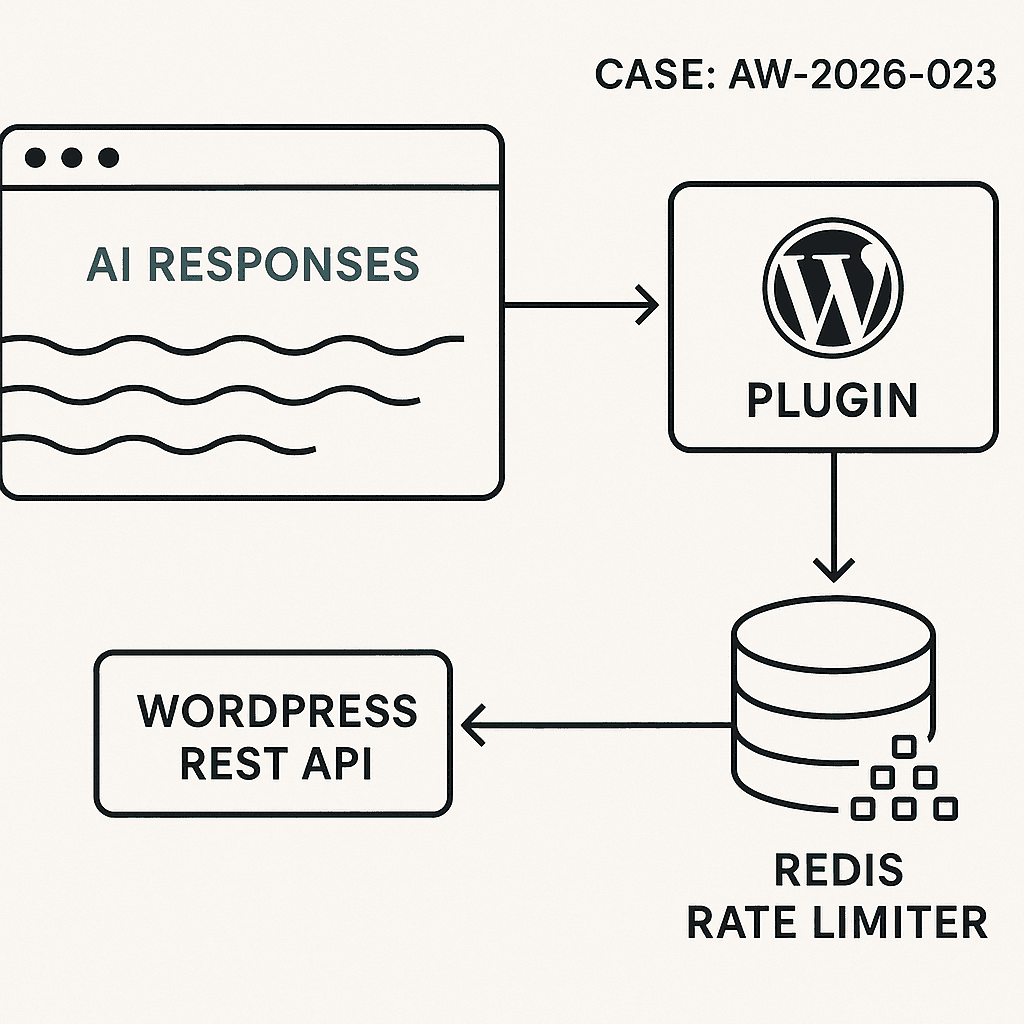
High-level architecture
– Browser: Shortcode renders chat UI and script. JS posts user messages to /wp-json/ai/v1/chat and reads streaming tokens via EventSource.
– WordPress plugin: Validates nonce, enforces rate limit, proxies request to the AI provider, streams tokens back.
– Redis: Token bucket per user/IP for rate limiting.
– Secrets: API key injected via environment (wp-config.php), never exposed to front-end.
Prereqs
– WordPress 6.4+
– PHP 8.1+
– Redis available (phpredis or Predis). Fallback to transients if Redis isn’t available.
– Web server buffering disabled for the streaming route (notes below).
Plugin: file structure
– wp-content/plugins/ai-stream-chat/ai-stream-chat.php
– wp-content/plugins/ai-stream-chat/assets/chat.js
ai-stream-chat.php (core plugin)
esc_url_raw(rest_url(self::REST_NAMESPACE . ‘/’ . self::REST_ROUTE)),
‘nonce’ => wp_create_nonce(self::NONCE_ACTION),
]);
wp_enqueue_script($handle);
wp_enqueue_style(‘ai-sc-css’, false);
$css = ‘.ai-sc{max-width:720px;margin:1rem auto;padding:1rem;border:1px solid #ddd;border-radius:8px}.ai-sc-log{white-space:pre-wrap;font-family:system-ui, -apple-system, Segoe UI, Roboto, Arial;padding:.5rem;height:320px;overflow:auto;background:#fafafa;border:1px solid #eee;border-radius:6px;margin:.5rem 0}.ai-sc-row{display:flex;gap:.5rem}.ai-sc-row input{flex:1;padding:.6rem}.ai-sc-row button{padding:.6rem 1rem}’;
wp_add_inline_style(‘ai-sc-css’, $css);
}
public function shortcode($atts) {
ob_start(); ?>
<div class="ai-sc" data-endpoint="”>
WP_REST_Server::READABLE,
‘callback’ => [$this, ‘handle_sse’],
‘permission_callback’ => ‘__return_true’,
‘args’ => [
‘q’ => [‘required’ => true, ‘sanitize_callback’ => ‘sanitize_text_field’],
‘_wpnonce’ => [‘required’ => true],
],
]);
}
private function get_api_key() {
// Define in wp-config.php: define(‘AI_PROVIDER_KEY’, ‘sk-…’);
return defined(‘AI_PROVIDER_KEY’) ? AI_PROVIDER_KEY : getenv(‘AI_PROVIDER_KEY’);
}
private function get_client_id() {
$ip = $_SERVER[‘REMOTE_ADDR’] ?? ‘0.0.0.0’;
$uid = get_current_user_id();
return $uid ? “u:$uid” : “ip:$ip”;
}
private function redis() {
if (class_exists(‘Redis’)) {
static $r = null;
if (!$r) {
$r = new Redis();
$r->connect(defined(‘WP_REDIS_HOST’) ? WP_REDIS_HOST : ‘127.0.0.1’, defined(‘WP_REDIS_PORT’) ? WP_REDIS_PORT : 6379, 1.0);
if (defined(‘WP_REDIS_PASSWORD’) && WP_REDIS_PASSWORD) $r->auth(WP_REDIS_PASSWORD);
if (defined(‘WP_REDIS_DB’)) $r->select(WP_REDIS_DB);
}
return $r;
}
return null;
}
private function token_bucket_allow($key, $capacity, $refill_ms) {
$now = (int) (microtime(true) * 1000);
$r = $this->redis();
if ($r) {
$lua = ”
local key = KEYS[1]
local now = tonumber(ARGV[1])
local capacity = tonumber(ARGV[2])
local refill_ms = tonumber(ARGV[3])
local tokens = tonumber(redis.call(‘HGET’, key, ‘tokens’) or capacity)
local ts = tonumber(redis.call(‘HGET’, key, ‘ts’) or now)
local delta = math.max(0, now – ts)
local add = (capacity * delta) / refill_ms
tokens = math.min(capacity, tokens + add)
local allowed = 0
if tokens >= 1 then
tokens = tokens – 1
allowed = 1
end
redis.call(‘HSET’, key, ‘tokens’, tokens, ‘ts’, now)
redis.call(‘PEXPIRE’, key, refill_ms)
return allowed
“;
$res = $r->eval($lua, [$key, $now, $capacity, $refill_ms], 1);
return (bool) $res;
}
// Fallback to transients
$st = get_transient($key);
if (!$st) $st = [‘tokens’ => $capacity, ‘ts’ => $now];
$delta = max(0, $now – $st[‘ts’]);
$st[‘tokens’] = min($capacity, $st[‘tokens’] + ($capacity * $delta) / $refill_ms);
$allowed = $st[‘tokens’] >= 1;
if ($allowed) $st[‘tokens’] -= 1;
$st[‘ts’] = $now;
set_transient($key, $st, 60);
return $allowed;
}
public function handle_sse(WP_REST_Request $req) {
if (!wp_verify_nonce($req->get_param(‘_wpnonce’), self::NONCE_ACTION)) {
return new WP_REST_Response([‘error’ => ‘Invalid nonce’], 403);
}
$q = trim((string) $req->get_param(‘q’));
if ($q === ” || strlen($q) > 500) {
return new WP_REST_Response([‘error’ => ‘Invalid input’], 400);
}
$clientId = $this->get_client_id();
$bucketKey = self::RATE_LIMIT_BUCKET . ‘:’ . $clientId;
if (!$this->token_bucket_allow($bucketKey, self::RATE_LIMIT_CAPACITY, self::RATE_LIMIT_REFILL_MS)) {
return new WP_REST_Response([‘error’ => ‘Rate limited’], 429);
}
$apiKey = $this->get_api_key();
if (!$apiKey) {
return new WP_REST_Response([‘error’ => ‘Server not configured’], 500);
}
// Start SSE stream
nocache_headers();
header(‘Content-Type: text/event-stream’);
header(‘Cache-Control: no-cache, no-transform’);
header(‘X-Accel-Buffering: no’); // Nginx
header(‘Connection: keep-alive’);
// Disable WP/Apache buffering
if (function_exists(‘apache_setenv’)) @apache_setenv(‘no-gzip’, ‘1’);
@ini_set(‘output_buffering’, ‘off’);
@ini_set(‘zlib.output_compression’, ‘0’);
while (ob_get_level() > 0) @ob_end_flush();
@ob_implicit_flush(1);
$providerUrl = ‘https://api.openai.com/v1/chat/completions’;
$payload = [
‘model’ => ‘gpt-4o-mini’,
‘stream’ => true,
‘messages’ => [
[‘role’ => ‘system’, ‘content’ => ‘You are a concise assistant.’],
[‘role’ => ‘user’, ‘content’ => $q]
],
// Optional: ‘temperature’ => 0.2,
];
$ch = curl_init($providerUrl);
curl_setopt_array($ch, [
CURLOPT_HTTPHEADER => [
‘Authorization: Bearer ‘ . $apiKey,
‘Content-Type: application/json’,
],
CURLOPT_POST => true,
CURLOPT_POSTFIELDS => json_encode($payload),
CURLOPT_WRITEFUNCTION => function($ch, $data) {
// Pass provider SSE chunks to client
echo $data;
echo “n”; // Ensure flush cadence
flush();
return strlen($data);
},
CURLOPT_TIMEOUT => 60,
CURLOPT_CONNECTTIMEOUT => 5,
CURLOPT_RETURNTRANSFER => false,
]);
// Preface event to help client reset UI
echo “event: startndata: {“ok”:true}nn”;
flush();
curl_exec($ch);
if (curl_errno($ch)) {
$err = curl_error($ch);
echo “event: errorndata: ” . json_encode([‘message’ => $err]) . “nn”;
flush();
}
curl_close($ch);
echo “event: donendata: {“ok”:true}nn”;
flush();
exit; // Important: stop WordPress from adding anything else
}
}
new AI_Stream_Chat();
assets/chat.js (front-end)
(function(){
const log = document.getElementById(‘ai-sc-log’);
const input = document.getElementById(‘ai-sc-input’);
const btn = document.getElementById(‘ai-sc-send’);
const endpoint = (window.AI_SC && AI_SC.restUrl) || document.querySelector(‘.ai-sc’)?.dataset?.endpoint;
function append(text) {
log.textContent += text;
log.scrollTop = log.scrollHeight;
}
function startStream(q) {
// Transform REST GET with params for SSE
const url = new URL(endpoint);
url.searchParams.set(‘q’, q);
url.searchParams.set(‘_wpnonce’, AI_SC.nonce);
const es = new EventSource(url.toString());
let buffer = ”;
es.addEventListener(‘start’, () => {
append(‘Assistant: ‘);
});
es.onmessage = (e) => {
// Provider sends JSON chunks with choices[0].delta.content or similar; we handle plain text fragments too.
try {
const data = JSON.parse(e.data);
// OpenAI stream frames contain: choices[0].delta.content
const token = data?.choices?.[0]?.delta?.content ?? ”;
if (token) append(token);
} catch {
// Some providers send plain text lines
if (e.data && e.data !== ‘[DONE]’) append(e.data);
}
};
es.addEventListener(‘done’, () => {
append(‘n’);
es.close();
btn.disabled = false;
input.disabled = false;
});
es.addEventListener(‘error’, (e) => {
append(‘n[Stream error]n’);
es.close();
btn.disabled = false;
input.disabled = false;
});
}
btn?.addEventListener(‘click’, () => {
const q = (input.value || ”).trim();
if (!q) return;
btn.disabled = true;
input.disabled = true;
append(‘You: ‘ + q + ‘n’);
startStream(q);
input.value = ”;
});
input?.addEventListener(‘keydown’, (e) => {
if (e.key === ‘Enter’) btn.click();
});
})();
wp-config.php secrets
– Add: define(‘AI_PROVIDER_KEY’, ‘sk-live-…’);
– Optional Redis: define(‘WP_REDIS_HOST’, ‘127.0.0.1’); define(‘WP_REDIS_PORT’, 6379); define(‘WP_REDIS_PASSWORD’, ‘…’); define(‘WP_REDIS_DB’, 1);
Nginx/Apache streaming notes
– Nginx: add to location for /wp-json/ai/v1/chat: proxy_buffering off; add_header X-Accel-Buffering no;
– Cloudflare/Proxies: ensure response is not buffered; disable HTML minification for the route.
– PHP-FPM: set fastcgi_buffering off; increase read timeout to 60s if needed.
Security hardening
– Nonce required per request; no provider key in the browser.
– Input sanitized and length-limited.
– Rate limiting per user/IP; tune capacity/refill.
– Consider restricting to logged-in users only, or use an additional secret header from server-rendered page.
– Log abuse via WP_DEBUG_LOG or a dedicated audit table.
Performance considerations
– Streaming prevents large payload waits; flush early, flush often.
– Keep REST handler stateless; no session locks.
– Use short provider timeouts and surface errors.
– If no Redis, transients work but are weaker under load.
Extending to production
– Add system prompt controls in wp-admin.
– Store minimal chat history server-side (post meta or custom table) with TTL.
– Swap providers by moving providerUrl/payload to a strategy class.
– Add billing/quotas if exposing to public users.
Usage
– Activate plugin
– Place [ai_chat] on a page
– Set AI_PROVIDER_KEY
– Test: open page, send a message, verify streaming