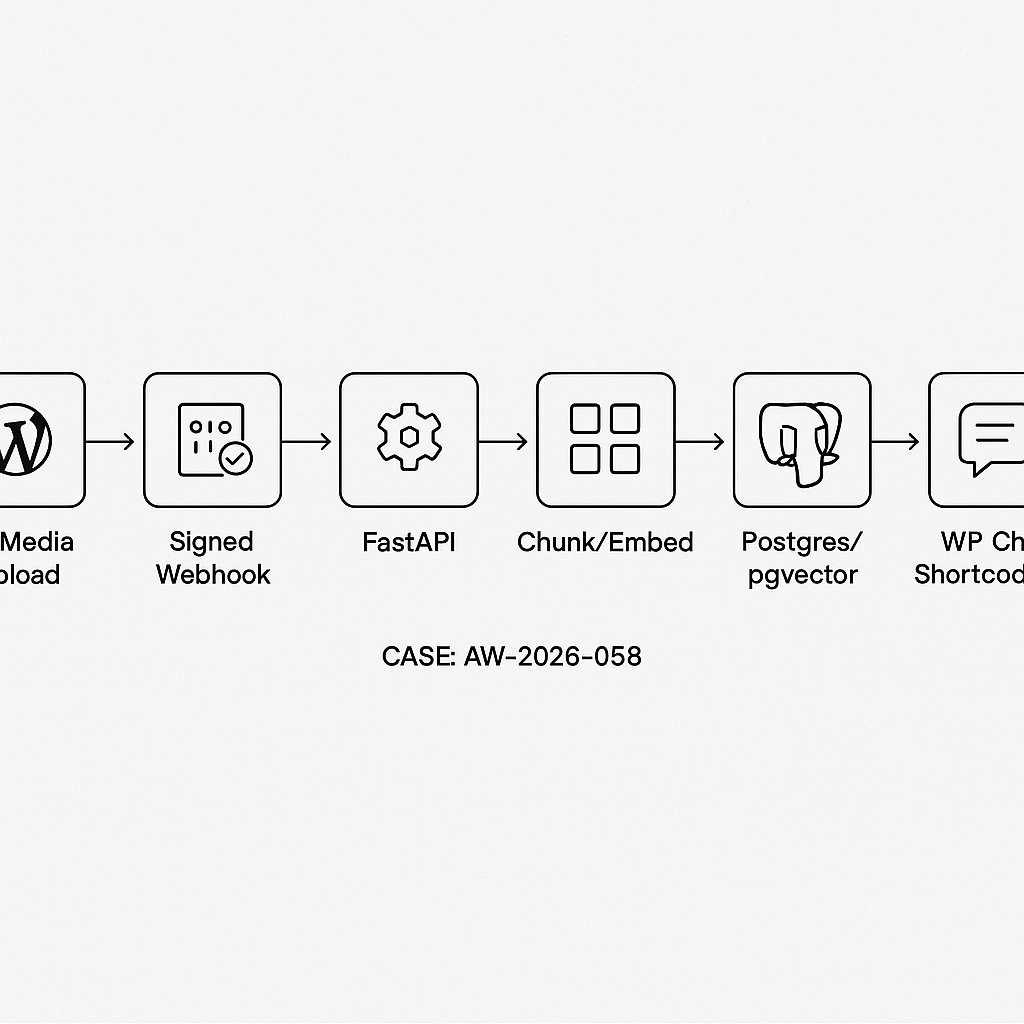
Overview
This tutorial wires WordPress to a production-grade RAG backend:
– Intake: WordPress Media upload triggers a signed webhook to the backend.
– Index: Backend fetches the file, chunks text, stores embeddings in Postgres/pgvector.
– Serve: FastAPI endpoint answers user questions via retrieval-augmented generation.
– Frontend: A WordPress shortcode renders a chat box that queries the backend.
We’ll keep the stack minimal and production-ready:
– WordPress (webhook + shortcode)
– Python FastAPI backend
– Postgres + pgvector
– OpenAI embeddings + model (swap as needed)
– Nginx or cloud proxy, HTTPS, and API key auth
Architecture
1) User uploads PDF/Doc to WordPress Media.
2) WordPress sends a webhook: {file_url, title, post_id, signature}.
3) Backend validates the HMAC, downloads file, extracts text, chunks, embeds, stores in pgvector with a collection/site scope.
4) Chat UI (shortcode) hits /rag/query with apiKey to return grounded answers.
Prereqs
– WordPress admin access
– Python 3.11+, FastAPI, uvicorn
– Postgres 14+ with pgvector
– OpenAI API key (or compatible embedding/LLM)
– A secret shared between WP and backend for webhook signing
Database setup (pgvector)
— Enable extension
CREATE EXTENSION IF NOT EXISTS vector;
— Documents table
CREATE TABLE IF NOT EXISTS documents (
id UUID PRIMARY KEY,
site_id TEXT NOT NULL,
doc_id TEXT NOT NULL, — WP attachment ID or slug
title TEXT,
source_url TEXT,
created_at TIMESTAMPTZ DEFAULT now()
);
— Chunks table
CREATE TABLE IF NOT EXISTS doc_chunks (
id UUID PRIMARY KEY,
doc_id UUID REFERENCES documents(id) ON DELETE CASCADE,
idx INT NOT NULL,
content TEXT NOT NULL,
embedding vector(1536), — match embedding size
token_count INT,
created_at TIMESTAMPTZ DEFAULT now()
);
— Index for ANN search
CREATE INDEX IF NOT EXISTS doc_chunks_embedding_ivfflat
ON doc_chunks USING ivfflat (embedding vector_cosine_ops)
WITH (lists = 100);
— Filter speedups
CREATE INDEX IF NOT EXISTS doc_chunks_doc_id_idx ON doc_chunks(doc_id);
CREATE INDEX IF NOT EXISTS documents_site_doc_idx ON documents(site_id, doc_id);
FastAPI backend (app/main.py)
– Provides /webhook/wp-media to index uploads.
– Provides /rag/query for Q&A.
– Uses HMAC-SHA256 signature (X-WP-Signature) header.
from fastapi import FastAPI, Header, HTTPException, Depends
from pydantic import BaseModel
import hmac, hashlib, os, uuid, httpx, io
import asyncpg
from typing import List, Optional
from datetime import datetime
from fastapi.middleware.cors import CORSMiddleware
from openai import AsyncOpenAI
OPENAI_API_KEY = os.getenv(“OPENAI_API_KEY”)
WEBHOOK_SECRET = os.getenv(“WEBHOOK_SECRET”) # shared with WP
DATABASE_URL = os.getenv(“DATABASE_URL”) # postgres://…
EMBED_MODEL = “text-embedding-3-small”
GEN_MODEL = “gpt-4o-mini”
app = FastAPI()
app.add_middleware(CORSMiddleware, allow_origins=[“https://your-site.com”], allow_methods=[“*”], allow_headers=[“*”])
client = AsyncOpenAI(api_key=OPENAI_API_KEY)
async def db():
if not hasattr(app.state, “pool”):
app.state.pool = await asyncpg.create_pool(DATABASE_URL, min_size=1, max_size=8)
return app.state.pool
def verify_signature(raw_body: bytes, signature: str):
mac = hmac.new(WEBHOOK_SECRET.encode(), raw_body, hashlib.sha256).hexdigest()
return hmac.compare_digest(mac, signature)
class WPWebhook(BaseModel):
site_id: str
file_url: str
title: Optional[str] = None
attachment_id: str
@app.post(“/webhook/wp-media”)
async def wp_media(webhook: WPWebhook, x_wp_signature: str = Header(None), raw_body: bytes = b””, pool=Depends(db)):
# Signature check (requires a middleware or route body retrieval)
if not x_wp_signature or not verify_signature(raw_body, x_wp_signature):
raise HTTPException(status_code=401, detail=”Invalid signature”)
# Download file
async with httpx.AsyncClient(timeout=60) as http:
r = await http.get(webhook.file_url)
r.raise_for_status()
content = r.content
# Extract text (PDF/doc). Minimal example uses pdfminer.six if PDF; else fallback.
text = await extract_text_auto(webhook.file_url, content)
chunks = simple_chunk(text, max_chars=1200, overlap=100)
# Insert document
doc_uuid = str(uuid.uuid4())
async with pool.acquire() as conn:
await conn.execute(
“INSERT INTO documents(id, site_id, doc_id, title, source_url) VALUES($1,$2,$3,$4,$5)”,
doc_uuid, webhook.site_id, webhook.attachment_id, webhook.title, webhook.file_url
)
# Embed and insert chunks
embeddings = await embed_texts([c[“content”] for c in chunks])
async with pool.acquire() as conn:
async with conn.transaction():
for i, (chunk, emb) in enumerate(zip(chunks, embeddings)):
await conn.execute(
“INSERT INTO doc_chunks(id, doc_id, idx, content, embedding, token_count) VALUES($1,$2,$3,$4,$5,$6)”,
str(uuid.uuid4()), doc_uuid, i, chunk[“content”], emb, chunk[“tokens”]
)
return {“status”:”ok”,”doc_id”:doc_uuid,”chunks”:len(chunks)}
async def extract_text_auto(url: str, content: bytes) -> str:
import mimetypes, tempfile, os
mt = mimetypes.guess_type(url)[0] or “”
if “pdf” in mt or url.lower().endswith(“.pdf”):
from pdfminer.high_level import extract_text
with tempfile.NamedTemporaryFile(delete=False, suffix=”.pdf”) as f:
f.write(content); f.flush()
out = extract_text(f.name)
os.unlink(f.name)
return out or “”
# Basic fallback
try:
return content.decode(“utf-8″, errors=”ignore”)
except:
return “”
def simple_chunk(text: str, max_chars=1200, overlap=100):
text = text.strip()
if not text:
return []
chunks = []
i = 0
while i < len(text):
end = min(i+max_chars, len(text))
chunks.append({"content": text[i:end], "tokens": int((end – i)/4)}) # rough est
i = end – overlap
if i < 0: i = 0
return chunks
async def embed_texts(texts: List[str]):
if not texts:
return []
resp = await client.embeddings.create(model=EMBED_MODEL, input=texts)
return [e.embedding for e in resp.data]
class QueryBody(BaseModel):
site_id: str
question: str
k: int = 5
api_key: Optional[str] = None # simple per-site key
def require_site_key(key: Optional[str], site_id: str):
expected = os.getenv(f"SITE_{site_id.upper()}_KEY")
if expected and key != expected:
raise HTTPException(status_code=401, detail="Invalid API key")
@app.post("/rag/query")
async def rag_query(q: QueryBody, pool=Depends(db)):
require_site_key(q.api_key, q.site_id)
# Embed question
qemb = (await embed_texts([q.question]))[0]
async with pool.acquire() as conn:
rows = await conn.fetch(
"""
SELECT c.content, 1 – (c.embedding $1::vector) AS score
FROM doc_chunks c
JOIN documents d ON d.id = c.doc_id
WHERE d.site_id = $2
ORDER BY c.embedding $1::vector
LIMIT $3
“””,
qemb, q.site_id, q.k
)
context = “nn”.join([r[“content”] for r in rows])
prompt = f”You are a helpful assistant. Use the context to answer.nnContext:n{context}nnQuestion: {q.question}nAnswer concisely with citations like [chunk #].”
messages = [{“role”:”user”,”content”:prompt}]
comp = await client.chat.completions.create(model=GEN_MODEL, messages=messages, temperature=0.2)
answer = comp.choices[0].message.content
return {“answer”: answer, “hits”: len(rows)}
Note: For raw_body signature verification, FastAPI needs request.state or a custom middleware to capture the raw bytes. In production, add a middleware to cache body for verification.
WordPress: webhook sender (plugin)
Create a small MU-plugin or standard plugin to post to the backend on upload.
post_type !== ‘attachment’) return;
$file_url = wp_get_attachment_url($post_ID);
$title = get_the_title($post_ID);
$site_id = get_bloginfo(‘url’); // or a fixed slug
$payload = array(
‘site_id’ => $site_id,
‘file_url’ => $file_url,
‘title’ => $title,
‘attachment_id’ => strval($post_ID),
);
$json = wp_json_encode($payload);
$secret = getenv(‘AI_WEBHOOK_SECRET’) ?: ‘change-me’;
$sig = hash_hmac(‘sha256’, $json, $secret);
$resp = wp_remote_post(‘https://api.your-backend.com/webhook/wp-media’, array(
‘headers’ => array(
‘Content-Type’ => ‘application/json’,
‘X-WP-Signature’ => $sig
),
‘body’ => $json,
‘timeout’ => 30
));
});
Shortcode chat UI
Adds [ai_chat] shortcode and a minimal UI that posts to /rag/query.
function ai_chat_shortcode($atts){
$a = shortcode_atts(array(
‘placeholder’ => ‘Ask about our docs…’,
‘site_id’ => get_bloginfo(‘url’),
), $atts);
ob_start(); ?>
<input id="ai-chat-q" type="text" placeholder="” style=”width:100%;padding:8px;” />
(function(){
const api = ‘https://api.your-backend.com/rag/query’;
const siteId = ”;
const key = ”;
const log = document.getElementById(‘ai-chat-log’);
const q = document.getElementById(‘ai-chat-q’);
document.getElementById(‘ai-chat-send’).addEventListener(‘click’, async function(){
const question = q.value.trim();
if(!question) return;
log.innerHTML += ‘
‘;
q.value = ”;
try {
const r = await fetch(api, {
method: ‘POST’,
headers: {‘Content-Type’:’application/json’},
body: JSON.stringify({site_id: siteId, question, api_key: key})
});
const data = await r.json();
log.innerHTML += ‘
‘;
} catch(e){
log.innerHTML += ‘
‘;
}
});
})();
Writing via a small admin page, or define in wp-config.php and expose via get_option fallback.
Security and performance
– Transport: Enforce HTTPS end-to-end. Set CORS to your WP origin only.
– Auth: Use HMAC for webhooks and per-site API keys for /rag/query. Rotate keys regularly.
– Limits: Cap file size on WP, and validate mimetypes server-side. Queue large files.
– Costs: Use a small embedding model for indexing; cache embeddings by hash.
– Indexing: Run embedding in a background worker if uploads are frequent. Return 202 and poll status.
– Vector search: Tune ivfflat lists and analyze to your data size. Consider HNSW (pgvector 0.7+).
– Token control: Limit k and compress context (dedupe, summarization).
– Observability: Log latency, chunk counts, and hit scores. Add simple eval prompts for regression checks.
– Deployment:
– Postgres: managed instance with pgvector.
– Backend: Fly.io/Render/VM with health checks, 2+ replicas, stickyless.
– Secrets: Use platform secrets, not hard-coded keys.
– CDN: Serve static JS/CSS via WP enqueue, cache API via short TTL if answers are stable.
Local testing
– Create .env with OPENAI_API_KEY, WEBHOOK_SECRET, DATABASE_URL, SITE_{SITEID}_KEY.
– Run: uvicorn app.main:app –host 0.0.0.0 –port 8080 –proxy-headers
– Post a test webhook with curl and validate doc/chunk counts.
– Use the [ai_chat] shortcode on a test page.
What to adjust
– Swap extractors (unstructured, textract) for DOCX/HTML.
– Replace OpenAI with local or Azure endpoints by changing embed/generation calls.
– Add per-document metadata filters (post type, tags) in the query.

This is a very clean and practical architecture; using a signed webhook for intake is a great choice for production security. How does the system handle updates or deletions of a source file in the Media Library to keep the vector index synchronized?
Good question — what “sync correctness” are you aiming for when a Media item changes: should an updated file immediately re-index and replace the old chunks, and on delete do you want hard removal from pgvector or a soft-delete/tombstone so existing answers can be audited?
At a high level, you can mirror WordPress lifecycle events by firing the same signed webhook on update/replace (re-index strategy could be “full re-chunk + overwrite by document_id/version” or incremental if you track chunk hashes), and on delete either purge all rows for that media_id or mark them inactive and filter at query time. In WordPress terms, that usually means hooking into media attachment update/replace and delete actions to trigger the backend, and making sure the backend treats those events idempotently.
Thank you for that detailed breakdown; hooking into the WordPress actions for a full re-chunk and overwrite on update seems like a very robust approach for maintaining accuracy.