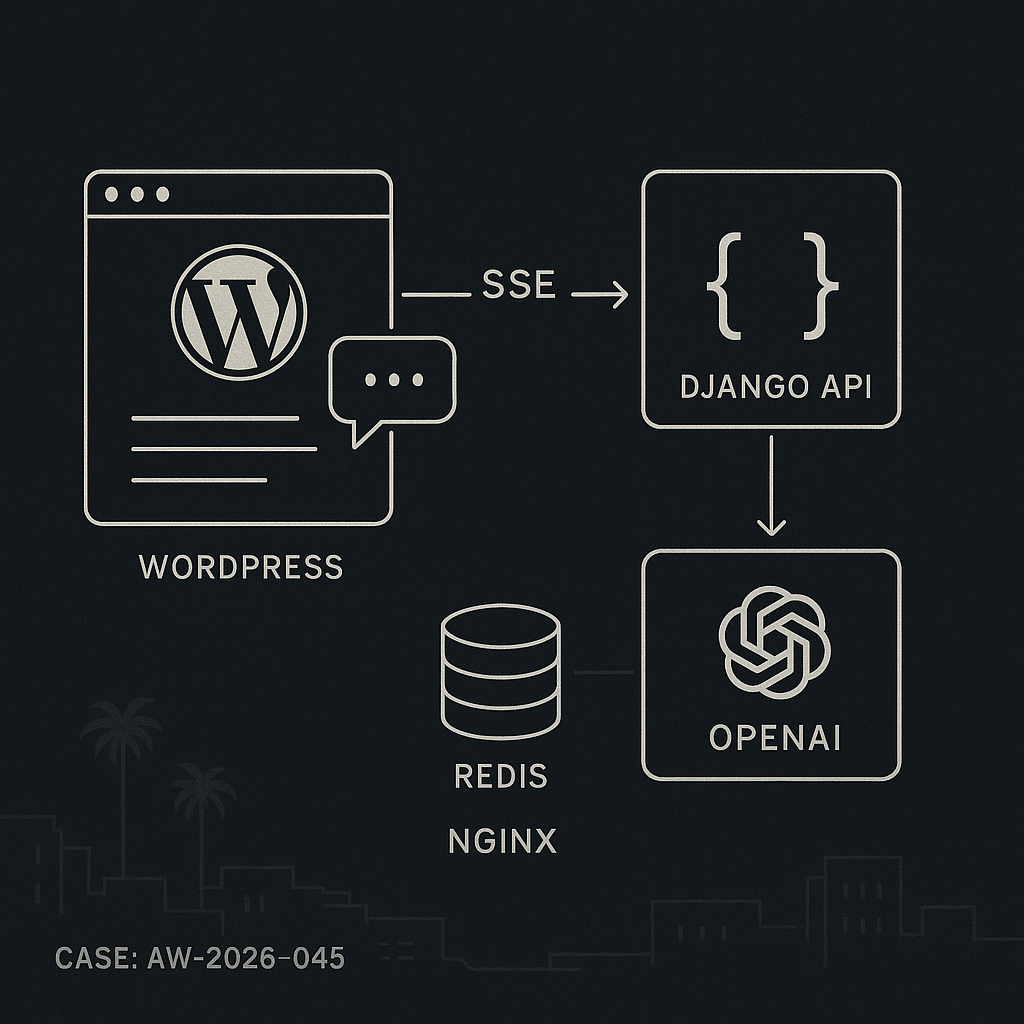
This post shows how to implement a production-ready AI chat in WordPress that streams responses with low latency and strong security. The setup:
– WordPress plugin renders the chat UI and signs requests.
– Django backend handles model calls, streams with SSE, caches with Redis, and enforces auth/rate limits.
– No API keys in the browser or WordPress DB.
Architecture
– WordPress (frontend): Shortcode [ai_chat], enqueue JS, get WP nonce, fetch a signed JWT from WP to call the backend.
– Django API: /v1/chat/stream (SSE), validates JWT, checks rate limits, optional moderation, calls OpenAI (or other LLM), streams tokens.
– Redis: Caching prompt fingerprints and user quotas, storing partial transcripts if needed.
– Nginx/Proxy: Keep-Alive, proxy_buffering off for SSE, generous timeouts.
WordPress plugin (minimal, secure)
– Store no model keys in WordPress.
– Use a secret in wp-config.php for signing short-lived JWTs.
– Nonce to mitigate CSRF.
wp-config.php
define(‘AIGUY_SSO_JWT_SECRET’, ‘rotate-this-64-bytes’);
define(‘AIGUY_BACKEND_BASE’, ‘https://api.example.com’);
Plugin file: wp-content/plugins/aiguy-chat/aiguy-chat.php
<?php
/**
* Plugin Name: AI Guy Chat
* Description: Streaming AI chat via secure backend.
*/
if (!defined('ABSPATH')) exit;
add_action('init', function () { add_shortcode('ai_chat', 'aiguy_chat_shortcode'); });
function aiguy_chat_shortcode() {
if (!is_user_logged_in()) return '
Please log in to use chat.
‘;
$nonce = wp_create_nonce(‘aiguy_chat’);
$payload = [
‘sub’ => get_current_user_id(),
‘roles’ => wp_get_current_user()->roles,
‘iat’ => time(),
‘exp’ => time() + 300,
‘site’ => get_site_url(),
];
$jwt = aiguy_jwt_encode($payload, AIGUY_SSO_JWT_SECRET);
wp_enqueue_script(‘aiguy-chat-js’, plugin_dir_url(__FILE__).’chat.js’, [], ‘1.0’, true);
wp_localize_script(‘aiguy-chat-js’, ‘AIGUYCFG’, [
‘nonce’ => $nonce,
‘jwt’ => $jwt,
‘api’ => AIGUY_BACKEND_BASE.’/v1/chat/stream’,
]);
ob_start(); ?>
‘HS256′,’typ’=>’JWT’])), ‘+/’, ‘-_’), ‘=’);
$p = rtrim(strtr(base64_encode(json_encode($payload)), ‘+/’, ‘-_’), ‘=’);
$s = rtrim(strtr(base64_encode(hash_hmac(‘sha256’, “$h.$p”, $secret, true)), ‘+/’, ‘-_’), ‘=’);
return “$h.$p.$s”;
}
JS: wp-content/plugins/aiguy-chat/chat.js
(function(){
const log = document.getElementById(‘aiguy-log’);
const form = document.getElementById(‘aiguy-form’);
const input = document.getElementById(‘aiguy-input’);
function append(role, text) {
const el = document.createElement(‘div’);
el.className = role;
el.textContent = text;
log.appendChild(el);
log.scrollTop = log.scrollHeight;
}
form.addEventListener(‘submit’, async (e) => {
e.preventDefault();
const q = input.value.trim();
if (!q) return;
append(‘user’, q);
input.value = ”;
const url = AIGUYCFG.api;
const params = { message: q };
const ctrl = new AbortController();
const res = await fetch(url, {
method: ‘POST’,
headers: {
‘Content-Type’: ‘application/json’,
‘Authorization’: ‘Bearer ‘+AIGUYCFG.jwt,
‘X-WP-Nonce’: AIGUYCFG.nonce
},
body: JSON.stringify(params),
signal: ctrl.signal
});
if (!res.ok) { append(‘error’, ‘Request failed.’); return; }
const reader = res.body.getReader();
const dec = new TextDecoder();
let acc = ”;
append(‘assistant’, ”);
const last = log.lastChild;
while (true) {
const {value, done} = await reader.read();
if (done) break;
acc += dec.decode(value, {stream: true});
for (const line of acc.split(‘n’)) {
if (!line.startsWith(‘data:’)) continue;
const payload = line.slice(5).trim();
if (payload === ‘[DONE]’) break;
try {
const chunk = JSON.parse(payload);
last.textContent += chunk.delta || ”;
} catch(_) {}
}
}
});
})();
Django backend (SSE with OpenAI, Redis, and limits)
– Use Django or Django + Django Ninja/DRF. Example below uses plain Django view.
– Keep OpenAI key only on the server.
– Validate JWT from WordPress using the shared secret.
settings.py (env-driven)
AIGUY_JWT_SECRET = os.getenv(‘AIGUY_JWT_SECRET’)
OPENAI_API_KEY = os.getenv(‘OPENAI_API_KEY’)
REDIS_URL = os.getenv(‘REDIS_URL’, ‘redis://127.0.0.1:6379/0’)
ALLOWED_ORIGINS = [‘https://www.example.com’]
urls.py
from django.urls import path
from .views import chat_stream
urlpatterns = [ path(‘v1/chat/stream’, chat_stream), ]
views.py
import json, time, hashlib, hmac, base64, os
from django.http import StreamingHttpResponse, HttpResponseForbidden, JsonResponse
from django.views.decorators.csrf import csrf_exempt
import redis
import openai
r = redis.from_url(os.getenv(‘REDIS_URL’,’redis://localhost:6379/0′))
openai.api_key = os.getenv(‘OPENAI_API_KEY’)
JWT_SECRET = os.getenv(‘AIGUY_JWT_SECRET’,”)
def verify_jwt(token):
try:
h,p,s = token.split(‘.’)
sig = base64.urlsafe_b64encode(hmac.new(JWT_SECRET.encode(), f'{h}.{p}’.encode(), ‘sha256′).digest()).rstrip(b’=’).decode()
if sig != s: return None
payload = json.loads(base64.urlsafe_b64decode(p + ‘==’))
if payload.get(‘exp’,0)
# Prompt fingerprint cache key
fp = hashlib.sha256((message.strip()).encode()).hexdigest()
cache_key = f’chat:fp:{fp}’
messages = [
{“role”:”system”,”content”:”You are a helpful assistant for the site.”},
{“role”:”user”,”content”:message}
]
resp = StreamingHttpResponse(
sse_iter(‘gpt-4o-mini’, messages, cache_key, payload[‘sub’]),
content_type=’text/event-stream’
)
resp[‘Cache-Control’] = ‘no-cache’
resp[‘X-Accel-Buffering’] = ‘no’ # for Nginx
return resp
Nginx proxy config (SSE safe)
location /v1/chat/stream {
proxy_pass http://django:8000/v1/chat/stream;
proxy_http_version 1.1;
proxy_set_header Connection ”;
proxy_set_header Host $host;
proxy_buffering off;
proxy_read_timeout 3600;
chunked_transfer_encoding on;
}
Security notes
– Keys only on backend. Never expose provider keys to WordPress or JS.
– Short-lived JWT (5 minutes). Rotate AIGUY_SSO_JWT_SECRET regularly.
– Validate CORS at the proxy. Pin ALLOWED_ORIGINS.
– Enforce rate limits with Redis. Add IP + user-based buckets.
– Log prompts and token counts with PII scrubbing.
Performance and cost
– Stream with SSE to improve UX latency.
– Cache frequent answers by prompt fingerprint (with TTL).
– Temperature low and max_tokens bounded server-side.
– Use connection pooling for Redis and HTTP.
– Add circuit breakers and provider timeouts.
Observability
– Log request_id, user_id, latency, tokens.
– Push metrics to Prometheus or Grafana via StatsD.
– Store error samples with stack traces and masked content.
Testing checklist
– Verify SSE survives 60+ seconds without proxy buffering.
– Confirm JWT expiration fails as expected.
– Confirm rate limit returns 429 and resets on TTL.
– Load test 100 concurrent chats; monitor CPU, Redis ops/sec, and open file handles.
– Validate caching hits on repeated inputs.
Deployment tips
– Put Django behind Nginx; keep workers async-friendly (uvicorn/gunicorn with gevent/uvicorn workers).
– Set Cloudflare to bypass cache on /v1/chat/stream and increase 524 timeout.
– Autoscale based on concurrent connections, not just CPU.
Extensions
– Add chat history with user scoping in Redis or Postgres.
– Add tools/functions (search, orders) via backend tool calling.
– Add moderation before model call and redact PII.
This pattern keeps WordPress simple and secure, offloads AI to a hardened backend, and delivers fast, streaming responses with production safeguards.

This is an excellent and very secure architecture for bringing a modern chat experience to WordPress. What made you decide on SSE over a technology like WebSockets for streaming the responses?
SSE tends to be the simpler fit when you only need server → browser streaming (tokens) and you’re already doing normal HTTP POSTs for user messages. It also usually plays nicer with common proxies/CDNs/load balancers and keeps the auth story straightforward (one request/one stream) without maintaining long-lived bidirectional state like WebSockets.
Curious what weighed most in your choice here: infra simplicity behind Nginx/CDN, any proxy timeout/buffering concerns, how you’re handling auth/JWT refresh on long streams, or scaling considerations (e.g., many concurrent streams) that pushed you toward SSE?
Thanks for the great explanation; I was mostly thinking about infrastructure simplicity and potential proxy buffering concerns.