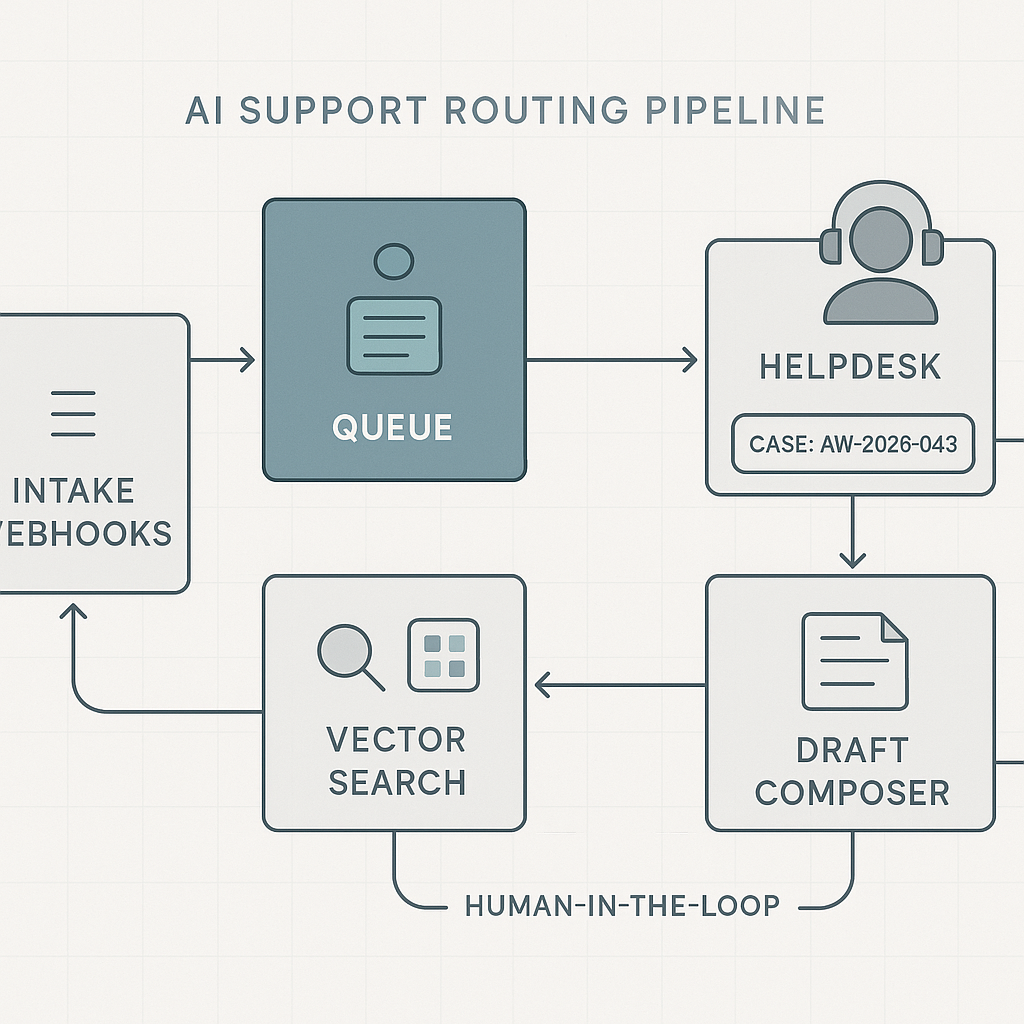
Overview
If your support inbox or helpdesk is the bottleneck, an AI router with safe auto-drafting can remove 30–50% of manual triage and shave minutes off every ticket. This post shows a 3-week build that is production-safe, auditable, and cost-efficient.
Target outcomes
– Reduce average first response time by 60–80%
– Auto-route 70–85% of tickets to the correct queue
– Auto-draft 30–50% of first replies for human approval
– Improve SLA attainment without headcount increase
System architecture
– Entry points
– Email: Gmail/Outlook API → webhook → intake.
– Helpdesk: Zendesk/Freshdesk webhooks on ticket_created.
– Chat: Intercom/LiveChat server-side webhook.
– Intake and queueing
– API Gateway (rate limits, auth → service account).
– Redaction middleware (PII/PHI scrub) using Microsoft Presidio or spaCy patterns.
– Message bus: Redis streams, SQS, or Kafka (1 topic per source).
– Idempotency key: source_id + source_ts.
– Processing workers (Python)
– Classifier: intent, product, urgency, sentiment.
– Policy engine: business rules before LLM (VIPs, outages, billing holds).
– RAG answerer: vector search on internal KB and macros.
– Draft composer: LLM with tool-use to include references and links.
– Action dispatcher: create/update ticket, set priority, assign group, attach draft.
– Storage and retrieval
– KB store: Postgres for canonical docs + nightly vectorization to Pinecone/Weaviate/pgvector.
– Prompt cache: Redis with SHA keys for repeated intents to cut LLM calls.
– Audit log: Append-only events in Postgres (ticket_id, model, prompts, hashes).
– Observability and risk controls
– Structured logs (JSON), request/response sizes, latency, token usage.
– Evaluation harness with golden tickets and expected labels.
– Canary flags: enable by queue, by customer, or by hour of day.
Recommended stack
– Runtime: Python 3.11, FastAPI on Cloud Run or AWS Lambda + API Gateway.
– Queue: SQS + Lambda or Redis Streams (ElastiCache) for low latency.
– Models: GPT-4o-mini for classification/drafting; small local NER for PII.
– Vector DB: pgvector if you prefer simplicity; Pinecone for managed scale.
– Helpdesk: Zendesk/Freshdesk/Intercom APIs with OAuth and scoped tokens.
– Secrets: AWS Secrets Manager or GCP Secret Manager.
– CI/CD: GitHub Actions with infra as code (Terraform).
Core workflows
1) Intake
– Receive event → dedupe → redact → push to queue.
– Persist raw event_id, source, scrubbed body, attachments metadata.
2) Classification
– Lightweight rule pass first (VIP domains, keywords).
– LLM classifier prompt returns: intent, product, urgency, language, confidence.
– Below confidence threshold → human queue.
3) Retrieval
– Build query with detected intent + product terms.
– Vector search top 6 chunks from KB + relevant macros and policy notes.
– Include latest incident banner if active.
4) Drafting
– Compose concise first reply referencing KB chunks with line numbers.
– Enforce style guide (tone, length, required links).
– Insert placeholders for missing data and gather-questions block.
– Add reason codes and source citations in hidden metadata.
5) Dispatch
– If queue allows human-in-the-loop: attach draft, tag ai_draft, require one-click approve/edit.
– For low-risk intents (password reset, known outage): auto-send with SLA tag.
– Always log prompts, citations, and model versions.
Safeguards and policies
– Redaction: Email, phone, address, card fragments replaced with tokens before LLM.
– Containment: Never call billing or user-modifying APIs from drafting path.
– Confidence gates: Separate thresholds for route, priority, auto-send.
– Quiet hours: No auto-send outside business hours (avoid off-time confusion).
– Kill switch: Feature flag by intent and channel.
Evaluation and tuning
– Golden set: 200 historical tickets labeled with correct queue and macro.
– Metrics per weekly iteration:
– Route accuracy (macro-F1) target ≥ 0.85
– Draft acceptance rate ≥ 0.6
– Auto-send safe intents error rate ≤ 0.5%
– Median end-to-end latency ≤ 4s
– Cost per ticket ≤ $0.02 for triage; ≤ $0.06 for draft
– A/B: Half queues get AI drafts; measure handle time delta and CSAT changes.
3-week implementation plan
Week 1
– Stand up API, queue, worker skeleton, and audit tables.
– Integrate helpdesk webhooks and OAuth.
– Build PII scrubber and idempotency logic.
– Import KB; create embeddings pipeline and nightly refresh.
– Create golden set and evaluation harness.
Week 2
– Implement classifier and RAG drafting with prompts and caching.
– Add policy engine and confidence gates.
– Wire to helpdesk: attach drafts, set groups, tags.
– Observability: logs, latency dashboards, cost per ticket panel.
– Run shadow mode on one queue.
Week 3
– Human-in-the-loop pilot in two queues; collect acceptance reasons.
– Tune prompts, raise/relax thresholds by intent.
– Enable auto-send for 2–3 low-risk intents.
– Security review, secrets rotation, and rate limits.
– Write rollback and incident playbook.
Cost model (typical SMB, 2k tickets/week)
– Triage only (classifier + light RAG): ~$35–$55/month.
– Drafting on 40%: ~$120–$180/month.
– Vector DB and infra: $50–$150/month.
– Net: 70%
– No PII leak incidents in 30 days
– CSAT flat or improved
– Auto-send covers 20–30% of total tickets
This router pattern also generalizes to sales inbound, RMA processing, and partner portals with minimal changes: swap KB, adjust intents, and modify dispatch actions.

This is a fantastic and practical breakdown, particularly the detail on using Microsoft Presidio for redaction. How did you handle the trade-off between thorough PII scrubbing and retaining enough context for the AI to draft a useful reply?
Good question—what kinds of entities did you end up scrubbing with Presidio (names/emails/phones, addresses, order IDs, account numbers, free-text “notes” fields, etc.) and did you replace them with placeholders/tokens or just delete them? Also curious how you evaluated the impact on draft quality—e.g., before/after samples, human rating, or measuring “needs follow-up” rates.
One approach that often keeps usefulness high is deterministic placeholders (so the same email/customer maps to the same token within a ticket/thread) plus an allowlist for non-sensitive identifiers that are essential for resolution (like product SKU or a safe ticket/order reference). That tends to preserve relationships and timelines without leaking raw PII.
That’s an excellent suggestion; using deterministic placeholders while allow-listing essential identifiers is a very practical way to solve that trade-off.