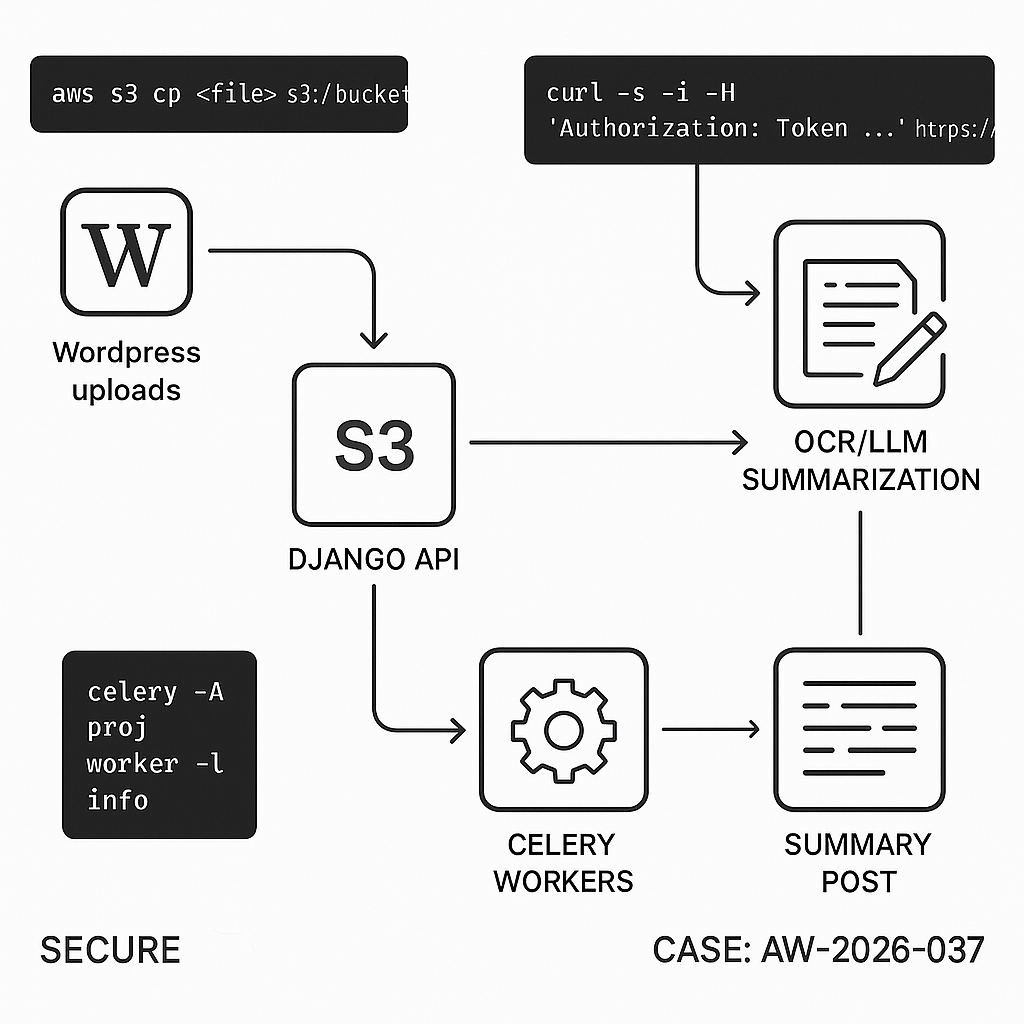
Overview
We’ll implement an end-to-end pipeline:
– User uploads a document to WordPress Media.
– WordPress offloads the file to S3, sends a job to a Django API.
– Django downloads the file, runs OCR (if needed), chunks text, gets an LLM summary, and stores artifacts.
– Django posts results back to WordPress via a signed callback.
– WordPress saves a draft “Document Summary” post with structured fields.
Why this design
– Decoupled and fault-tolerant (Celery workers).
– Scales horizontally.
– Auditable (job records + signed callbacks).
– No long-running PHP on WordPress.
Architecture
– WordPress: tiny plugin + WP REST callback + S3 offload (plugin) + background initiation (Action Scheduler).
– Django: REST API (Django REST Framework), Celery workers, Redis broker, S3 storage, Tesseract OCR (optional), LLM provider (OpenAI or Anthropic).
– Security: HMAC-signed requests both directions, IP allowlist (optional), minimal scopes.
Prereqs
– WordPress 6.x, PHP 8.1+, Action Scheduler, WP Offload Media (or S3 Uploads).
– Django 5.x, Django REST Framework, Celery 5.x, Redis, boto3.
– S3 bucket + IAM with least-privilege.
– LLM provider API key.
– Domain + HTTPS on both services.
Step 1: WordPress plugin (initiate job + receive result)
Create wp-content/plugins/ai-doc-pipeline/ai-doc-pipeline.php
”,
‘wp_webhook_secret’ => wp_generate_password(32, false),
‘django_shared_secret’ => ”,
];
add_option(self::OPTION, $defaults);
$this->register_cpt();
flush_rewrite_rules();
}
public function register_cpt() {
register_post_type(self::CPT, [
‘label’ => ‘Document Summaries’,
‘public’ => false,
‘show_ui’ => true,
‘supports’ => [‘title’, ‘editor’, ‘custom-fields’],
]);
}
private function get_settings() {
return get_option(self::OPTION, []);
}
// On new media, enqueue a background action to notify Django
public function on_new_media($attachment_id) {
$mime = get_post_mime_type($attachment_id);
if (!preg_match(‘/(pdf|msword|officedocument|image|plain|rtf)/’, $mime)) return;
if (!class_exists(‘ActionScheduler’)) return; // require Action Scheduler
as_enqueue_async_action(‘aidoc_send_to_django’, [‘attachment_id’ => $attachment_id], ‘aidoc’);
}
}
new AIDocPipeline();
// Background action
add_action(‘aidoc_send_to_django’, function($attachment_id) {
$settings = get_option(AIDocPipeline::OPTION, []);
$endpoint = rtrim($settings[‘django_endpoint’] ?? ”, ‘/’);
$secret = $settings[‘django_shared_secret’] ?? ”;
if (!$endpoint || !$secret) return;
$url = wp_get_attachment_url($attachment_id);
if (!$url) return;
$payload = [
‘attachment_id’ => $attachment_id,
‘file_url’ => $url,
‘site’ => get_bloginfo(‘name’),
‘callback_url’ => rest_url(‘aidoc/v1/result’),
‘ts’ => time(),
];
$body = wp_json_encode($payload);
$sig = base64_encode(hash_hmac(‘sha256’, $body, $secret, true));
wp_remote_post($endpoint . ‘/api/v1/jobs’, [
‘headers’ => [
‘Content-Type’ => ‘application/json’,
‘X-AI-Signature’ => $sig,
],
‘body’ => $body,
‘timeout’ => 20,
]);
}, 10, 1);
// REST route to accept result
add_action(‘rest_api_init’, function() {
register_rest_route(‘aidoc/v1’, ‘/result’, [
‘methods’ => ‘POST’,
‘callback’ => function(WP_REST_Request $req) {
$settings = get_option(AIDocPipeline::OPTION, []);
$secret = $settings[‘wp_webhook_secret’] ?? ”;
$raw = $req->get_body();
$sig = $req->get_header(‘x-ai-signature’) ?? ”;
$ts = intval($req->get_header(‘x-ai-timestamp’) ?? ‘0’);
if (abs(time() – $ts) > 300) return new WP_Error(‘stale’, ‘Stale request’, [‘status’ => 401]);
$calc = base64_encode(hash_hmac(‘sha256’, $raw, $secret, true));
if (!hash_equals($calc, $sig)) return new WP_Error(‘bad_sig’, ‘Invalid signature’, [‘status’ => 401]);
$data = json_decode($raw, true);
if (!$data) return new WP_Error(‘bad_json’, ‘Invalid JSON’, [‘status’ => 400]);
// Create or update summary post
$post_id = wp_insert_post([
‘post_type’ => AIDocPipeline::CPT,
‘post_status’ => ‘draft’,
‘post_title’ => sanitize_text_field($data[‘title’] ?? ‘Untitled Summary’),
‘post_content’ => wp_kses_post($data[‘summary_markdown’] ?? ”),
]);
if ($post_id && !is_wp_error($post_id)) {
update_post_meta($post_id, ‘_source_attachment_id’, intval($data[‘attachment_id’] ?? 0));
update_post_meta($post_id, ‘_word_count’, intval($data[‘word_count’] ?? 0));
update_post_meta($post_id, ‘_processing_ms’, intval($data[‘processing_ms’] ?? 0));
update_post_meta($post_id, ‘_chunks’, intval($data[‘chunks’] ?? 0));
update_post_meta($post_id, ‘_s3_text_key’, sanitize_text_field($data[‘s3_text_key’] ?? ”));
update_post_meta($post_id, ‘_job_id’, sanitize_text_field($data[‘job_id’] ?? ”));
}
return [‘ok’ => true, ‘post_id’ => $post_id];
},
‘permission_callback’ => ‘__return_true’,
]);
});
Notes:
– Install “Action Scheduler” plugin.
– Configure settings via wp option update or a small admin page (omitted for brevity).
– Ensure media offloading to S3 is active so Django can fetch public or presigned URLs.
Step 2: Django project setup
Create a Django project with DRF and Celery.
pip install django djangorestframework celery redis boto3 pydantic python-dotenv httpx pypdf pytesseract Pillow pdfminer.six fastembed
settings.py (key lines)
– Add rest_framework to INSTALLED_APPS.
– Configure Redis URL and Celery.
– Store secrets via env.
CELERY_BROKER_URL = env(“REDIS_URL”)
CELERY_RESULT_BACKEND = env(“REDIS_URL”)
AI_SHARED_SECRET = env(“AI_SHARED_SECRET”) # matches WordPress django_shared_secret
WP_CALLBACK_SECRET = env(“WP_CALLBACK_SECRET”) # matches WordPress wp_webhook_secret
WP_ALLOWED_CALLBACKS = env.list(“WP_ALLOWED_CALLBACKS”, default=[]) # optional IPs
S3 config:
AWS_ACCESS_KEY_ID = env(“AWS_ACCESS_KEY_ID”)
AWS_SECRET_ACCESS_KEY = env(“AWS_SECRET_ACCESS_KEY”)
AWS_STORAGE_BUCKET_NAME = env(“AWS_STORAGE_BUCKET_NAME”)
AWS_S3_REGION_NAME = env(“AWS_S3_REGION_NAME”)
celery.py
from __future__ import annotations
import os
from celery import Celery
os.environ.setdefault(“DJANGO_SETTINGS_MODULE”, “core.settings”)
app = Celery(“core”)
app.config_from_object(“django.conf:settings”, namespace=”CELERY”)
app.autodiscover_tasks()
urls.py
from django.urls import path
from api.views import JobView
urlpatterns = [path(“api/v1/jobs”, JobView.as_view())]
Step 3: Django API view (verify HMAC and enqueue task)
api/views.py
import base64, hmac, hashlib, time, uuid, json
from rest_framework.views import APIView
from rest_framework.response import Response
from rest_framework import status
from django.conf import settings
from .tasks import process_document
def verify_sig(raw: bytes, sig: str, secret: str) -> bool:
calc = base64.b64encode(hmac.new(secret.encode(), raw, hashlib.sha256).digest()).decode()
return hmac.compare_digest(calc, sig or “”)
class JobView(APIView):
authentication_classes = []
permission_classes = []
def post(self, request):
raw = request.body
sig = request.headers.get(“X-AI-Signature”, “”)
if not verify_sig(raw, sig, settings.AI_SHARED_SECRET):
return Response({“error”: “bad signature”}, status=status.HTTP_401_UNAUTHORIZED)
data = request.data
job_id = str(uuid.uuid4())
process_document.delay(job_id, data)
return Response({“ok”: True, “job_id”: job_id})
Step 4: Celery task (download, OCR/text, chunk, summarize, store, callback)
api/tasks.py
import time, io, os, base64, hmac, hashlib, json
import httpx, boto3
from django.conf import settings
from celery import shared_task
from pydantic import BaseModel
from pdfminer.high_level import extract_text as pdf_text
from pypdf import PdfReader
from PIL import Image
import pytesseract
class JobPayload(BaseModel):
attachment_id: int
file_url: str
site: str
callback_url: str
ts: int
def hmac_b64(secret: str, body: bytes) -> str:
import hashlib, hmac, base64
return base64.b64encode(hmac.new(secret.encode(), body, hashlib.sha256).digest()).decode()
def extract_from_pdf(data: bytes) -> str:
try:
return pdf_text(io.BytesIO(data))
except Exception:
# Fallback OCR on each page if text layer missing
txt = []
reader = PdfReader(io.BytesIO(data))
for page in reader.pages:
# Basic rasterization approach assumed; for production use a PDF to image lib
pass
return “n”.join(txt)
def extract_from_image(data: bytes) -> str:
img = Image.open(io.BytesIO(data)).convert(“RGB”)
return pytesseract.image_to_string(img)
async def fetch_bytes(url: str) -> bytes:
async with httpx.AsyncClient(timeout=60.0, follow_redirects=True) as client:
r = await client.get(url)
r.raise_for_status()
return r.content
def chunk_text(text: str, size=1200, overlap=150):
tokens = text.split()
out = []
i = 0
while i str:
# Replace with your provider; example uses OpenAI responses API compatible call via httpx
api_key = os.environ.get(“OPENAI_API_KEY”)
headers = {“Authorization”: f”Bearer {api_key}”, “Content-Type”: “application/json”}
system = “You are a technical summarizer. Produce a concise, structured summary with headings and bullet points. Keep code blocks when useful.”
all_sections = []
async with httpx.AsyncClient(timeout=60.0) as client:
for idx, ch in enumerate(chunks):
payload = {
“model”: “gpt-4o-mini”,
“input”: [
{“role”:”system”,”content”:system},
{“role”:”user”,”content”:f”Part {idx+1}/{len(chunks)}:n{ch}nSummarize key points.”}
]
}
r = await client.post(“https://api.openai.com/v1/responses”, json=payload, headers=headers)
r.raise_for_status()
txt = r.json().get(“output_text”,””).strip()
all_sections.append(txt)
# Final pass
final_prompt = “Combine these partial summaries into one cohesive markdown summary with sections, bullets, and a short executive overview:n” + “nn”.join(all_sections)
payload = {“model”:”gpt-4o-mini”,”input”:[{“role”:”user”,”content”:final_prompt}]}
r = await client.post(“https://api.openai.com/v1/responses”, json=payload, headers=headers)
r.raise_for_status()
return r.json().get(“output_text”,””)
@shared_task(bind=True, max_retries=3, default_retry_delay=30)
def process_document(self, job_id: str, data: dict):
t0 = time.time()
payload = JobPayload(**data)
# 1) Download file
content = httpx.run(fetch_bytes(payload.file_url))
# 2) Extract text
text = “”
if any(payload.file_url.lower().endswith(x) for x in [“.pdf”]):
text = extract_from_pdf(content)
elif any(payload.file_url.lower().endswith(x) for x in [“.png”,”.jpg”,”.jpeg”,”.tif”,”.tiff”,”.webp”]):
text = extract_from_image(content)
else:
try:
text = content.decode(“utf-8″, errors=”ignore”)
except Exception:
text = “”
text = (text or “”).strip()
if not text:
raise self.retry(exc=RuntimeError(“No text extracted”))
# 3) Chunk + summarize
chunks = chunk_text(text)
summary_md = httpx.run(llm_summarize(chunks))
# 4) Store raw text to S3
s3 = boto3.client(“s3″, region_name=settings.AWS_S3_REGION_NAME,
aws_access_key_id=settings.AWS_ACCESS_KEY_ID,
aws_secret_access_key=settings.AWS_SECRET_ACCESS_KEY)
s3_key = f”processed/{job_id}/text.txt”
s3.put_object(Bucket=settings.AWS_STORAGE_BUCKET_NAME, Key=s3_key, Body=text.encode(“utf-8″), ContentType=”text/plain”)
# 5) Callback to WordPress (signed)
body = json.dumps({
“job_id”: job_id,
“attachment_id”: payload.attachment_id,
“title”: f”Summary of {payload.attachment_id}”,
“summary_markdown”: summary_md,
“word_count”: len(text.split()),
“processing_ms”: int((time.time() – t0)*1000),
“chunks”: len(chunks),
“s3_text_key”: s3_key
})
sig = hmac_b64(settings.WP_CALLBACK_SECRET, body.encode())
headers = {
“Content-Type”: “application/json”,
“X-AI-Signature”: sig,
“X-AI-Timestamp”: str(int(time.time()))
}
with httpx.Client(timeout=20.0) as client:
r = client.post(payload.callback_url, data=body, headers=headers)
r.raise_for_status()
return {“ok”: True, “job_id”: job_id}
Notes:
– httpx.run is a simple helper for running async coroutines in sync Celery; alternatively use asyncio.run().
– Replace the OpenAI call with your provider/model as needed.
– For production OCR on PDFs, integrate a robust rasterizer (e.g., pdf2image + poppler).
Step 5: Environment and run
.env (Django)
REDIS_URL=redis://localhost:6379/0
AI_SHARED_SECRET=replace-with-strong-random
WP_CALLBACK_SECRET=replace-with-strong-random
AWS_ACCESS_KEY_ID=…
AWS_SECRET_ACCESS_KEY=…
AWS_STORAGE_BUCKET_NAME=…
AWS_S3_REGION_NAME=us-west-2
OPENAI_API_KEY=…
WordPress options (match Django)
– django_shared_secret = AI_SHARED_SECRET
– wp_webhook_secret = WP_CALLBACK_SECRET
– django_endpoint = https://api.your-domain.com
Run
– Redis: redis-server
– Django: python manage.py runserver 0.0.0.0:8000 (behind nginx/gunicorn in prod)
– Celery: celery -A core.celery:app worker -l info -Q default -c 4
Step 6: Security hardening
– Only accept signed requests. Rotate secrets periodically.
– Validate file types and size limits on WordPress.
– Consider presigned S3 URLs instead of public media.
– Add IP allowlists on the WordPress callback route at the web server level.
– Enforce 5-minute freshness on timestamps (already in WP receiver).
Step 7: Observability
– Add job table in Django to persist status, errors, and durations.
– Emit structured logs (JSON) and correlate by job_id.
– Track cost: store chunk counts and prompt tokens if your provider exposes them.
Step 8: Performance tips
– Use batch Celery queues for large backlogs; set concurrency based on CPU.
– Cache OCR results for identical files (hash by SHA256).
– Use streaming uploads to S3; avoid loading large files fully in memory.
– Switch to embeddings + extractive summarization for very long docs to reduce LLM cost.
Minimal test with curl
– Simulate WordPress → Django:
curl -X POST https://api.your-domain.com/api/v1/jobs
-H “Content-Type: application/json”
-H “X-AI-Signature: $(printf ‘%s’ ‘{“attachment_id”:1,”file_url”:”https://…/sample.pdf”,”site”:”Test”,”callback_url”:”https://wp.site.com/wp-json/aidoc/v1/result”,”ts”:123}’ | openssl dgst -sha256 -hmac ‘AI_SHARED_SECRET’ -binary | openssl base64)”
-d ‘{“attachment_id”:1,”file_url”:”https://…/sample.pdf”,”site”:”Test”,”callback_url”:”https://wp.site.com/wp-json/aidoc/v1/result”,”ts”:123}’
– Simulate Django → WordPress:
curl -X POST https://wp.site.com/wp-json/aidoc/v1/result
-H “Content-Type: application/json”
-H “X-AI-Timestamp: 1700000000”
-H “X-AI-Signature: $(printf ‘%s’ ‘{“job_id”:”1″,”attachment_id”:1,”title”:”t”,”summary_markdown”:”s”}’ | openssl dgst -sha256 -hmac ‘WP_CALLBACK_SECRET’ -binary | openssl base64)”
-d ‘{“job_id”:”1″,”attachment_id”:1,”title”:”t”,”summary_markdown”:”s”}’
What you get
– Automated, resilient summarization pipeline.
– Clear security boundaries with HMAC.
– A reusable pattern for any long-running AI task initiated from WordPress.

This is a fantastic, scalable architecture for offloading heavy processing from WordPress. From the user’s perspective, how do you communicate the job’s status in the admin panel while it’s being processed?
Good question—are you mainly trying to show status to editors on the Media item itself, or on the generated “Document Summary” post (or both)?
A couple lightweight options in WP admin:
– Store a simple status in post meta (e.g., `queued/processing/done/failed` + timestamps) and surface it via a custom admin column and/or a small metabox on the attachment/summary post.
– Add a “Refresh status” button that polls your WP REST endpoint (which reads the latest known status), or do a gentle auto-poll on the edit screen while status is `processing`.
– If you’re using Action Scheduler for kickoff/retries, you can also write short Action Scheduler notes (or expose the latest action state) to help admins see what WP last attempted without building a full dashboard.
Which audience matters more for you here—editors needing a simple badge, or admins needing troubleshooting detail?
Thanks for these great suggestions; my main focus is on providing a simple status for editors directly on the Media item itself.