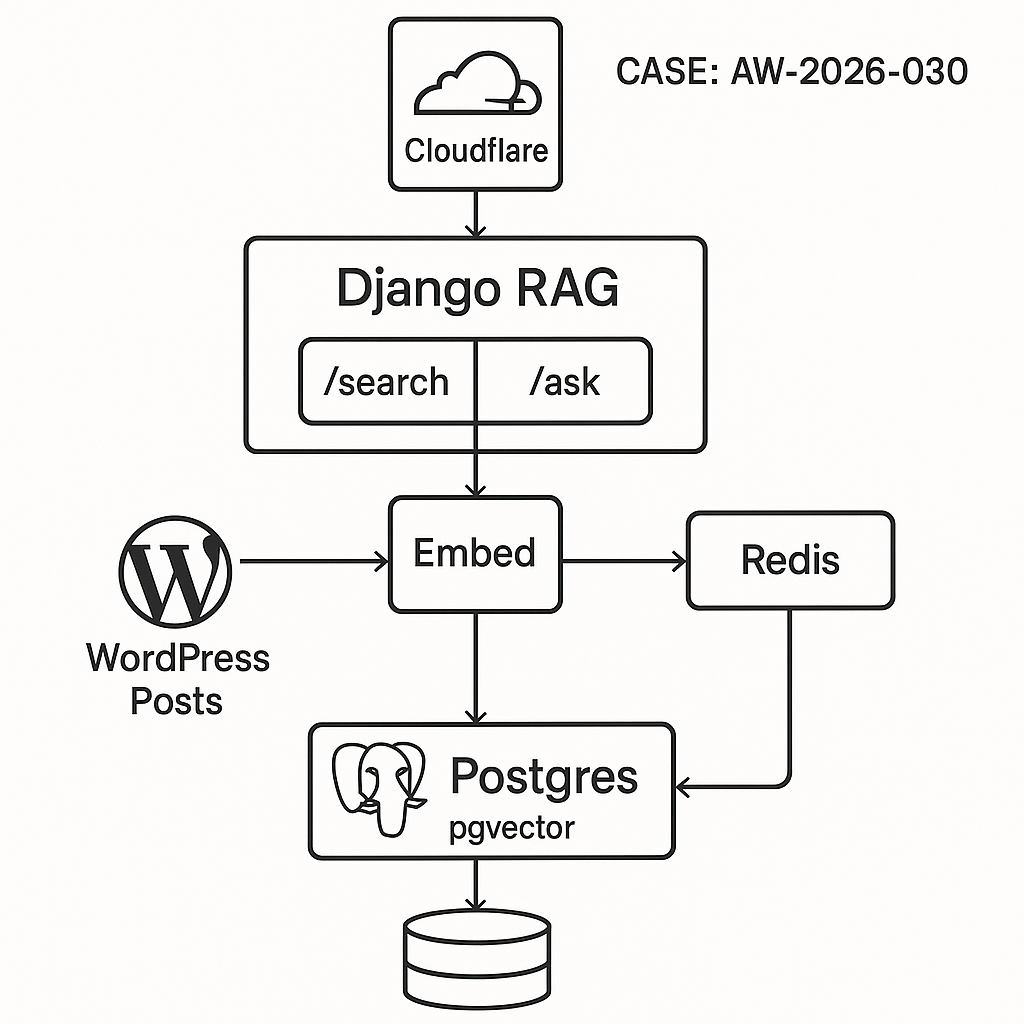
Overview
We’ll build a small, production-ready RAG service that:
– Pulls WordPress posts via REST
– Cleans, chunks, and embeds content with OpenAI
– Stores vectors in Postgres using pgvector
– Serves /search and /ask endpoints via Django
– Caches responses in Redis and rate-limits clients
– Ships with Docker for easy deploy
Stack
– Python 3.11, Django 5, DRF
– Postgres 16 + pgvector
– Redis (cache/rate limit)
– OpenAI embeddings + responses
– Docker + Gunicorn
Architecture
– Ingest worker: WP REST -> Clean -> Chunk -> Embed -> Upsert to Postgres
– API service:
– /search: vector similarity over pgvector
– /ask: retrieve top chunks -> prompt -> LLM -> cache
– Redis: cache answers and throttle
– Postgres: source of truth for docs/chunks
– Reverse proxy/CDN: Cloudflare (optional)
1) Create database with pgvector
SQL (run once):
CREATE EXTENSION IF NOT EXISTS vector;
— documents table
CREATE TABLE documents (
id UUID PRIMARY KEY,
wp_id INTEGER UNIQUE,
slug TEXT,
title TEXT,
url TEXT,
updated_at TIMESTAMPTZ,
checksum TEXT
);
— chunks table
CREATE TABLE chunks (
id UUID PRIMARY KEY,
doc_id UUID REFERENCES documents(id) ON DELETE CASCADE,
ord INTEGER,
content TEXT,
embedding vector(3072), — adjust to your embedding dimension
token_count INTEGER
);
— index for fast ANN search
CREATE INDEX ON chunks USING ivfflat (embedding vector_cosine_ops) WITH (lists = 100);
2) Django project setup
pip install django djangorestframework psycopg[binary,pool] redis python-dotenv pydantic openai tiktoken html2text
settings.py (key parts):
– Configure DATABASES for Postgres.
– Configure CACHES for Redis.
– Add REST_FRAMEWORK.
– Load OPENAI_API_KEY from env.
– Add simple header auth.
Example env:
OPENAI_API_KEY=sk-…
DATABASE_URL=postgresql://app:pass@db:5432/app
REDIS_URL=redis://redis:6379/0
ALLOWED_HOSTS=*
3) Models (lightweight)
We’ll use raw SQL for vector ops; Django models stay simple.
app/models.py:
from django.db import models
import uuid
class Document(models.Model):
id = models.UUIDField(primary_key=True, default=uuid.uuid4, editable=False)
wp_id = models.IntegerField(unique=True)
slug = models.TextField()
title = models.TextField()
url = models.TextField()
updated_at = models.DateTimeField()
checksum = models.TextField()
class Chunk(models.Model):
id = models.UUIDField(primary_key=True, default=uuid.uuid4, editable=False)
doc = models.ForeignKey(Document, on_delete=models.CASCADE)
ord = models.IntegerField()
content = models.TextField()
embedding = models.BinaryField(null=True) # store in pgvector via SQL, not ORM
token_count = models.IntegerField()
Note: We’ll write embeddings via raw SQL to the vector column.
4) WordPress ingestion
– Pull posts from /wp-json/wp/v2/posts
– Clean HTML -> text
– Chunk ~800 tokens with 100-token overlap
– Embed with text-embedding-3-large (3072 dims) or -small (1536 dims)
– Upsert documents and chunks
ingest.py:
import os, math, hashlib, time, uuid, requests
from datetime import datetime, timezone
import html2text
import tiktoken
import psycopg
from openai import OpenAI
WP_URL = os.getenv(“WP_URL”) # e.g., https://your-site.com
OPENAI_API_KEY = os.getenv(“OPENAI_API_KEY”)
DATABASE_URL = os.getenv(“DATABASE_URL”)
EMBED_MODEL = “text-embedding-3-large” # dimension 3072
CHUNK_TOKENS = 800
OVERLAP = 100
client = OpenAI(api_key=OPENAI_API_KEY)
tokenizer = tiktoken.get_encoding(“cl100k_base”)
h2t = html2text.HTML2Text()
h2t.ignore_links = False
h2t.body_width = 0
def fetch_posts():
page = 1
posts = []
while True:
r = requests.get(f”{WP_URL}/wp-json/wp/v2/posts”, params={“per_page”: 100, “page”: page}, timeout=30)
if r.status_code == 400 and “rest_post_invalid_page_number” in r.text:
break
r.raise_for_status()
batch = r.json()
if not batch:
break
posts.extend(batch)
page += 1
return posts
def clean_text(html, title):
text = h2t.handle(html or “”)
full = f”# {title}nn{text}”.strip()
return ” “.join(full.split())
def chunk_text(txt):
ids = tokenizer.encode(txt)
chunks = []
start = 0
ord_i = 0
while start start else end
return chunks
def sha1(s): return hashlib.sha1(s.encode(“utf-8”)).hexdigest()
def embed_texts(texts):
resp = client.embeddings.create(model=EMBED_MODEL, input=texts)
return [e.embedding for e in resp.data]
def upsert(conn, post, chunks, embeddings):
wp_id = post[“id”]
slug = post[“slug”]
title = post[“title”][“rendered”]
url = post[“link”]
updated = datetime.fromisoformat(post[“modified_gmt”] + “+00:00”)
checksum = sha1(post[“content”][“rendered”])
cur = conn.cursor()
cur.execute(“””
INSERT INTO documents (id, wp_id, slug, title, url, updated_at, checksum)
VALUES (%s,%s,%s,%s,%s,%s,%s)
ON CONFLICT (wp_id) DO UPDATE
SET slug=EXCLUDED.slug, title=EXCLUDED.title, url=EXCLUDED.url,
updated_at=EXCLUDED.updated_at, checksum=EXCLUDED.checksum
RETURNING id, checksum
“””, (uuid.uuid4(), wp_id, slug, title, url, updated, checksum))
doc_id, db_checksum = cur.fetchone()
# If content unchanged, skip re-chunk
if db_checksum == checksum:
conn.commit()
return
# Replace chunks for this doc
cur.execute(“DELETE FROM chunks WHERE doc_id=%s”, (doc_id,))
for (ord_i, content), emb in zip(chunks, embeddings):
cur.execute(“””
INSERT INTO chunks (id, doc_id, ord, content, embedding, token_count)
VALUES (%s,%s,%s,%s,%s,%s)
“””, (uuid.uuid4(), doc_id, ord_i, content, emb, len(tokenizer.encode(content))))
conn.commit()
def run():
posts = fetch_posts()
with psycopg.connect(DATABASE_URL) as conn:
for p in posts:
title = p[“title”][“rendered”]
txt = clean_text(p[“content”][“rendered”], title)
chunks = chunk_text(txt)
# Batch embed for throughput
texts = [c[1] for c in chunks]
for i in range(0, len(texts), 64):
batch = texts[i:i+64]
embs = embed_texts(batch)
upsert(conn, p, list(enumerate(batch, start=i)), embs)
time.sleep(0.2)
if __name__ == “__main__”:
run()
5) Vector search (pgvector SQL)
We’ll use cosine distance. Note: vector dimension must match the model.
search.py (utility):
import psycopg, os
DATABASE_URL = os.getenv(“DATABASE_URL”)
def top_k(query_emb, k=8):
with psycopg.connect(DATABASE_URL) as conn:
cur = conn.cursor()
cur.execute(“””
SELECT c.content, d.title, d.url, 1 – (c.embedding %s::vector) AS score
FROM chunks c
JOIN documents d ON d.id = c.doc_id
ORDER BY c.embedding %s::vector
LIMIT %s
“””, (query_emb, query_emb, k))
rows = cur.fetchall()
return [{“content”: r[0], “title”: r[1], “url”: r[2], “score”: float(r[3])} for r in rows]
6) Django API endpoints
– Header auth: X-API-Key
– /search: embed query -> vector search
– /ask: retrieve top chunks -> prompt LLM -> cache
auth.py (middleware):
from django.http import JsonResponse
import os, time, redis, hashlib
API_KEY = os.getenv(“API_KEY”)
r = redis.from_url(os.getenv(“REDIS_URL”, “redis://localhost:6379/0”))
class SimpleAuthRateLimit:
def __init__(self, get_response): self.get_response = get_response
def __call__(self, request):
key = request.headers.get(“X-API-Key”)
if not key or key != API_KEY:
return JsonResponse({“error”:”unauthorized”}, status=401)
# rate limit: 60 req/min per key
bucket = f”rl:{key}:{int(time.time()//60)}”
cnt = r.incr(bucket)
if cnt == 1: r.expire(bucket, 70)
if cnt > 60: return JsonResponse({“error”:”rate_limited”}, status=429)
return self.get_response(request)
settings.py: add middleware path to MIDDLEWARE.
views.py:
import os, json, hashlib
from django.views.decorators.csrf import csrf_exempt
from django.http import JsonResponse
from openai import OpenAI
from .search import top_k
import redis
client = OpenAI(api_key=os.getenv(“OPENAI_API_KEY”))
cache = redis.from_url(os.getenv(“REDIS_URL”))
def embed(q):
return client.embeddings.create(model=”text-embedding-3-large”, input=q).data[0].embedding
def answer_with_context(query, contexts):
system = “You are a concise assistant. Use only the provided context. Cite URLs when relevant.”
ctx = “nn—nn”.join([c[“content”][:1200] for c in contexts[:6]])
prompt = f”Context:n{ctx}nnQuestion: {query}nAnswer concisely. Include source titles and URLs if helpful.”
resp = client.chat.completions.create(
model=”gpt-4o-mini”,
messages=[{“role”:”system”,”content”:system},{“role”:”user”,”content”:prompt}],
temperature=0.2,
)
return resp.choices[0].message.content
@csrf_exempt
def search_view(request):
if request.method != “POST”:
return JsonResponse({“error”:”POST only”}, status=405)
body = json.loads(request.body.decode(“utf-8”))
q = body.get(“q”,””).strip()
if not q: return JsonResponse({“error”:”missing q”}, status=400)
emb = embed(q)
hits = top_k(emb, k=8)
return JsonResponse({“results”: hits})
@csrf_exempt
def ask_view(request):
if request.method != “POST”:
return JsonResponse({“error”:”POST only”}, status=405)
body = json.loads(request.body.decode(“utf-8”))
q = body.get(“q”,””).strip()
if not q: return JsonResponse({“error”:”missing q”}, status=400)
emb = embed(q)
hits = top_k(emb, k=8)
# cache key: query + top doc urls
key_src = q + “|” + “|”.join([h[“url”] for h in hits[:6]])
ck = “ans:” + hashlib.sha1(key_src.encode()).hexdigest()
cached = cache.get(ck)
if cached:
return JsonResponse({“answer”: cached.decode(“utf-8”), “cached”: True, “sources”: hits[:6]})
ans = answer_with_context(q, hits)
cache.setex(ck, 3600, ans)
return JsonResponse({“answer”: ans, “cached”: False, “sources”: hits[:6]})
urls.py:
from django.urls import path
from .views import search_view, ask_view
urlpatterns = [
path(“search”, search_view),
path(“ask”, ask_view),
]
7) Dockerize
Dockerfile:
FROM python:3.11-slim
WORKDIR /app
ENV PYTHONDONTWRITEBYTECODE=1 PYTHONUNBUFFERED=1
RUN apt-get update && apt-get install -y build-essential libpq-dev && rm -rf /var/lib/apt/lists/*
COPY requirements.txt .
RUN pip install –no-cache-dir -r requirements.txt
COPY . .
CMD [“gunicorn”, “project.wsgi:application”, “-w”, “3”, “-b”, “0.0.0.0:8000”, “–timeout”, “120”]
requirements.txt: versions matching your local install.
docker-compose.yml:
version: “3.9”
services:
web:
build: .
env_file: .env
ports: [“8000:8000”]
depends_on: [db, redis]
db:
image: pgvector/pgvector:pg16
environment:
POSTGRES_DB: app
POSTGRES_USER: app
POSTGRES_PASSWORD: pass
volumes: [“pgdata:/var/lib/postgresql/data”]
redis:
image: redis:7
volumes:
pgdata:
8) Security and ops
– Put Cloudflare in front. Only expose 443 to web. Block /admin if not needed.
– Use header auth (X-API-Key). Rotate keys regularly.
– Limit model output tokens to control latency/cost.
– Add health endpoint that checks DB and Redis.
– Log query, latency, hit/miss (without storing PII).
– Back up Postgres nightly. Enable WAL archiving if needed.
9) Performance tuning
– Use text-embedding-3-small for lower cost; adjust vector dims to 1536.
– Increase ivfflat lists based on data size (rule of thumb: sqrt(N)).
– Warm Redis with popular Q/A.
– Batch embeddings (32–128) to maximize throughput.
– Add hybrid search (BM25 via pg_trgm) and rerank if needed.
10) WordPress sync strategies
– Full reingest nightly + incremental webhook:
– Use WordPress action on post save to call /ingest webhook (custom endpoint) with post ID.
– Ingest script fetches single post and reindexes only that document.
– Store checksum to avoid redundant work.
Quick test
– Run docker-compose up
– Ingest: docker compose exec web python ingest.py
– Search: curl -H “X-API-Key: YOURKEY” -X POST localhost:8000/search -d ‘{“q”:”your topic”}’ -H “Content-Type: application/json”
– Ask: curl -H “X-API-Key: YOURKEY” -X POST localhost:8000/ask -d ‘{“q”:”Summarize pricing”}’ -H “Content-Type: application/json”
What you get
– A clean RAG backend you can drop behind your site, chat widget, or internal tools.
– Real-time answers grounded in your WordPress content.
– Clear paths to scale, secure, and monitor.

This is an excellent, practical guide for building a production-ready RAG system. How do you envision handling post updates or deletions to keep the vector store synchronized?
Good question—sync is usually the first thing that gets messy in production. A practical baseline is to track `modified_gmt` (or content hash) and do an incremental scheduled reindex (e.g., every few minutes) that upserts changed posts and marks missing ones as soft-deleted, then periodically hard-delete their vectors. If you can add a small WP plugin, webhooks on `save_post`/`before_delete_post` can push IDs to your worker for near-real-time updates and deletions.
Do you need near-real-time freshness, or is “updated within N minutes” acceptable? And are you allowed to install a plugin / custom endpoint in WordPress, or does it need to be REST-polling only?
Thank you, the incremental scheduled re-index is a great solution for us, as near-real-time freshness is not a strict requirement.