Overview
This is a production-ready analytics stack designed for product teams that need fast event queries and reliable, explainable metrics:
– Storage/engine: ClickHouse
– Ingestion: Event collector (HTTP) to ClickHouse; Airbyte for SaaS enrichment
– Transformations: dbt (dbt-clickhouse)
– Dashboards: Apache Superset
– Orchestration: Cron or Airflow (optional)
– Monitoring: ClickHouse system tables + alerting
Why this stack
– ClickHouse gives millisecond queries on billions of rows with low storage overhead.
– Airbyte reliably syncs SaaS sources (Stripe, HubSpot, PostHog export, S3 logs) into ClickHouse.
– dbt standardizes transformations, testing, and CI.
– Superset is fast, self-hostable, and permissionable.
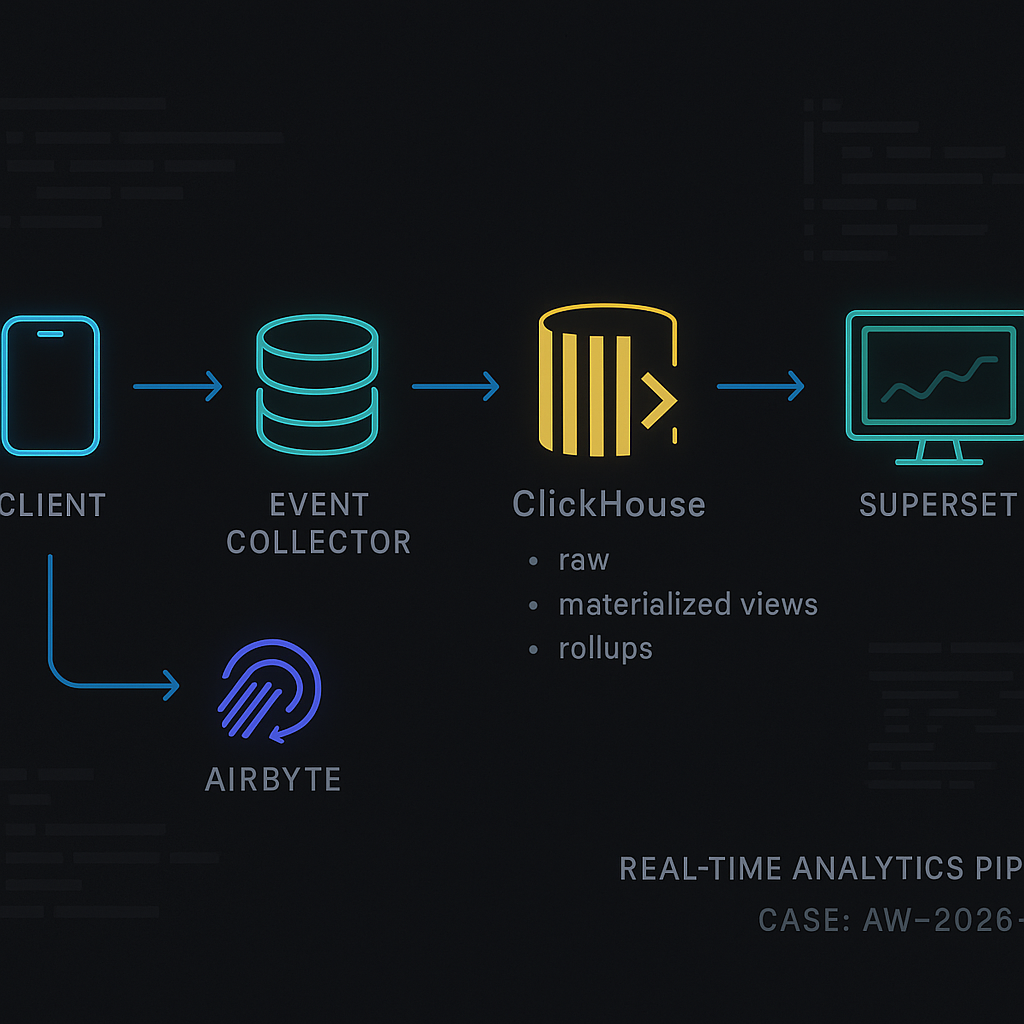
Reference architecture (flow)
Client apps/web → Event Collector (NGINX + small Python/Go handler) → ClickHouse (raw_events) → dbt models/materialized views → Superset dashboards
Plus: Airbyte → ClickHouse (dim_*, stg_* tables) for enrichment joins
Event collection
– Send JSON over HTTPS from SDKs to your collector. Keep the collector stateless and append-only.
– Validate required keys, add server timestamps, and write line-delimited JSON batches to ClickHouse via HTTP insert.
ClickHouse: core tables
Use ReplacingMergeTree for safe deduplication and TTL for hot/cold retention.
Example table (compact):
CREATE TABLE analytics.raw_events
(
event_time DateTime64(3, ‘UTC’),
event_date Date MATERIALIZED toDate(event_time),
event_name LowCardinality(String),
event_id UUID,
user_id String,
session_id String,
device LowCardinality(String),
os LowCardinality(String),
country LowCardinality(FixedString(2)),
properties JSON,
received_at DateTime64(3, ‘UTC’) DEFAULT now64(3),
_ingest_version UInt32 DEFAULT 1
)
ENGINE = ReplacingMergeTree(_ingest_version)
PARTITION BY toYYYYMM(event_date)
ORDER BY (event_date, user_id, event_name, event_id)
TTL event_date + INTERVAL 180 DAY
SETTINGS index_granularity = 8192;
Notes
– ReplacingMergeTree dedupes rows with the same primary key using _ingest_version; update that when reprocessing.
– For very high volume, switch to ReplicatedReplacingMergeTree and add Kafka ingestion or buffering via S3.
Sessionization materialized view
CREATE MATERIALIZED VIEW analytics.mv_sessions
ENGINE = AggregatingMergeTree()
PARTITION BY toYYYYMM(event_date)
ORDER BY (event_date, user_id, session_id)
AS
SELECT
minState(event_time) AS session_start_state,
maxState(event_time) AS session_end_state,
user_id,
session_id,
toDate(min(event_time)) AS event_date,
anyState(country) AS country_state,
countState() AS events_state
FROM analytics.raw_events
GROUP BY user_id, session_id;
Session query:
SELECT
user_id,
session_id,
minMerge(session_start_state) AS session_start,
maxMerge(session_end_state) AS session_end,
anyMerge(country_state) AS country,
countMerge(events_state) AS events
FROM analytics.mv_sessions
WHERE event_date >= today() – 7
GROUP BY user_id, session_id;
Daily rollups (cost saver)
– Create a daily_agg_events table with SummingMergeTree for event counts by event_name, country, user_id segment, etc.
– Use a materialized view to fill it from raw_events.
– Point common dashboards to rollups; leave ad-hoc drill-downs on raw_events.
Airbyte: enrichment data
– Destination: ClickHouse (native destination).
– Sources: Stripe, HubSpot, CRM, billing exports, S3 logs.
– Namespace to analytics_ext.*
– Keep staging (stg_*) tables raw; build dim_* models in dbt for clean joins.
dbt on ClickHouse
– Adapter: dbt-clickhouse.
– Store models in analytics.* schemas; configure incremental where possible.
Example dbt model (event → signup funnel):
{{ config(materialized=’table’) }}
SELECT
e.user_id,
minIf(e.event_time, e.event_name = ‘page_view’ AND JSONExtractString(e.properties, ‘path’) = ‘/signup’) AS first_signup_page_at,
minIf(e.event_time, e.event_name = ‘signup_submitted’) AS signup_submitted_at,
minIf(e.event_time, e.event_name = ‘signup_completed’) AS signup_completed_at,
IF(signup_completed_at IS NOT NULL, 1, 0) AS completed
FROM {{ source(‘analytics’, ‘raw_events’) }} e
WHERE e.event_date >= addDays(today(), -30)
GROUP BY e.user_id;
Data quality
– dbt tests: not_null on event_time, event_id; unique on event_id within a day; accepted_values on event_name.
– ClickHouse constraints: use CHECKs for schema sanity (e.g., length(country)=2).
Superset dashboards
– Connection: SQLAlchemy driver for ClickHouse.
– Datasets: expose models and rollups; hide raw tables from non-admins.
– Common charts:
– DAU/WAU/MAU from rollups
– Activation funnel (dbt model)
– Session length distribution (mv_sessions)
– L7 retention cohort
– Country/device breakdown
– Caching: enable datasource and chart-level caching; warm critical charts via a small cron job hitting chart APIs.
Monitoring and ops
– Lag/health:
– SELECT count() FROM system.mutations WHERE is_done = 0;
– SELECT * FROM system.parts WHERE active = 0; (stuck merges)
– SELECT * FROM system.disks; (space)
– Alert on:
– Insert failures from collector
– Mutations backlog
– Disk > 75%
– Queries > p95 threshold
– Backfill strategy:
– Insert to raw_events with higher _ingest_version to overwrite.
– Pause dependent materialized views or rebuild rollups after batch backfill.
– Backpressure:
– Use async inserts (async_insert=1) and min_bytes_to_use_direct_io for large loads.
Security
– TLS for ClickHouse HTTP/native.
– Users/roles: read-only for BI; writer for collector; admin for dbt/ops.
– Row-level security: create row policies for tenants or business units.
– Mask PII: store hashed user_id; keep mapping in a restricted dim_user table if needed.
Performance tips
– Keep properties JSON compact; extract hot keys into dedicated columns.
– LowCardinality on strings with medium/low cardinality (event_name, device).
– ORDER BY: put high-selectivity columns first (event_date, user_id).
– Use SAMPLE on exploratory queries; LIMIT 0 BY for distinct lists.
– Partition by month for most workloads; day if >1B/day.
Cost control
– TTL to move old partitions to cheaper storage or delete after 180 days.
– Rollups for dashboards; raw only for deep dives.
– Prefer ClickHouse Cloud autoscaling or size 2–3 medium nodes before sharding.
Minimal docker-compose (dev)
version: “3.8”
services:
clickhouse:
image: clickhouse/clickhouse-server:24.1
ports: [“8123:8123″,”9000:9000”]
ulimits: { nofile: { soft: 262144, hard: 262144 } }
superset:
image: apache/superset:latest
ports: [“8088:8088”]
environment:
– SUPERSET_SECRET_KEY=dev
airbyte:
image: airbyte/airbyte:latest
ports: [“8000:8000”] # use official deployment for prod
collector:
build: ./collector # small Python/Go service that validates and inserts to ClickHouse
Rollout checklist
– Define event contract and versioning.
– Provision ClickHouse and create raw_events with TTL and dedupe.
– Stand up collector; load test inserts.
– Configure Airbyte syncs for enrichment.
– Add dbt models and tests; set up CI.
– Publish Superset datasets and dashboards with caching.
– Add monitoring, alerts, and a backfill playbook.

This is an excellent overview of a powerful and modern analytics stack. Have you encountered any specific challenges with materializing complex dbt models or handling incremental loads at scale on ClickHouse?
A few common ClickHouse + dbt pain points tend to show up around incrementals and table design. Incremental models can get tricky depending on whether you’re using `insert_overwrite` vs append + dedupe, and whether you have a reliable event timestamp/watermark—late-arriving events can silently skew results if the strategy isn’t explicit. Also, ClickHouse “ordering” (ORDER BY) and partitioning choices matter a lot for incremental merges and query speed; it’s easy to end up with great SQL but a table layout that makes it slow or expensive to maintain. Finally, mutations (UPDATE/DELETE) can be surprising at scale since they’re asynchronous and can backlog, so patterns that rely on frequent rewrites can hurt.
What scale are you working at (rows/day and retention), and are your models more “sessionization/funnels” or wide metric aggregates? Also curious whether you’re targeting MergeTree tables directly or leaning on materialized views for parts of the pipeline.
Thanks, that’s spot on; we’re at about 5B rows/day with 1-year retention, building wide metric aggregates directly into MergeTree tables.