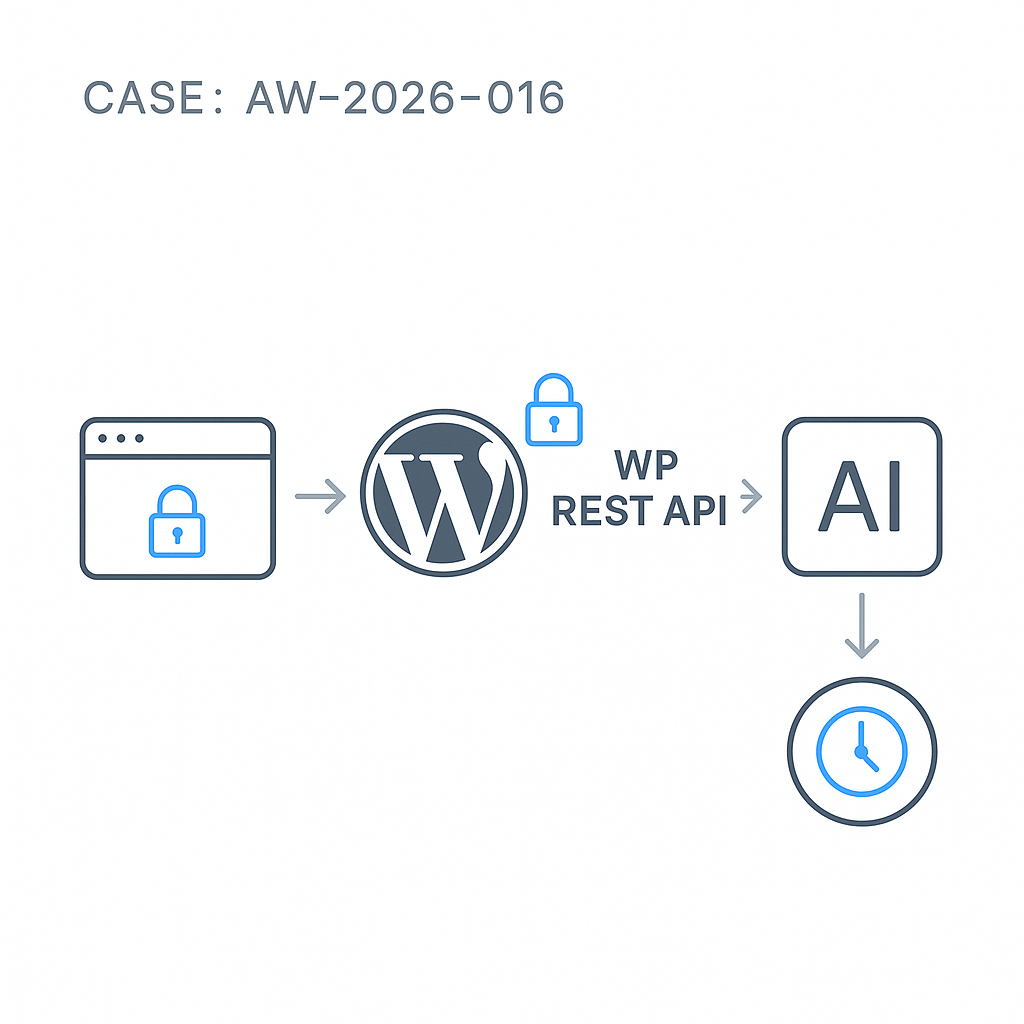
Why this pattern
– Keep API keys off the client and out of theme code.
– Centralize validation, rate limits, and model allowlists.
– Add caching and observability for cost and performance control.
High-level architecture
– Client: fetches /wp-json/ai/v1/infer with a nonce.
– WordPress plugin: validates input, enforces rate limits, caches responses, proxies to the LLM vendor with server-side keys.
– Vendor API: OpenAI, Anthropic, or your inference server.
– Optional queue: for long-running generations.
Minimal plugin (secure proxy)
File: wp-content/plugins/ai-inference-proxy/ai-inference-proxy.php
‘POST’,
‘callback’ => [$this, ‘handle_infer’],
‘permission_callback’ => function() {
return current_user_can(‘read’) || is_user_logged_in() || wp_doing_ajax() || true;
},
‘args’ => [
‘prompt’ => [‘type’ => ‘string’, ‘required’ => true],
‘model’ => [‘type’ => ‘string’, ‘required’ => false],
‘max_tokens’ => [‘type’ => ‘integer’, ‘required’ => false],
‘temperature’ => [‘type’ => ‘number’, ‘required’ => false],
],
]);
}
private function get_client_fingerprint(WP_REST_Request $req) {
$user = get_current_user_id();
$ip = $_SERVER[‘REMOTE_ADDR’] ?? ‘0.0.0.0’;
return $user ? “u:$user” : “ip:$ip”;
}
private function rate_limit_key($fp) {
return “aigil_rl_{$fp}”;
}
private function cache_key($model, $prompt, $params) {
$h = wp_hash($model . ‘|’ . $prompt . ‘|’ . json_encode($params));
return “aigil_cache_$h”;
}
private function hit_rate_limit($key) {
$now = time();
$entry = get_transient($key);
if (!$entry) {
$entry = [‘count’ => 1, ‘reset’ => $now + self::WINDOW_SEC];
set_transient($key, $entry, self::WINDOW_SEC);
return false;
}
if ($entry[‘reset’] 1, ‘reset’ => $now + self::WINDOW_SEC];
set_transient($key, $entry, self::WINDOW_SEC);
return false;
}
$entry[‘count’]++;
set_transient($key, $entry, $entry[‘reset’] – $now);
return $entry[‘count’] > self::RATE_LIMIT;
}
private function vendor_request($body) {
// Read server-side secrets from wp-config.php or environment.
$api_key = defined(‘OPENAI_API_KEY’) ? OPENAI_API_KEY : getenv(‘OPENAI_API_KEY’);
if (!$api_key) return new WP_Error(‘no_key’, ‘Server not configured’, [‘status’ => 500]);
// Map to your vendor endpoint. Example: OpenAI Responses API
$url = ‘https://api.openai.com/v1/responses’;
$args = [
‘timeout’ => 20,
‘redirection’ => 0,
‘blocking’ => true,
‘headers’ => [
‘Authorization’ => ‘Bearer ‘ . $api_key,
‘Content-Type’ => ‘application/json’,
],
‘body’ => wp_json_encode($body),
];
$resp = wp_remote_post($url, $args);
if (is_wp_error($resp)) return $resp;
$code = wp_remote_retrieve_response_code($resp);
$data = json_decode(wp_remote_retrieve_body($resp), true);
if ($code >= 400) {
return new WP_Error(‘vendor_error’, ‘Upstream error’, [
‘status’ => 502,
‘details’ => [‘code’ => $code, ‘body’ => $data]
]);
}
return $data;
}
public function handle_infer(WP_REST_Request $req) {
// Input hardening
$prompt = trim((string) $req->get_param(‘prompt’));
if ($prompt === ” || mb_strlen($prompt) > 4000) {
return new WP_Error(‘bad_input’, ‘Invalid prompt’, [‘status’ => 400]);
}
$model = (string) ($req->get_param(‘model’) ?: ‘gpt-4o-mini’);
$allow = [‘gpt-4o-mini’, ‘gpt-4o’, ‘o3-mini’];
if (!in_array($model, $allow, true)) {
return new WP_Error(‘model_not_allowed’, ‘Model not allowed’, [‘status’ => 400]);
}
$max_tokens = min(800, max(50, (int) ($req->get_param(‘max_tokens’) ?: 400)));
$temperature = max(0.0, min(1.0, (float) ($req->get_param(‘temperature’) ?: 0.2)));
// Rate limiting
$fp = $this->get_client_fingerprint($req);
$rl_key = $this->rate_limit_key($fp);
if ($this->hit_rate_limit($rl_key)) {
return new WP_Error(‘rate_limited’, ‘Too many requests’, [‘status’ => 429]);
}
// Cache check
$cache_params = [‘model’ => $model, ‘max_tokens’ => $max_tokens, ‘temperature’ => $temperature];
$ckey = $this->cache_key($model, $prompt, $cache_params);
$cached = wp_cache_get($ckey, ‘aigil’);
if ($cached) {
return rest_ensure_response([
‘cached’ => true,
‘model’ => $model,
‘output’ => $cached,
]);
}
// Build vendor body (OpenAI Responses format)
$body = [
‘model’ => $model,
‘input’ => [
[‘role’ => ‘system’, ‘content’ => ‘Be concise and helpful.’],
[‘role’ => ‘user’, ‘content’ => $prompt],
],
‘max_output_tokens’ => $max_tokens,
‘temperature’ => $temperature,
];
// Call vendor
$data = $this->vendor_request($body);
if (is_wp_error($data)) return $data;
// Extract text safely (Responses API)
$text = ”;
if (isset($data[‘output’]) && is_array($data[‘output’])) {
foreach ($data[‘output’] as $item) {
if (($item[‘type’] ?? ”) === ‘message’ && isset($item[‘content’][0][‘text’])) {
$text .= $item[‘content’][0][‘text’];
}
}
} elseif (isset($data[‘choices’][0][‘message’][‘content’])) {
$text = $data[‘choices’][0][‘message’][‘content’];
}
$text = trim((string) $text);
// Cache store (object cache/Redis-aware)
if ($text !== ”) {
wp_cache_set($ckey, $text, ‘aigil’, self::CACHE_TTL);
}
// Minimal analytics log (avoid PII)
error_log(sprintf(‘[AI_PROXY] model=%s len=%d user=%s’, $model, strlen($text), $fp));
return rest_ensure_response([
‘cached’ => false,
‘model’ => $model,
‘output’ => $text,
]);
}
}
new AIGIL_Proxy();
Server config
– Store keys server-side:
– In wp-config.php: define(‘OPENAI_API_KEY’, ‘sk-xxx’);
– Or environment: set in Docker/K8s secret, read via getenv.
– Enable persistent object cache (Redis or Memcached) for effective caching.
– Set correct timeouts at PHP-FPM and reverse proxy (Nginx) > plugin timeout.
Front-end usage (nonce + fetch)
1) Enqueue and localize in your theme or plugin:
esc_url_raw( rest_url(‘ai/v1’) ),
‘nonce’ => wp_create_nonce(‘wp_rest’),
]);
});
2) ai-client.js:
async function askLLM(prompt) {
const res = await fetch(`${AIGIL.root}/infer`, {
method: ‘POST’,
headers: {
‘Content-Type’: ‘application/json’,
‘X-WP-Nonce’: AIGIL.nonce
},
body: JSON.stringify({
prompt,
model: ‘gpt-4o-mini’,
max_tokens: 400,
temperature: 0.2
})
});
if (!res.ok) {
const err = await res.json().catch(() => ({}));
throw new Error(err?.message || `HTTP ${res.status}`);
}
return res.json();
}
askLLM(‘Summarize today’s sales KPIs.’).then(console.log).catch(console.error);
Production notes
– Validate input length and strip HTML from user content if taking from forms.
– Model allowlist blocks costlier or experimental models by default.
– Rate limits: move to IP + user + UA combo if needed. For high-traffic, use Redis INCR with TTL.
– Caching: hash prompt + params. For authenticated/private use, consider user-scoped keys to avoid data leakage.
– Timeouts/retries: prefer a single attempt with a 20–30s timeout; log upstream latency.
– Logging: ship anonymized logs to a central sink (e.g., CloudWatch, ELK). Never log full prompts with PII.
– Streaming: if you need token streaming, prefer a Node/Python edge worker and forward via Server-Sent Events; WordPress can stream, but proxies and PHP buffers often break it.
– Cost control: apply server-side prompt templates and max token caps. Add a simple quota per user.
– Security: do not expose keys client-side; use HTTPS; audit access to the REST route; consider capability checks for admin-only models.
Extending the proxy
– Add tool/function calling with an allowlisted function registry and strict JSON schemas.
– Queue long jobs using Action Scheduler; return a job_id and poll a status route.
– Add vendor adapters (Anthropic, OpenRouter, local) with a small interface for portability.
This proxy pattern keeps your WordPress stack secure, fast, and maintainable while integrating LLM features in production.

This is an excellent and much-needed pattern for securely integrating AI into WordPress. For rate limiting, do you have a preferred method for differentiating between anonymous users, such as by IP address?
Good question—before picking an approach, are you serving traffic through a CDN/reverse proxy (so you may need to trust `X-Forwarded-For`/`CF-Connecting-IP`), and do you want different limits for logged-in vs anonymous users?
For anonymous users, the common baseline is IP-based limiting (ideally IP + User-Agent as a coarse fingerprint), but it can be unfair with shared IPs (schools, offices, mobile carriers) and easy to evade with rotation. A slightly sturdier pattern is issuing a short-lived per-session cookie/token (or tying it to a WP nonce) and rate-limiting on that, with IP as a secondary signal/backup. How strict do you need to be (soft throttling vs hard blocks), and is occasional false-positive throttling acceptable?
Thank you, the session cookie approach with IP as a secondary signal is a great solution for us since we are behind a CDN.