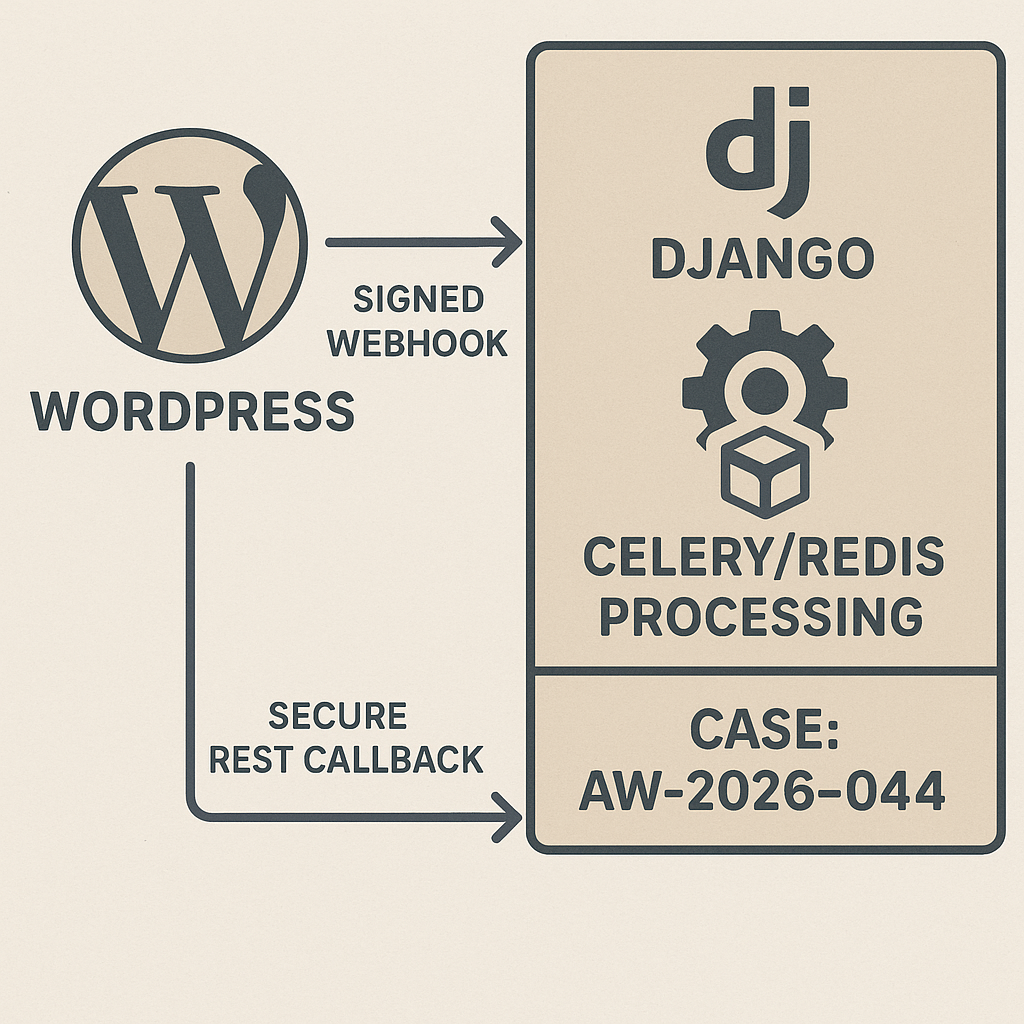
This tutorial shows how to offload AI work from WordPress to a Python backend with Celery/Redis. WordPress signs a job request, Django verifies and enqueues, Celery calls OpenAI (or any compatible endpoint), then posts results back to WordPress.
What you’ll get
– A minimal WP plugin that sends signed jobs and receives callbacks
– A Django microservice with an HMAC-protected endpoint
– A Celery worker using Redis, with retries and rate limits
– A secure callback to update WP posts
Architecture
– WordPress (PHP): Button/cron triggers job -> signed POST -> Django /jobs
– Django API: Verify HMAC -> enqueue Celery task
– Celery + Redis: Run LLM call -> POST results to WP REST API
– WordPress: Update post or meta; show status
Prerequisites
– WordPress 6.x with Application Passwords enabled
– Python 3.11+, Django 5.x, Celery 5.x, Redis
– OpenAI (or compatible) API key
– Public HTTPS endpoints (ngrok for local) or reverse proxy
1) WordPress: minimal plugin to send jobs
Create wp-content/plugins/ai-job-queue/ai-job-queue.php
<?php
/**
* Plugin Name: AI Job Queue (Django)
* Description: Sends signed AI jobs to a Django queue and receives callbacks.
* Version: 0.1.0
*/
if (!defined('ABSPATH')) exit;
add_action('admin_menu', function () {
add_menu_page('AI Jobs', 'AI Jobs', 'edit_posts', 'ai-jobs', 'ai_jobs_page');
});
function ai_jobs_page() {
if (!current_user_can('edit_posts')) wp_die('No access');
if (isset($_POST['ai_enqueue']) && check_admin_referer('ai_jobs_nonce')) {
$post_id = intval($_POST['post_id']);
$resp = ai_send_job($post_id);
echo '
Queued: ‘ . esc_html($resp) . ‘
‘;
}
?>
AI Job Queue
$post_id,
‘title’ => $post->post_title,
‘content’ => wp_strip_all_tags($post->post_content),
‘callback_url’ => home_url(‘/wp-json/ai-jobs/v1/callback’),
‘timestamp’ => time(),
);
$endpoint = getenv(‘DJANGO_JOBS_URL’) ?: ‘https://django.example.com/jobs’;
$secret = getenv(‘AI_JOBS_HMAC_SECRET’);
$signature = base64_encode(hash_hmac(‘sha256’, wp_json_encode($body), $secret, true));
$resp = wp_remote_post($endpoint, array(
‘timeout’ => 15,
‘headers’ => array(
‘Content-Type’ => ‘application/json’,
‘X-AI-Signature’ => $signature,
),
‘body’ => wp_json_encode($body),
));
if (is_wp_error($resp)) return $resp->get_error_message();
return ‘OK’;
}
// REST callback to accept results
add_action(‘rest_api_init’, function () {
register_rest_route(‘ai-jobs/v1’, ‘/callback’, array(
‘methods’ => ‘POST’,
‘callback’ => ‘ai_jobs_callback’,
‘permission_callback’ => ‘__return_true’,
));
});
function ai_jobs_callback($request) {
$data = $request->get_json_params();
$post_id = intval($data[‘post_id’] ?? 0);
$summary = $data[‘summary’] ?? ”;
$status = $data[‘status’] ?? ‘unknown’;
if (!$post_id) return new WP_REST_Response(array(‘error’ => ‘missing post_id’), 400);
if ($status === ‘ok’) {
update_post_meta($post_id, ‘_ai_summary’, wp_kses_post($summary));
return array(‘ack’ => true);
}
update_post_meta($post_id, ‘_ai_error’, sanitize_text_field($data[‘error’] ?? ”));
return array(‘ack’ => true);
}
Notes
– Store AI_JOBS_HMAC_SECRET and DJANGO_JOBS_URL in wp-config.php:
putenv(‘AI_JOBS_HMAC_SECRET=CHANGEME_LONG_RANDOM’);
putenv(‘DJANGO_JOBS_URL=https://django.example.com/jobs’);
2) Django: API to receive signed jobs
Install
pip install django djangorestframework celery redis httpx python-dotenv
project/settings.py (key parts)
INSTALLED_APPS = [
‘django.contrib.contenttypes’,
‘rest_framework’,
‘jobs’,
]
ALLOWED_HOSTS = [‘*’]
CSRF_TRUSTED_ORIGINS = [‘https://your-wp-domain.com’]
AI_JOBS_HMAC_SECRET = os.getenv(‘AI_JOBS_HMAC_SECRET’, ‘CHANGEME’)
WP_CALLBACK_AUTH = os.getenv(‘WP_CALLBACK_AUTH’) # “user:app_password” base64 later
OPENAI_API_KEY = os.getenv(‘OPENAI_API_KEY’)
OPENAI_BASE_URL = os.getenv(‘OPENAI_BASE_URL’, ‘https://api.openai.com/v1’)
Celery (project/celery.py)
import os
from celery import Celery
os.environ.setdefault(‘DJANGO_SETTINGS_MODULE’, ‘project.settings’)
app = Celery(‘project’)
app.conf.update(
broker_url=os.getenv(‘REDIS_URL’, ‘redis://redis:6379/0’),
result_backend=os.getenv(‘REDIS_URL’, ‘redis://redis:6379/0’),
task_routes={‘jobs.tasks.*’: {‘queue’: ‘ai’}},
task_annotations={‘jobs.tasks.process_job’: {‘rate_limit’: ’30/m’}},
task_time_limit=60,
task_soft_time_limit=50,
broker_connection_retry_on_startup=True,
)
app.autodiscover_tasks()
jobs/apps.py
from django.apps import AppConfig
class JobsConfig(AppConfig):
name = ‘jobs’
def ready(self):
from . import signals # optional
jobs/urls.py
from django.urls import path
from .views import job_create
urlpatterns = [path(‘jobs’, job_create)]
project/urls.py
from django.urls import path, include
urlpatterns = [path(”, include(‘jobs.urls’))]
jobs/views.py
import base64, hmac, hashlib, json, os
from django.conf import settings
from django.http import JsonResponse
from django.views.decorators.csrf import csrf_exempt
from .tasks import process_job
def verify_sig(body_bytes, sig_header):
mac = hmac.new(settings.AI_JOBS_HMAC_SECRET.encode(), body_bytes, hashlib.sha256).digest()
expected = base64.b64encode(mac).decode()
return hmac.compare_digest(expected, sig_header or ”)
@csrf_exempt
def job_create(request):
if request.method != ‘POST’:
return JsonResponse({‘error’: ‘method’}, status=405)
body = request.body
sig = request.headers.get(‘X-AI-Signature’, ”)
if not verify_sig(body, sig):
return JsonResponse({‘error’: ‘bad signature’}, status=401)
payload = json.loads(body.decode(‘utf-8’))
process_job.delay(payload)
return JsonResponse({‘queued’: True})
3) Celery task: call OpenAI and callback to WP
jobs/tasks.py
import os, httpx, asyncio
from celery import shared_task
from django.conf import settings
def make_prompt(title, content):
return f”Write a crisp 120-word executive summary for a blog post.nTitle: {title}nContent:n{content[:4000]}”
async def call_llm_async(prompt):
headers = {
‘Authorization’: f’Bearer {settings.OPENAI_API_KEY}’,
‘Content-Type’: ‘application/json’,
}
async with httpx.AsyncClient(base_url=settings.OPENAI_BASE_URL, timeout=30) as client:
r = await client.post(‘/chat/completions’, json={
‘model’: ‘gpt-4o-mini’,
‘messages’: [{‘role’: ‘user’, ‘content’: prompt}],
‘temperature’: 0.3,
}, headers=headers)
r.raise_for_status()
data = r.json()
return data[‘choices’][0][‘message’][‘content’].strip()
def wp_basic_auth():
# settings.WP_CALLBACK_AUTH should be “username:app_password”
import base64
token = base64.b64encode(settings.WP_CALLBACK_AUTH.encode()).decode()
return {‘Authorization’: f’Basic {token}’, ‘Content-Type’: ‘application/json’}
@shared_task(bind=True, autoretry_for=(Exception,), retry_backoff=5, retry_kwargs={‘max_retries’: 5})
def process_job(self, payload):
post_id = payload[‘post_id’]
callback = payload[‘callback_url’]
prompt = make_prompt(payload[‘title’], payload[‘content’])
try:
summary = asyncio.run(call_llm_async(prompt))
data = {‘post_id’: post_id, ‘status’: ‘ok’, ‘summary’: summary}
except Exception as e:
data = {‘post_id’: post_id, ‘status’: ‘error’, ‘error’: str(e)[:300]}
headers = wp_basic_auth()
with httpx.Client(timeout=15) as client:
client.post(callback, json=data, headers=headers)
4) WordPress REST auth for callbacks
– Create an Application Password for a user with edit_posts.
– Store “username:app_password” in Django env var WP_CALLBACK_AUTH.
5) Redis, Celery, Django with Docker Compose
docker-compose.yml
version: ‘3.8’
services:
redis:
image: redis:7-alpine
ports: [‘6379:6379’]
web:
build: .
command: gunicorn project.wsgi:application -b 0.0.0.0:8000
environment:
– AI_JOBS_HMAC_SECRET=CHANGEME_LONG_RANDOM
– OPENAI_API_KEY=${OPENAI_API_KEY}
– OPENAI_BASE_URL=https://api.openai.com/v1
– WP_CALLBACK_AUTH=${WP_CALLBACK_AUTH}
– REDIS_URL=redis://redis:6379/0
depends_on: [redis]
ports: [‘8000:8000’]
worker:
build: .
command: celery -A project.celery.app worker -Q ai –loglevel=INFO
environment:
– AI_JOBS_HMAC_SECRET=CHANGEME_LONG_RANDOM
– OPENAI_API_KEY=${OPENAI_API_KEY}
– OPENAI_BASE_URL=https://api.openai.com/v1
– WP_CALLBACK_AUTH=${WP_CALLBACK_AUTH}
– REDIS_URL=redis://redis:6379/0
depends_on: [redis, web]
Dockerfile (for Django)
FROM python:3.11-slim
WORKDIR /app
COPY requirements.txt .
RUN pip install -r requirements.txt
COPY . .
ENV PYTHONDONTWRITEBYTECODE=1 PYTHONUNBUFFERED=1
EXPOSE 8000
requirements.txt
django
djangorestframework
celery
redis
httpx
gunicorn
python-dotenv
6) Security hardening
– Rotate AI_JOBS_HMAC_SECRET regularly; use at least 32 random bytes.
– Enforce HTTPS and set Django ALLOWED_HOSTS and CSRF_TRUSTED_ORIGINS.
– IP allowlist WordPress -> Django if possible.
– Validate content length; cap payload sizes (e.g., Nginx client_max_body_size).
– Least-privilege WP user for Application Password.
– Log job IDs and outcomes; redact secrets.
7) Testing quickly
– Local tunnel for Django (ngrok http 8000) and set DJANGO_JOBS_URL to that HTTPS URL.
– In WP admin -> AI Jobs, enter a Post ID and click Generate Summary.
– Confirm _ai_summary meta is populated.
8) Operations tips
– Add a “Job status” meta box in WP reading a status endpoint from Django.
– Use Celery beat for rate windows; add cache-based circuit breaker for API failures.
– Implement idempotency: include a job_id and ignore duplicate callbacks.
That’s it. You now have a production-ready pattern to move AI work off WordPress, with signatures, queueing, and a clean callback loop.
