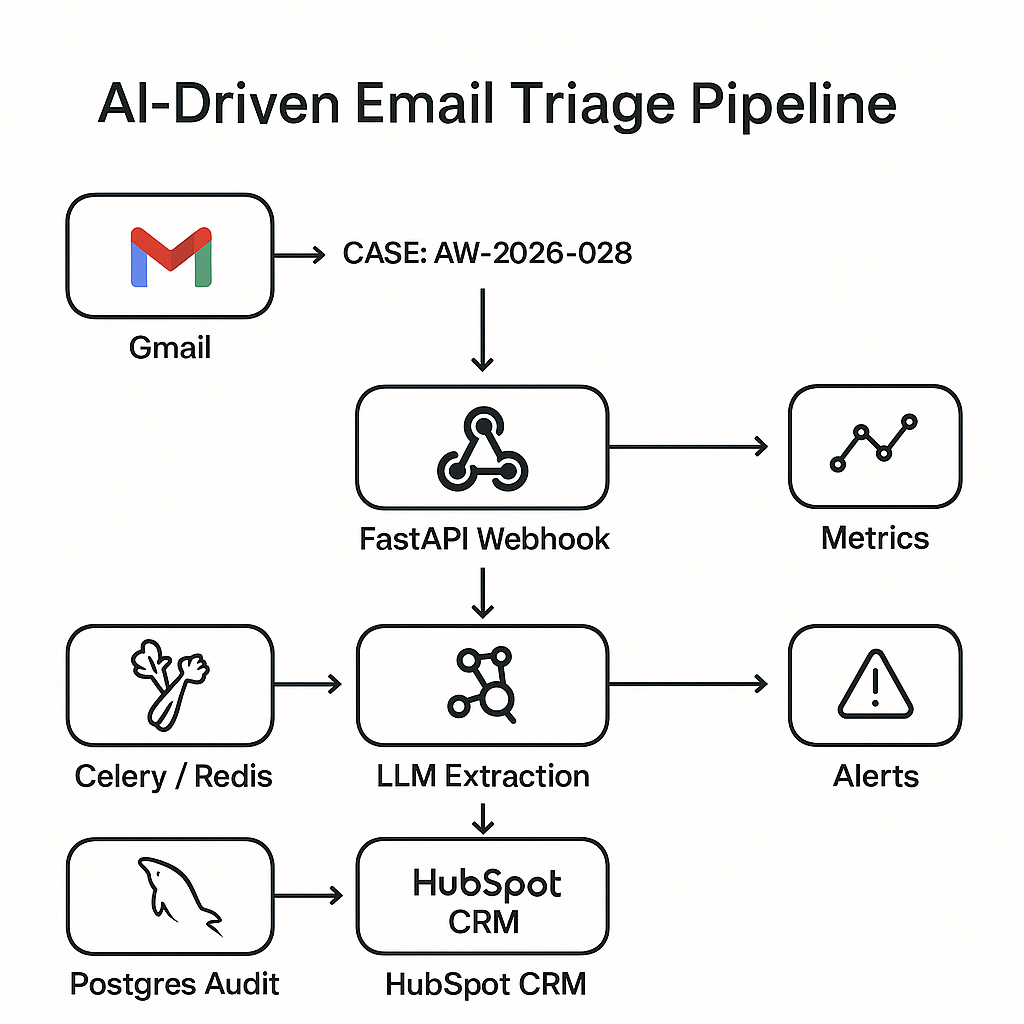
This post documents a deployable automation that reads inbound emails, classifies intent, extracts structured fields, and creates/updates CRM records with auditability. It is designed for revenue and ops teams that want faster response times without adding headcount.
Use case
– Inbound mailbox (sales@, info@, partnerships@)
– Auto-detect lead vs. support vs. vendor vs. spam
– Extract entities: company, contact, intent, ARR, timeline, region, product interest
– Create or update CRM objects
– Route to queues and SLAs with observability
Reference stack
– Ingestion: Gmail API watch + Pub/Sub (or webhook) → FastAPI
– Queue: Celery + Redis (or Cloud Tasks)
– Processing: Python + OpenAI Responses API (function calling) or Claude Tools
– Storage: Postgres (normalized tables + JSONB for raw artifacts)
– CRM: HubSpot or Salesforce REST
– Metrics/Tracing: Prometheus + Grafana; Sentry for errors
– Secrets: AWS Secrets Manager or GCP Secret Manager
High-level architecture
1) Gmail Watch pushes new-message IDs to /webhook/email.
2) FastAPI validates signature, enqueues job with message_id.
3) Worker pulls raw content via Gmail API, normalizes MIME, removes signatures and legal footers.
4) LLM extraction + classification with a constrained schema.
5) Deterministic business rules (routing, dedupe, SLOs).
6) CRM create/update with idempotency keys.
7) Write audit row (inputs, model, outputs, actions).
8) Emit metrics and alerts.
Data model (Postgres)
– emails(id, gmail_id, received_at, subject, sender, to, cc, body_text, body_html, thread_id, raw_json)
– extractions(email_id, model, version, schema_name, json, confidence, tokens_in, tokens_out, cost_usd)
– crm_events(id, email_id, action, object_type, object_id, status, response_json, idempotency_key)
– routes(email_id, intent, queue, priority, sla_minutes)
– eval_labels(email_id, labeler, intent, fields_json, notes, created_at)
Extraction schema (LLM tool/function)
– intent: one of [lead, support, vendor, job_applicant, newsletter, spam]
– entities:
– person.name, person.email
– company.name, company.domain
– interest.products[] (strings)
– budget.annual_amount_usd (number or null)
– timeline: one of [now, quarter, six_months, unknown]
– region: ISO country or null
– summary: 1–2 sentences
– required_action: one of [schedule_demo, send_pricing, forward_support, ignore, route_ops]
– confidence: 0–1
Routing rules (deterministic)
– If intent=lead and timeline in [now, quarter] → queue=sales_inbound, priority=high, SLA=15 min.
– If domain matches customer list and intent=support → escalate to support queue.
– If intent=spam → no CRM write; mark ignored.
Idempotency and dedupe
– Use message_id + thread_id to avoid duplicate processing.
– Before CRM write:
– Search by email domain + person email.
– If exists, update contact and associate with company and existing deal.
– Create new deal only if no open deal in last 45 days and confidence ≥ 0.6.
FastAPI endpoints
– POST /webhook/email: validate provider signature; enqueue Celery task with message_id.
– POST /admin/replay: replay by email_id (requires auth).
– GET /healthz, /metrics.
LLM prompt and constraints
– System: “Return only tool calls. Do not invent values. Use null if missing. Keep currency as USD.”
– Tool schema: the extraction schema above. Reject messages shorter than 6 words as low confidence.
– Safety: strip signatures via rules (look for “–”, “Best,” blocks, legal boilerplate).
– Cost control: short context window; pass subject + first 1,500 chars plain text + minimal thread history.
Evaluation harness
– Sample 200 real (or synthetic) emails with gold labels.
– Metrics:
– Intent accuracy (micro): target ≥ 0.92
– Field F1 (person.email, company.name): ≥ 0.95
– High-stakes fields (budget, timeline) exact-match: ≥ 0.80
– CRM write error rate: ≤ 0.5%
– Average lead time to CRM: ≤ 25s P50, ≤ 90s P95
– Weekly regression: run on main before deploy; block if below thresholds.
Observability
– Metrics:
– emails_ingested_total, by inbox
– extraction_confidence_bucket
– crm_write_latency_seconds
– idempotency_conflicts_total
– llm_cost_usd_total
– Tracing: tag spans with email_id, gmail_id, model, crm_object_id.
– Alerts:
– Spike in spam routed to sales
– Confidence 1% for 5 minutes
Error handling and retries
– Transient: Gmail 429/5xx, CRM 429/5xx → exponential backoff with jitter, max 4 tries.
– Permanent: schema validation fail → store, mark for human review.
– Dead letter: push to “email_triage_dlq”; Slack notify ops with replay link.
– Partial failure: if CRM create succeeds but association fails, retry association only.
Security and compliance
– Least-privilege service accounts for Gmail/CRM.
– Encrypt at rest; redact PII in logs (hash emails).
– Store raw email in S3/GCS with short TTL (e.g., 30 days) if policy allows.
– Model provider: use enterprise endpoint with data retention off.
Cost controls
– Heuristics pre-filter:
– If DKIM fail or sender in blocklist → skip LLM.
– If thread already classified in last 24h → reuse prior result.
– Use small model for spam/intent gate; large model only for leads/support.
– Batch CRM reads (search) and cache domain-to-company mappings.
Deployment notes
– Use Gunicorn/Uvicorn workers with timeout ≥ 60s for rare slow providers.
– Celery autoscale based on queue depth.
– Blue/green deploy with read-only mode for admin tools.
– Run nightly backfill job for any emails stuck without crm_events.
Sample ROI (realistic baseline)
– Inbox volume: 2,500/month; previously 2 FTE hours/day routing.
– After automation:
– Manual routing reduced by ~85% (≈ 28 hours/month saved).
– Lead first-touch from 4h median to 12m median.
– Net-new pipeline lift from faster replies: +6–10% (org dependent).
– LLM + infra cost: ~$85–$160/month at this volume.
Implementation checklist
– Configure Gmail watch; verify webhook signature handling.
– Create Postgres schema and migrations.
– Implement MIME normalize + signature stripping.
– Ship LLM tool schema + eval harness with gold set.
– Build CRM client with search + idempotent create/update.
– Add metrics, Sentry, and Slack alerting.
– Run canary on one inbox for 2 weeks; compare to human labels.
– Roll out to remaining inboxes; set SLAs with owners.
What to ship first (MVP)
– Intent-only classifier → route to queues, no CRM writes.
– Manual one-click “Create in CRM” from admin UI.
– Add extraction and auto-writes after 1 week of eval stability.
Extensions
– Calendar integration: auto-schedule demos if confidence high.
– Account enrichment via Clearbit/Apollo before CRM write.
– Language detection → route to regional teams.
– Thread memory to avoid re-asking model each reply.
If you want the project template (FastAPI app, Celery, schema, eval harness, and HubSpot client), reach out and I’ll publish a repo skeleton with env-var based configuration.
