Why this matters
– Most “AI for WordPress” attempts call providers directly from the browser. That leaks keys, invites prompt injection, and breaks at scale.
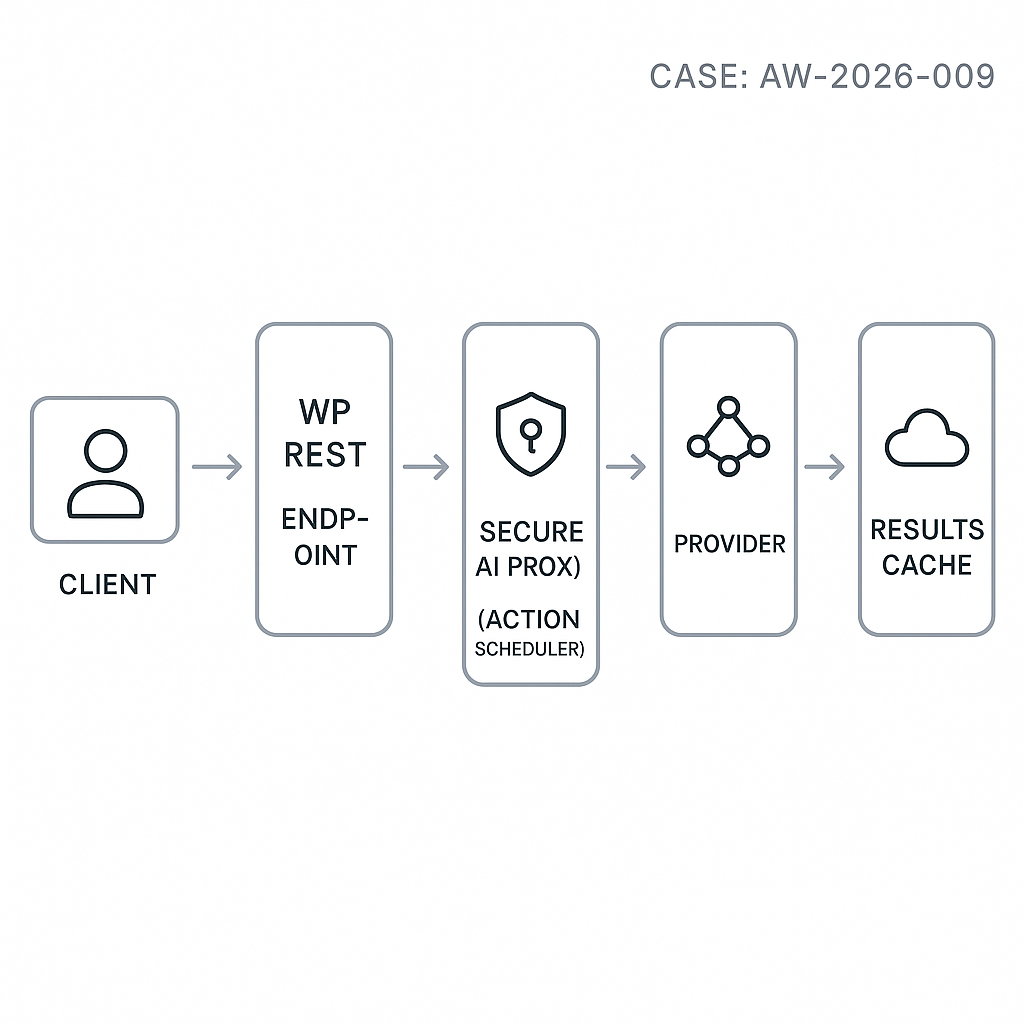
– This post shows a production-ready pattern: a secure WordPress REST endpoint that enqueues requests, budgets tokens, calls a server-side AI proxy, and returns cached results.
Architecture overview
– Client (WP front end or headless): POST /wp-json/ai/v1/chat with a conversation id and message.
– WordPress plugin:
– Validates nonce/JWT and role capability.
– Enforces per-user and per-route rate limits.
– Computes token budgets and truncates history.
– Enqueues a background job via Action Scheduler.
– Returns a request id; client polls GET /wp-json/ai/v1/chat/{id}.
– AI Proxy (recommended): a small backend (e.g., Django/FastAPI) that holds provider API keys, normalizes providers (OpenAI, Anthropic), handles retries, and redacts PII per policy.
– Storage:
– wp_posts or custom table for ai_requests (status, input hash, output, token usage).
– Transient or object cache for hot responses.
– Optional: SSE/WebSocket via a small Node/Edge worker if you need streaming.
Data model (custom table)
– Table: wp_ai_requests
– id (bigint), user_id, status (pending, running, done, error)
– route (chat, summarize, classify)
– input_hash (sha256 for cache dedupe)
– prompt_json (sanitized, compact)
– result_json
– provider (openai, anthropic)
– tokens_in, tokens_out, cost_usd, created_at, updated_at
Minimal plugin (core pieces)
File: ai-chat-endpoint/ai-chat-endpoint.php
/*
Plugin Name: AI Chat Endpoint
Description: Secure AI chat REST API with queueing and token budgeting.
Version: 0.1.0
*/
if (!defined(‘ABSPATH’)) exit;
class AIGuyLA_AI_Endpoint {
const NS = ‘ai/v1’;
public function __construct() {
add_action(‘rest_api_init’, [$this, ‘routes’]);
add_action(‘ai_chat_process_request’, [$this, ‘process_request’], 10, 1);
}
public function routes() {
register_rest_route(self::NS, ‘/chat’, [
‘methods’ => ‘POST’,
‘callback’ => [$this, ‘create_request’],
‘permission_callback’ => [$this, ‘can_use_ai’],
‘args’ => [
‘conversation_id’ => [‘required’ => true],
‘message’ => [‘required’ => true],
],
]);
register_rest_route(self::NS, ‘/chat/(?Pd+)’, [
‘methods’ => ‘GET’,
‘callback’ => [$this, ‘get_request’],
‘permission_callback’ => [$this, ‘can_use_ai’],
]);
}
public function can_use_ai(WP_REST_Request $req) {
// Nonce or JWT check; fallback to logged-in capability.
if (is_user_logged_in() && current_user_can(‘read’)) return true;
return false;
}
private function rate_limited($user_id) {
$key = ‘ai_rl_’ . $user_id;
$hits = (int) get_transient($key);
if ($hits > 30) return true; // 30 req / 5 min
set_transient($key, $hits + 1, 5 * MINUTE_IN_SECONDS);
return false;
}
private function tokenize_estimate($text) {
// Cheap heuristic; replace with tiktoken server-side if needed.
$wc = str_word_count($text);
return (int) max(1, $wc * 1.3);
}
private function trim_history($messages, $max_tokens) {
$budget = $max_tokens;
$out = [];
for ($i = count($messages) – 1; $i >= 0; $i–) {
$t = $this->tokenize_estimate(json_encode($messages[$i]));
if ($t > $budget) break;
$out[] = $messages[$i];
$budget -= $t;
}
return array_reverse($out);
}
public function create_request(WP_REST_Request $req) {
$user_id = get_current_user_id();
if ($this->rate_limited($user_id)) {
return new WP_REST_Response([‘error’ => ‘rate_limited’], 429);
}
$conv_id = sanitize_text_field($req[‘conversation_id’]);
$message = wp_kses_post($req[‘message’]);
// Build messages (fetch last N from your store).
$history = []; // TODO: load from your conversation table.
$messages = array_merge($history, [[‘role’ => ‘user’, ‘content’ => $message]]);
$messages = $this->trim_history($messages, 6000); // leave room for output
$payload = [
‘provider’ => ‘openai:gpt-4o-mini’,
‘temperature’ => 0.2,
‘messages’ => $messages,
‘system’ => ‘You are a concise assistant.’,
‘max_output_tokens’ => 800,
‘metadata’ => [‘wp_user’ => $user_id, ‘conversation_id’ => $conv_id],
];
$input_hash = hash(‘sha256’, json_encode($payload));
global $wpdb;
$table = $wpdb->prefix . ‘ai_requests’;
$wpdb->insert($table, [
‘user_id’ => $user_id,
‘status’ => ‘pending’,
‘route’ => ‘chat’,
‘input_hash’ => $input_hash,
‘prompt_json’ => wp_json_encode($payload),
‘created_at’ => current_time(‘mysql’, 1),
‘updated_at’ => current_time(‘mysql’, 1),
]);
$id = (int) $wpdb->insert_id;
if (function_exists(‘as_enqueue_async_action’)) {
as_enqueue_async_action(‘ai_chat_process_request’, [$id], ‘ai’);
} else {
// Fallback: process inline (not recommended in prod).
$this->process_request($id);
}
return [‘id’ => $id, ‘status’ => ‘queued’];
}
public function get_request(WP_REST_Request $req) {
global $wpdb;
$table = $wpdb->prefix . ‘ai_requests’;
$row = $wpdb->get_row($wpdb->prepare(“SELECT * FROM $table WHERE id=%d”, (int) $req[‘id’]), ARRAY_A);
if (!$row) return new WP_REST_Response([‘error’ => ‘not_found’], 404);
// Limit data exposure.
return [
‘id’ => (int) $row[‘id’],
‘status’ => $row[‘status’],
‘result’ => $row[‘result_json’] ? json_decode($row[‘result_json’], true) : null,
‘tokens’ => [
‘in’ => (int) $row[‘tokens_in’],
‘out’ => (int) $row[‘tokens_out’],
]
];
}
public function process_request($id) {
global $wpdb;
$table = $wpdb->prefix . ‘ai_requests’;
$row = $wpdb->get_row($wpdb->prepare(“SELECT * FROM $table WHERE id=%d”, (int)$id), ARRAY_A);
if (!$row || $row[‘status’] !== ‘pending’) return;
$wpdb->update($table, [‘status’ => ‘running’, ‘updated_at’ => current_time(‘mysql’, 1)], [‘id’ => $id]);
$payload = json_decode($row[‘prompt_json’], true);
// Call your secure proxy instead of provider directly.
$proxy_url = getenv(‘AI_PROXY_URL’);
$proxy_key = getenv(‘AI_PROXY_KEY’);
$resp = wp_remote_post($proxy_url . ‘/v1/chat’, [
‘timeout’ => 30,
‘headers’ => [
‘Authorization’ => ‘Bearer ‘ . $proxy_key,
‘Content-Type’ => ‘application/json’,
],
‘body’ => wp_json_encode($payload),
]);
if (is_wp_error($resp)) {
$wpdb->update($table, [‘status’ => ‘error’, ‘result_json’ => wp_json_encode([‘error’ => $resp->get_error_message()])], [‘id’ => $id]);
return;
}
$code = wp_remote_retrieve_response_code($resp);
$body = wp_remote_retrieve_body($resp);
if ($code !== 200) {
$wpdb->update($table, [‘status’ => ‘error’, ‘result_json’ => $body], [‘id’ => $id]);
return;
}
$data = json_decode($body, true);
$tokens_in = isset($data[‘usage’][‘prompt_tokens’]) ? (int)$data[‘usage’][‘prompt_tokens’] : 0;
$tokens_out = isset($data[‘usage’][‘completion_tokens’]) ? (int)$data[‘usage’][‘completion_tokens’] : 0;
$wpdb->update($table, [
‘status’ => ‘done’,
‘result_json’ => wp_json_encode($data),
‘tokens_in’ => $tokens_in,
‘tokens_out’ => $tokens_out,
‘updated_at’ => current_time(‘mysql’, 1)
], [‘id’ => $id]);
}
}
new AIGuyLA_AI_Endpoint();
Register the table on activation
– Create the table using dbDelta.
– Install Action Scheduler (composer or plugin) for reliable background jobs.
Security hardening
– Never embed provider API keys in JS. Use a server-side proxy with IP allowlist and per-tenant keys.
– Validate nonce or JWT on every request. For headless, use short-lived JWT via a login endpoint.
– Enforce:
– Per-user rate limit (transient/object cache).
– Per-route max tokens and max output tokens.
– Allowed roles/capabilities (e.g., manage_options for admin-only routes).
– Sanitize content and strip HTML from user prompts where not needed.
– Log only necessary fields; avoid storing raw PII.
Performance considerations
– Cache identical requests by input_hash for 5–30 minutes to eliminate repeats.
– Use persistent object cache (Redis) to reduce db hits.
– Set timeouts and retry with exponential backoff in the proxy, not in WordPress.
– Batch-cron Action Scheduler to run with a dedicated queue (group “ai”) and WP-CLI runner.
– Keep payloads compact; remove redundant system prompts and reduce message metadata.
Server-side AI proxy (FastAPI example sketch)
– Endpoints: POST /v1/chat
– Responsibilities:
– Map provider models, inject safety/system prompts, enforce token ceilings.
– Retry on 429/5xx with jitter.
– Return normalized JSON with usage and finish_reason.
– Sign results with an HMAC if you need tamper detection.
Client usage example
– POST /wp-json/ai/v1/chat with:
– conversation_id: “abc123”
– message: “Summarize the last 3 updates in this thread.”
– Response: { id: 42, status: “queued” }
– Poll GET /wp-json/ai/v1/chat/42 until status = “done”, then render result. For streaming, offload to an SSE service.
Observability and cost control
– Store tokens_in/tokens_out and compute cost_usd in a nightly job.
– Add a WP-CLI command: wp ai:stats to print per-user usage.
– Alert when provider 5xx rate > 2% over 15 minutes or latency > 6s p95.
Deployment checklist
– Put AI_PROXY_URL and AI_PROXY_KEY in wp-config.php via environment variables.
– Enforce HTTPS everywhere; HSTS on the proxy.
– Enable Redis object cache and Action Scheduler health checks.
– Backup the ai_requests table; set a 30–60 day retention policy.
What to build next
– SSE streaming endpoint via a tiny Node worker subscribed to a Redis pub/sub channel.
– Vector augmentation: add a retrieval step (pgvector) before the chat call.
– UI block: a Gutenberg block that handles nonce, posting, and polling with exponential backoff.
This pattern keeps secrets off the client, scales with queues, and provides clear control over cost, latency, and reliability—all within a WordPress environment.
