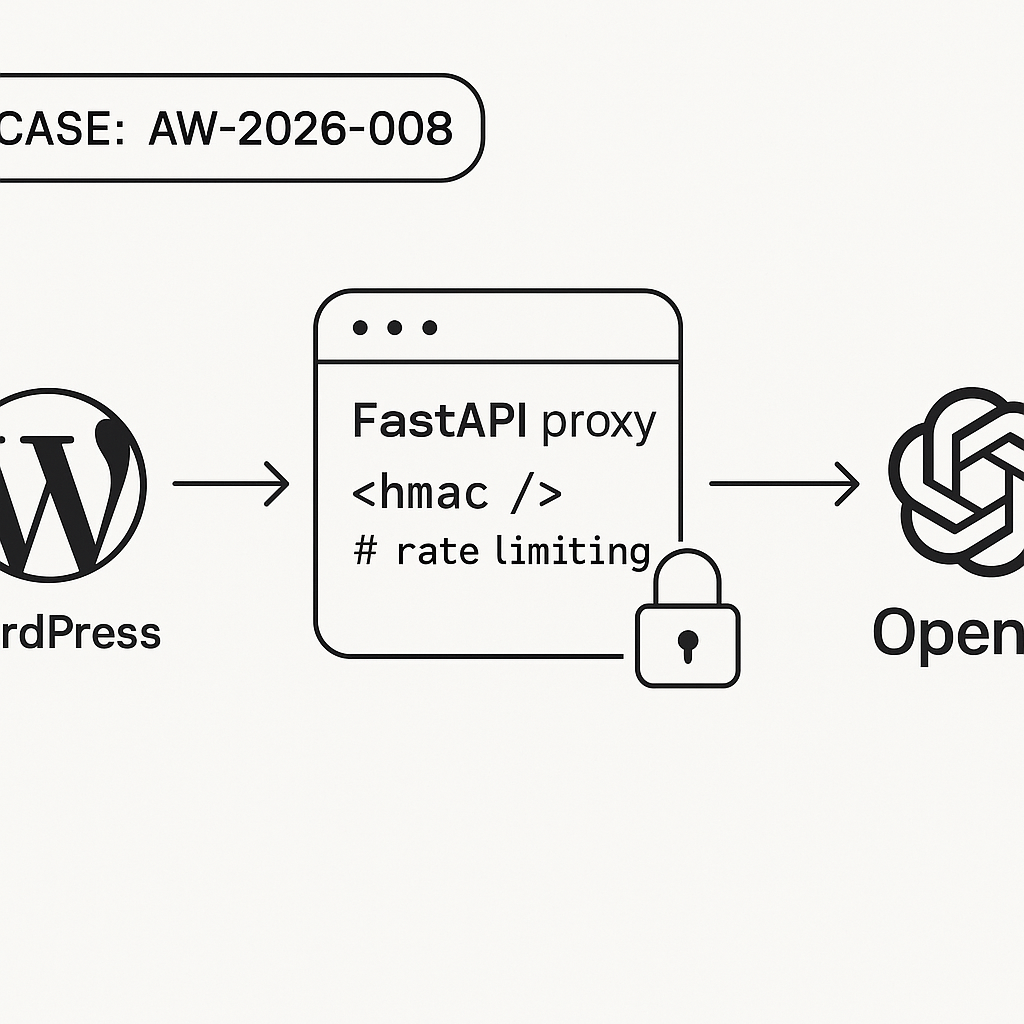
Overview
– Goal: Call OpenAI from WordPress without storing API keys in WP.
– Architecture: WordPress plugin -> HTTPS -> FastAPI proxy -> OpenAI API.
– Security: HMAC-signed requests, short time window, rate limiting, CORS, Cloudflare.
– Outcomes: Streaming responses, reduced latency, auditability.
1) FastAPI Proxy (Python)
Create project structure:
.
├─ app/
│ ├─ main.py
│ ├─ security.py
│ ├─ limiter.py
│ └─ models.py
├─ requirements.txt
├─ .env
└─ Dockerfile
requirements.txt:
fastapi==0.115.4
uvicorn[standard]==0.30.6
httpx==0.27.2
pydantic==2.9.2
python-dotenv==1.0.1
redis==5.0.7
limits==3.13.0
slowapi==0.1.8
orjson==3.10.7
.env (do not commit):
OPENAI_API_KEY=sk-…
HMAC_SHARED_SECRET=super-long-random
ALLOWED_ORIGINS=https://example.com
RATE_LIMIT=60/minute
ALLOWED_DRIFT_SECONDS=30
app/models.py:
from pydantic import BaseModel, Field
from typing import Optional, List, Dict, Any
class ChatMessage(BaseModel):
role: str
content: str
class ChatRequest(BaseModel):
model: str = Field(default=”gpt-4o-mini”)
messages: List[ChatMessage]
temperature: float = 0.2
max_tokens: Optional[int] = 512
stream: bool = True
metadata: Optional[Dict[str, Any]] = None
app/security.py:
import hmac, hashlib, time, os
from fastapi import HTTPException, Header
SHARED_SECRET = os.getenv(“HMAC_SHARED_SECRET”, “”)
ALLOWED_DRIFT = int(os.getenv(“ALLOWED_DRIFT_SECONDS”, “30”))
def verify_hmac_signature(body: bytes, x_signature: str, x_timestamp: str):
if not (x_signature and x_timestamp):
raise HTTPException(status_code=401, detail=”Missing signature headers”)
try:
ts = int(x_timestamp)
except:
raise HTTPException(status_code=401, detail=”Invalid timestamp”)
if abs(int(time.time()) – ts) > ALLOWED_DRIFT:
raise HTTPException(status_code=401, detail=”Stale request”)
mac = hmac.new(SHARED_SECRET.encode(), msg=(x_timestamp + “.”).encode() + body, digestmod=hashlib.sha256)
expected = “sha256=” + mac.hexdigest()
if not hmac.compare_digest(expected, x_signature):
raise HTTPException(status_code=401, detail=”Bad signature”)
app/limiter.py:
import os
from slowapi import Limiter
from slowapi.util import get_remote_address
from redis import Redis
from limits.storage import RedisStorage
redis_url = os.getenv(“REDIS_URL”, “redis://localhost:6379/0”)
storage = RedisStorage(redis_url)
limiter = Limiter(key_func=get_remote_address, storage_uri=redis_url)
app/main.py:
import os, httpx, orjson
from fastapi import FastAPI, Request
from fastapi.responses import StreamingResponse, JSONResponse
from fastapi.middleware.cors import CORSMiddleware
from .models import ChatRequest
from .security import verify_hmac_signature
from .limiter import limiter
from slowapi.errors import RateLimitExceeded
from slowapi.middleware import SlowAPIMiddleware
OPENAI_API_KEY = os.getenv(“OPENAI_API_KEY”)
ALLOWED_ORIGINS = os.getenv(“ALLOWED_ORIGINS”, “”).split(“,”)
RATE_LIMIT = os.getenv(“RATE_LIMIT”, “60/minute”)
app = FastAPI()
app.add_middleware(SlowAPIMiddleware)
if ALLOWED_ORIGINS and ALLOWED_ORIGINS[0]:
app.add_middleware(
CORSMiddleware,
allow_origins=[o.strip() for o in ALLOWED_ORIGINS],
allow_credentials=False,
allow_methods=[“POST”, “OPTIONS”],
allow_headers=[“*”],
)
@app.exception_handler(RateLimitExceeded)
def ratelimit_handler(request, exc):
return JSONResponse(status_code=429, content={“detail”:”Rate limit exceeded”})
@app.post(“/v1/chat/completions”)
@limiter.limit(RATE_LIMIT)
async def chat(request: Request):
raw = await request.body()
xsig = request.headers.get(“x-signature”)
xts = request.headers.get(“x-timestamp”)
verify_hmac_signature(raw, xsig, xts)
data = ChatRequest.model_validate_json(raw)
headers = {
“Authorization”: f”Bearer {OPENAI_API_KEY}”,
“Content-Type”: “application/json”,
}
payload = {
“model”: data.model,
“messages”: [m.model_dump() for m in data.messages],
“temperature”: data.temperature,
“max_tokens”: data.max_tokens,
“stream”: data.stream,
}
async def stream():
timeout = httpx.Timeout(30.0, read=60.0, write=30.0, connect=10.0)
async with httpx.AsyncClient(timeout=timeout) as client:
async with client.stream(“POST”, “https://api.openai.com/v1/chat/completions”, headers=headers, json=payload) as r:
async for chunk in r.aiter_bytes():
yield chunk
if data.stream:
return StreamingResponse(stream(), media_type=”text/event-stream”)
else:
async with httpx.AsyncClient(timeout=30.0) as client:
r = await client.post(“https://api.openai.com/v1/chat/completions”, headers=headers, json=payload)
return JSONResponse(status_code=r.status_code, content=r.json())
Dockerfile:
FROM python:3.11-slim
WORKDIR /app
COPY requirements.txt .
RUN pip install –no-cache-dir -r requirements.txt
COPY app ./app
ENV PYTHONUNBUFFERED=1
EXPOSE 8000
CMD [“uvicorn”, “app.main:app”, “–host”, “0.0.0.0”, “–port”, “8000”]
Local run:
docker run –env-file .env -p 8000:8000 yourrepo/openai-proxy:latest
2) WordPress Plugin (HMAC + Admin UI)
Create wp-content/plugins/ai-secure-proxy/ai-secure-proxy.php:
<?php
/*
Plugin Name: AI Secure Proxy
Description: Calls a secured FastAPI proxy with HMAC-signed requests.
Version: 1.0.0
*/
if (!defined('ABSPATH')) exit;
class AISecureProxy {
const OPT_ENDPOINT = 'ai_proxy_endpoint';
const OPT_SECRET = 'ai_proxy_secret';
public function __construct() {
add_action('admin_menu', [$this,'menu']);
add_action('admin_init', [$this,'settings']);
add_action('wp_ajax_ai_proxy_chat', [$this,'handle_ajax']);
add_action('add_meta_boxes', [$this,'add_box']);
add_action('admin_enqueue_scripts', [$this,'enqueue']);
}
public function menu() {
add_options_page('AI Secure Proxy','AI Secure Proxy','manage_options','ai-secure-proxy',[$this,'render']);
}
public function settings() {
register_setting('ai-secure-proxy','ai_proxy_endpoint');
register_setting('ai-secure-proxy','ai_proxy_secret');
add_settings_section('ai-secure-proxy-sec','Settings',null,'ai-secure-proxy');
add_settings_field(self::OPT_ENDPOINT,'Proxy Endpoint',[$this,'field_endpoint'],'ai-secure-proxy','ai-secure-proxy-sec');
add_settings_field(self::OPT_SECRET,'Shared Secret',[$this,'field_secret'],'ai-secure-proxy','ai-secure-proxy-sec');
}
public function field_endpoint(){ $v=esc_attr(get_option(self::OPT_ENDPOINT,'')); echo "”; }
public function field_secret(){ $v=esc_attr(get_option(self::OPT_SECRET,”)); echo “”; }
public function render(){
echo “
AI Secure Proxy
“;
settings_fields(‘ai-secure-proxy’); do_settings_sections(‘ai-secure-proxy’); submit_button(); echo “
“;
}
public function add_box() {
add_meta_box(‘ai-secure-box’,’AI Assistant’,[$this,’box_html’],’post’,’side’);
}
public function box_html($post){
echo ““;
echo ““;
echo “
“;
wp_nonce_field(‘ai_secure_proxy’,’ai_secure_nonce’);
}
public function enqueue($hook){
if ($hook !== ‘post.php’ && $hook !== ‘post-new.php’) return;
wp_enqueue_script(‘ai-secure-proxy-js’, plugin_dir_url(__FILE__).’ui.js’, [‘jquery’], ‘1.0’, true);
wp_localize_script(‘ai-secure-proxy-js’,’AIProxy’,[
‘ajaxurl’=>admin_url(‘admin-ajax.php’),
‘nonce’=>wp_create_nonce(‘ai_secure_proxy’)
]);
}
private function sign($timestamp, $body, $secret){
return ‘sha256=’ . hash_hmac(‘sha256’, $timestamp . ‘.’ . $body, $secret);
}
public function handle_ajax(){
check_ajax_referer(‘ai_secure_proxy’,’nonce’);
if (!current_user_can(‘edit_posts’)) wp_send_json_error(‘forbidden’, 403);
$endpoint = get_option(self::OPT_ENDPOINT,”);
$secret = get_option(self::OPT_SECRET,”);
if (!$endpoint || !$secret) wp_send_json_error(‘not_configured’, 400);
$post_id = intval($_POST[‘post_id’] ?? 0);
$prompt = sanitize_text_field($_POST[‘prompt’] ?? ”);
$content = get_post_field(‘post_content’, $post_id);
$messages = [
[‘role’=>’system’,’content’=>’You are a concise assistant for WordPress editors.’],
[‘role’=>’user’,’content’=>”Post content:n”.$content.”nnTask:n”.$prompt]
];
$body = wp_json_encode([‘model’=>’gpt-4o-mini’,’messages’=>$messages,’temperature’=>0.2,’stream’=>false], JSON_UNESCAPED_SLASHES);
$ts = strval(time());
$sig = $this->sign($ts, $body, $secret);
$args = [
‘headers’=>[
‘Content-Type’=>’application/json’,
‘x-signature’=>$sig,
‘x-timestamp’=>$ts
],
‘body’=>$body,
‘timeout’=>45
];
$res = wp_remote_post($endpoint, $args);
if (is_wp_error($res)) wp_send_json_error($res->get_error_message(), 500);
$code = wp_remote_retrieve_response_code($res);
$data = json_decode(wp_remote_retrieve_body($res), true);
if ($code !== 200) wp_send_json_error($data[‘detail’] ?? ‘proxy_error’, $code);
$text = $data[‘choices’][0][‘message’][‘content’] ?? ”;
wp_send_json_success([‘text’=>$text]);
}
}
new AISecureProxy();
Create ui.js:
jQuery(function($){
$(‘#ai_generate’).on(‘click’, function(e){
e.preventDefault();
const prompt = $(‘#ai_prompt’).val();
$(‘#ai_output’).text(‘Generating…’);
$.post(AIProxy.ajaxurl, {
action: ‘ai_proxy_chat’,
nonce: AIProxy.nonce,
post_id: $(‘#post_ID’).val(),
prompt: prompt
}).done(function(res){
if (res.success) $(‘#ai_output’).text(res.data.text || ‘(no output)’);
else $(‘#ai_output’).text(‘Error: ‘ + (res.data || ‘unknown’));
}).fail(function(xhr){
$(‘#ai_output’).text(‘HTTP ‘ + xhr.status + ‘: ‘ + xhr.responseText);
});
});
});
3) Test the Proxy
– Start Redis locally if using docker compose or cloud service.
– curl test (replace values):
TS=$(date +%s); BODY='{“model”:”gpt-4o-mini”,”messages”:[{“role”:”user”,”content”:”Say hi”}],”stream”:false}’; SIG=’sha256=’$(printf “%s.%s” “$TS” “$BODY” | openssl dgst -sha256 -hmac ‘super-long-random’ -hex | sed ‘s/^.* //’); curl -i -X POST http://localhost:8000/v1/chat/completions -H “Content-Type: application/json” -H “x-timestamp: $TS” -H “x-signature: $SIG” -d “$BODY”
– In WordPress: set endpoint to your deployed URL, add the same shared secret, open a post, click Generate.
4) Deployment
– Run behind a reverse proxy (Nginx) with HTTP/2 and gzip on. Set client_max_body_size 512k.
– Put Cloudflare in front. Enable WAF, Bot Fight Mode, rate limiting rule for path /v1/chat/completions.
– Restrict origins via ALLOWED_ORIGINS. Optionally IP allowlist your WP server.
– Use Docker on a small VM (2 vCPU/2GB). Autoscale if RPS > 20 sustained.
– Rotate HMAC secret quarterly. Store in secrets manager.
– Enable health check endpoint (GET /) if desired.
5) Performance Notes
– Use stream=false in admin to keep the UI simple. For front-end UIs, enable stream=true and process SSE.
– Set temperature low for predictable drafts.
– Batch common system prompts to reduce tokens.
– Cache frequent prompts behind Redis keyed by normalized messages if costs matter.
6) Security Checklist
– Never put OpenAI keys in WordPress or client JS.
– Verify HMAC with timestamp drift window <= 30s.
– Enforce rate limits per IP and/or per site key.
– Limit models allowed by the proxy to a safe allowlist.
– Log request IDs, latency, and token counts (without storing content if sensitive).
– Keep dependencies patched and lock versions.
7) Optional: Nginx Snippet
server {
listen 443 ssl http2;
server_name proxy.example.com;
client_max_body_size 512k;
location / {
proxy_pass http://127.0.0.1:8000;
proxy_set_header Host $host;
proxy_set_header X-Forwarded-For $remote_addr;
proxy_read_timeout 65s;
}
}
Troubleshooting
– 401 stale request: check server time sync (use NTP).
– 401 bad signature: confirm same secret and exact body bytes.
– 429: raise RATE_LIMIT or verify Cloudflare rules.
– CORS errors: set ALLOWED_ORIGINS to your WP domain.
What to Build Next
– Add JWT per-editor scoping on WP side.
– Add content policy filter in proxy (regex/lint) before calling OpenAI.
– Add billing/usage metering per site.
