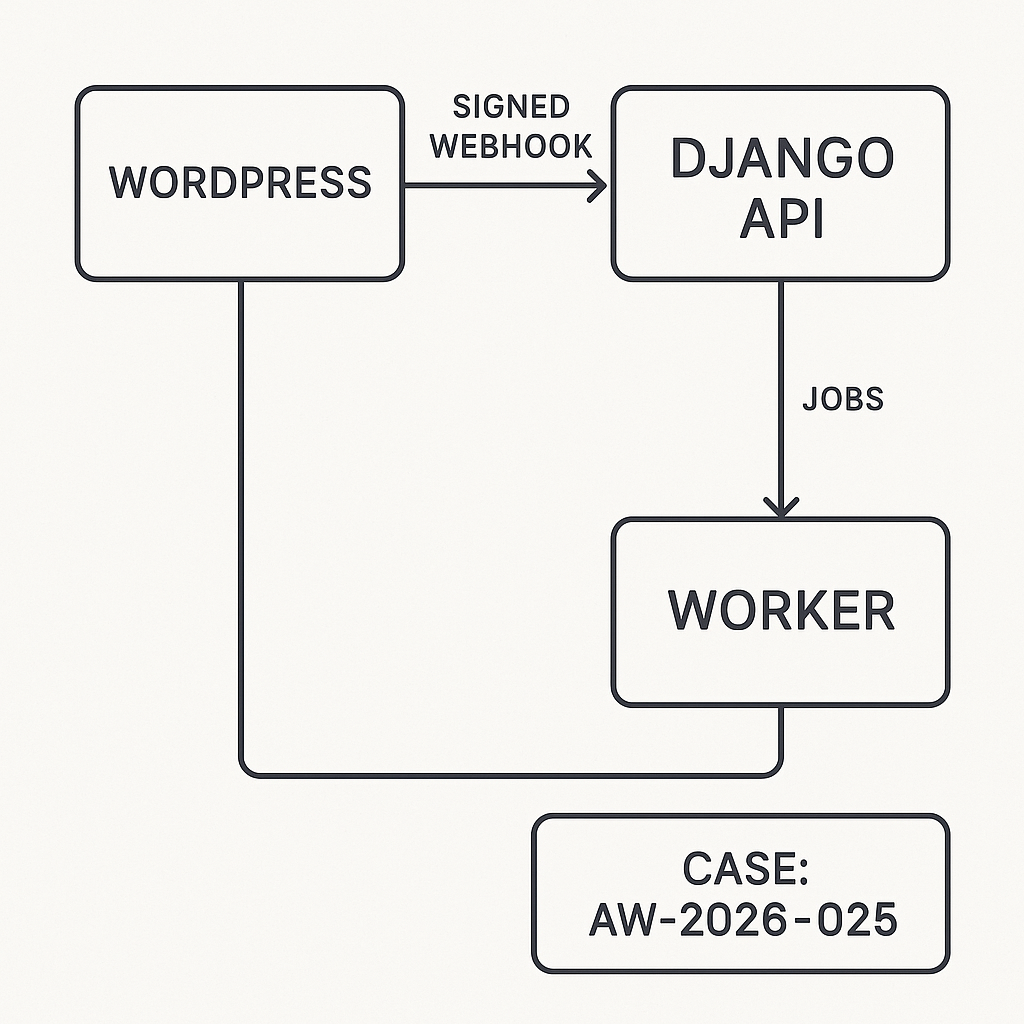
Overview
This guide shows how to send events from WordPress to a Django backend to trigger AI automations (e.g., generate summaries, classify leads, enrich posts). The goal: secure, reliable, and observable webhooks with minimal friction and production-ready patterns.
Architecture
– WordPress: Emits events and posts JSON to a Django webhook endpoint.
– Django API: Validates signature, enforces idempotency, enqueues jobs.
– Worker: Celery/RQ runs AI tasks and calls external APIs.
– Storage: PostgreSQL for logs and idempotency keys; Redis for queues.
– Observability: Structured logs, metrics, dead-letter handling.
Flow
1) WP action fires → build payload → add Idempotency-Key + timestamp.
2) Sign payload with HMAC (shared secret).
3) POST to Django /webhooks/wp.
4) Django verifies signature, timestamp window, and idempotency.
5) Store event, enqueue async job.
6) Respond 202 quickly; worker runs the AI task and reports status.
WordPress: Minimal Plugin Sender
– Store secret and endpoint in wp_options.
– Use wp_remote_post with HMAC-SHA256 on the raw JSON.
Example (PHP, condensed)
– Create a small must-use plugin or standard plugin.
– Settings
– ai_relay_endpoint: https://api.example.com/webhooks/wp
– ai_relay_secret: from env or wp-config.php constant
– Hook example (post publish)
function aigila_generate_signature($secret, $body, $timestamp) {
$base = $timestamp . ‘.’ . $body;
return hash_hmac(‘sha256’, $base, $secret);
}
add_action(‘publish_post’, function($post_id) {
$endpoint = get_option(‘ai_relay_endpoint’);
$secret = get_option(‘ai_relay_secret’);
if (!$endpoint || !$secret) return;
$post = get_post($post_id);
$payload = array(
‘event’ => ‘post.published’,
‘post_id’ => $post_id,
‘title’ => $post->post_title,
‘url’ => get_permalink($post_id),
‘author’ => get_the_author_meta(‘display_name’, $post->post_author),
‘published_at’ => get_post_time(‘c’, true, $post),
‘idempotency_key’ => wp_generate_uuid4(),
‘site’ => get_bloginfo(‘url’),
‘meta’ => array(
‘categories’ => wp_get_post_categories($post_id),
‘tags’ => wp_get_post_tags($post_id, array(‘fields’ => ‘names’)),
)
);
$body = wp_json_encode($payload);
$ts = (string) time();
$sig = aigila_generate_signature($secret, $body, $ts);
$args = array(
‘timeout’ => 5,
‘redirection’ => 0,
‘blocking’ => false, // fire-and-forget
‘headers’ => array(
‘Content-Type’ => ‘application/json’,
‘X-WP-Timestamp’ => $ts,
‘X-WP-Signature’ => $sig,
‘Idempotency-Key’ => $payload[‘idempotency_key’],
‘User-Agent’ => ‘AI-Guy-WP-Relay/1.0’,
),
‘body’ => $body,
);
wp_remote_post($endpoint, $args);
});
Security Notes (WordPress)
– Put the secret in wp-config.php define(‘AI_RELAY_SECRET’, ‘…’); and pull into options programmatically.
– Only send non-PII unless encrypted; sanitize strings.
– Optional: IP allowlist for your Django API.
Django: Receiving Webhooks
– Use Django REST Framework.
– Verify HMAC and timestamp (e.g., 5-minute window).
– Enforce idempotency by storing the Idempotency-Key.
– Return 202 ASAP; do heavy work in Celery.
Models (idempotency and event log, simplified)
from django.db import models
class WebhookEvent(models.Model):
id = models.BigAutoField(primary_key=True)
idempotency_key = models.CharField(max_length=64, unique=True)
event = models.CharField(max_length=64)
payload = models.JSONField()
received_at = models.DateTimeField(auto_now_add=True)
status = models.CharField(max_length=16, default=’queued’) # queued|processing|done|error
error = models.TextField(blank=True, default=”)
Signature Utility
import hmac, hashlib, time
from django.conf import settings
def verify_signature(raw_body: bytes, header_sig: str, header_ts: str) -> bool:
try:
ts = int(header_ts)
except Exception:
return False
if abs(int(time.time()) – ts) > 300:
return False
base = f”{header_ts}.{raw_body.decode(‘utf-8’)}”
expected = hmac.new(
settings.WP_RELAY_SECRET.encode(),
base.encode(),
hashlib.sha256
).hexdigest()
return hmac.compare_digest(expected, header_sig)
DRF View
from rest_framework.views import APIView
from rest_framework.response import Response
from rest_framework import status
from django.db import transaction, IntegrityError
from .models import WebhookEvent
from .tasks import process_wp_event # Celery task
import json
class WPWebhookView(APIView):
authentication_classes = [] # HMAC-only
permission_classes = [] # network segmentation recommended
def post(self, request, *args, **kwargs):
sig = request.headers.get(‘X-WP-Signature’)
ts = request.headers.get(‘X-WP-Timestamp’)
idem = request.headers.get(‘Idempotency-Key’)
if not sig or not ts or not idem:
return Response({‘error’: ‘missing headers’}, status=400)
raw = request.body
if not verify_signature(raw, sig, ts):
return Response({‘error’: ‘bad signature’}, status=401)
try:
payload = json.loads(raw.decode(‘utf-8’))
except Exception:
return Response({‘error’: ‘invalid json’}, status=400)
try:
with transaction.atomic():
evt = WebhookEvent.objects.create(
idempotency_key=idem,
event=payload.get(‘event’, ‘unknown’),
payload=payload,
status=’queued’
)
except IntegrityError:
# Duplicate; already queued or processed
return Response({‘status’: ‘duplicate’}, status=202)
process_wp_event.delay(evt.id)
return Response({‘status’: ‘accepted’}, status=202)
Celery Task (AI workflow)
from celery import shared_task
from django.db import transaction
from .models import WebhookEvent
@shared_task(bind=True, autoretry_for=(Exception,), retry_backoff=True, max_retries=5)
def process_wp_event(self, event_id: int):
evt = WebhookEvent.objects.get(pk=event_id)
with transaction.atomic():
evt.status = ‘processing’
evt.save()
try:
if evt.event == ‘post.published’:
# Example: call LLM to generate SEO summary; push to WP via REST API.
# External calls should have timeouts and circuit breakers.
pass
else:
pass
with transaction.atomic():
evt.status = ‘done’
evt.save()
except Exception as e:
with transaction.atomic():
evt.status = ‘error’
evt.error = str(e)[:2000]
evt.save()
raise
Configuration Checklist (Django)
– Settings
– WP_RELAY_SECRET from environment variable.
– DRF throttling: low global rate, higher for /webhooks/wp if needed.
– ALLOWED_HOSTS, CSRF exempt for this endpoint.
– URL
– path(“webhooks/wp”, WPWebhookView.as_view())
– Middleware
– Ensure no body-altering middleware runs before signature check.
Hardening
– Network: put the API behind a private ingress or allowlist WordPress IP.
– TLS: enforce TLS 1.2+, HSTS; do not accept HTTP.
– Size limits: reject payloads > 256 KB for this use case.
– Idempotency TTL: keep keys 7–30 days; prune with a cron.
– Dead-letter: failed Celery tasks move to a dead-letter queue for manual replay.
– Observability: log request_id, idempotency_key, event; export metrics (accepted, duplicate, failures, latency).
– Backpressure: return 429 if your queue depth is high; WordPress can retry with exponential backoff.
Retries and Backoff
– WordPress defaults to fire-and-forget above; if you need guaranteed delivery:
– Use blocking => true and inspect HTTP status.
– Implement retry schedule (e.g., 1m, 5m, 30m, 2h) on 5xx/429.
– Do not retry on 401/400.
Validating Data
– In Django, validate required fields based on event type.
– Normalize URLs, limit string lengths, and strip HTML.
– Reject unknown events to reduce noise.
Pushing Results Back to WordPress
– Use the WP REST API with an application password or JWT plugin.
– Store secrets in Django env vars.
– Always include an Idempotency-Key when updating WP to avoid duplicate meta.
Performance Tips
– 202 quickly; keep p99 under 100 ms by skipping DB-heavy work inline.
– Use ujson or orjson for faster JSON.
– Reuse HTTP sessions in workers.
– Batch external API calls when possible.
Local Testing
– Use ngrok or Cloudflare Tunnel to receive webhooks in dev.
– curl example:
– BODY='{“event”:”post.published”,”idempotency_key”:”abc-123″}’
– TS=$(date +%s)
– SIG=$(python – <<PY
import hmac,hashlib,os
secret=os.environ.get("WP_RELAY_SECRET","test")
body=os.environ["BODY"]; ts=os.environ["TS"]
print(hmac.new(secret.encode(), f"{ts}.{body}".encode(), hashlib.sha256).hexdigest())
PY
)
– curl -i -X POST http://localhost:8000/webhooks/wp
-H "Content-Type: application/json"
-H "X-WP-Timestamp: $TS"
-H "X-WP-Signature: $SIG"
-H "Idempotency-Key: abc-123"
–data "$BODY"
What This Unlocks
– Automated content enrichment on publish.
– Lead capture → enrichment → CRM sync.
– Comment moderation pipelines with AI classification.
– Scheduled batch jobs initiated from WP cron.
Production Readiness Summary
– Auth: HMAC signature + timestamp window.
– Reliability: idempotency + queue + retries + dead-letter.
– Security: network controls + TLS + small payloads + sanitized data.
– Observability: structured logs, metrics, and trace IDs.
– Performance: fast 202 path and offloaded work.

This is a very clear and robust architecture; I appreciate the detailed focus on security with HMAC signing. How do you recommend managing the rotation of the shared secret in a production environment without downtime?
Good question — the usual low-downtime pattern is to support dual secrets for a short overlap period. On the Django side, accept signatures from both “current” and “next” secrets; on the WordPress side, start signing with “next” while still allowing “current” for a grace window, then retire the old one. Another simple approach is adding a `key_id`/version header (or embedding it in the signature header) so Django knows which secret to try first and you can rotate without guessing. Curious what you’re using for config/secrets management today (env vars, WP constants, a secrets manager), and whether WP can be updated quickly enough to do an overlap rollout?
That’s very helpful; we use a secrets manager with fast WordPress deployments, so the dual secret overlap approach is a perfect fit for our setup.