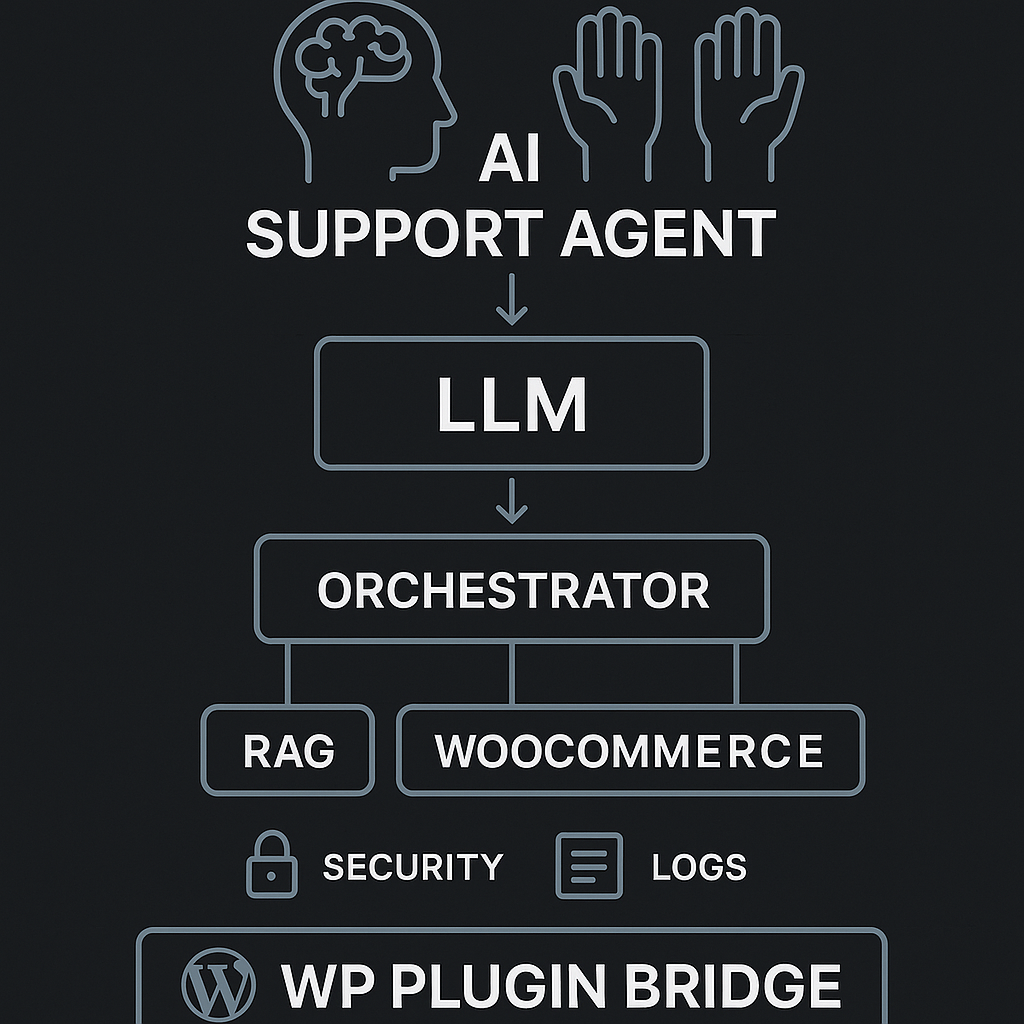
This post walks through a production-ready support agent for a WooCommerce WordPress site. It follows a Brain + Hands architecture, uses secure tool calls, and ships with observability and guardrails. The goal: cut response time and ticket volume without risking data leaks or hallucinated actions.
Use case
– Answer product FAQs from docs
– Check order status
– Create/assign support tickets
– Escalate when confidence is low
– Log everything for audit and iteration
High-level architecture (Brain + Hands)
– Brain (LLM policy + reasoning):
– Interprets user intent
– Plans which tools to call and in what order
– Produces final response or escalation note
– Hands (tools + services):
– read_kb: product/FAQ retrieval (RAG)
– get_order_status: query WooCommerce/DB
– create_ticket: issue system
– send_email/update_user_note: notification
– Orchestrator:
– Validates tool requests (schema, authz)
– Executes tools with timeouts/retries
– Maintains short-term memory and trace
– Enforces rate limits and cost caps
Data flows
– Public content: vector store from docs, product pages, and how-tos
– Private content: order and ticket data via API with scoped tokens
– No raw PII in prompts; use stable IDs and redact before logging
Core components
– LLM: gpt-4.1-mini or equivalent, with tool/function calling
– Vector store: pgvector or Pinecone
– App server: Python (FastAPI) or Node (Express) behind API gateway
– Queue: Redis or SQS for deferred tasks (emails, ticket creation)
– WordPress bridge: minimal plugin that proxies chat to backend with JWT
Prompt design (Brain)
– System role:
– You are the Support Agent for [Brand]. Be concise, cite sources when from the KB, never guess order data, never disclose internal IDs. If confidence [{chunk, source, score}]
– get_order_status(order_id: string, user_token: string) -> {status, eta, items[]}
– create_ticket(subject: string, body: string, user_id: string) -> {ticket_id, url}
Memory strategy
– Short-term (per session): last 10 turns, anonymized entities
– Long-term: none by default; persist resolved FAQs as “suggested macros”
– Tool memory: cache recent order lookups by order_id (5 min TTL)
Error handling and retries
– Tool timeouts: 3s read_kb, 2s get_order_status, 5s create_ticket
– Retries: exponential backoff 2 attempts, idempotency keys for write ops
– Fallbacks:
– If read_kb fails → return minimal fallback FAQ
– If get_order_status fails → offer escalation with ticket creation
– If LLM call fails → canned message + queue a “human follow-up” task
Security and privacy
– JWT from WP session maps to a short-lived backend token (5 min)
– Tool-level authorization checks (RBAC): support.read_kb, orders.read_own, tickets.create
– PII scrubbing:
– Replace emails/phones with tokens before logging
– Mask order_id except last 4 in user-facing responses
– Prompt guards:
– Block tool calls that include secrets or raw SQL-like input
– Refuse to exfiltrate data not tied to the user
Implementation sketch (Python FastAPI)
from fastapi import FastAPI, Depends, HTTPException
import httpx, time, uuid
app = FastAPI()
class ToolError(Exception): pass
async def read_kb(query, top_k=4):
# call vector store
async with httpx.AsyncClient(timeout=3) as c:
r = await c.post(“https://vec/search”, json={“q”: query, “k”: top_k})
r.raise_for_status()
return r.json()[“hits”]
async def get_order_status(order_id, user_token):
async with httpx.AsyncClient(timeout=2, headers={“Authorization”: f”Bearer {user_token}”}) as c:
r = await c.get(f”https://woo/api/orders/{order_id}”)
if r.status_code == 403:
raise ToolError(“not_authorized”)
r.raise_for_status()
return r.json()
async def create_ticket(subject, body, user_id):
idemp = str(uuid.uuid4())
async with httpx.AsyncClient(timeout=5, headers={“Idempotency-Key”: idemp}) as c:
r = await c.post(“https://tickets/new”, json={“subject”: subject, “body”: body, “user_id”: user_id})
r.raise_for_status()
return r.json()
async def orchestrate(message, session, user_ctx):
# 1) build tool-available prompt with redacted context
prompt = build_prompt(message, session, user_ctx)
# 2) call LLM with tools
plan = await llm_call_with_tools(prompt)
# 3) validate tool calls
for call in plan.tool_calls:
validate_schema(call)
if call.name == “get_order_status”:
assert user_ctx.scopes.contains(“orders.read_own”)
assert call.args[“order_id”].startswith(user_ctx.allowed_order_prefix)
# 4) execute tools with retries
results = {}
for call in plan.tool_calls:
results[call.id] = await run_with_retry(call)
# 5) final response
final = await llm_finalize(prompt, plan, results)
return final
def run_with_retry(call):
async def run():
if call.name == “read_kb”: return await read_kb(**call.args)
if call.name == “get_order_status”: return await get_order_status(**call.args)
if call.name == “create_ticket”: return await create_ticket(**call.args)
raise ToolError(“unknown_tool”)
delay = 0.3
for _ in range(3):
try: return await run()
except (httpx.TimeoutException, ToolError):
await asyncio.sleep(delay); delay *= 2
raise
WordPress plugin bridge (minimal)
– Enqueue a chat widget.
– Proxy /wp-json/agent/v1/chat to backend with user JWT.
– Never store API keys in PHP.
PHP (excerpt)
add_action(‘rest_api_init’, function() {
register_rest_route(‘agent/v1’, ‘/chat’, [
‘methods’ => ‘POST’,
‘permission_callback’ => function() { return is_user_logged_in() || true; },
‘callback’ => ‘aig_chat_proxy’
]);
});
function aig_chat_proxy(WP_REST_Request $req) {
$token = wp_create_nonce(‘aig_session_’ . get_current_user_id());
$body = [
‘message’ => $req->get_param(‘message’),
‘session_id’ => aig_get_session_id(),
‘wp_user’ => get_current_user_id()
];
$resp = wp_remote_post(‘https://api.aiguy.la/agent/chat’, [
‘headers’ => [‘X-WP-Token’ => $token],
‘body’ => wp_json_encode($body)
]);
return rest_ensure_response(json_decode(wp_remote_retrieve_body($resp), true));
}
RAG setup
– Ingest:
– Crawl /docs and /products/*.md
– Chunk at 500–800 tokens with overlap 50
– Store URL slugs and titles for citations
– Retrieval:
– Hybrid (BM25 + vector) to reduce misses
– Filter by product tags if user context includes product_id
– Post-retrieval:
– Deduplicate by URL; keep top_k=5; force at least one “policy” doc when user asks for returns/warranty
Guardrails and refusal policy
– If user asks for actions outside scope (refunds, edits to orders):
– Explain limitation and offer to create a ticket with required info
– If confidence low on KB answers:
– Return best-effort summary + references + invitation to escalate
Monitoring and analytics
– Capture per-turn:
– user_id (hashed), session_id, tool_calls[], tokens_in/out, latency_ms, confidence, outcome
– Dashboards:
– Deflection rate (answered without ticket)
– First response time vs. baseline
– Tool error rates
– Cost per conversation
– Alerting:
– Spike in get_order_status 403s
– LLM finalize error rate > 2%
– P95 latency > 5s
Cost controls
– Use small model for planning; larger for finalize only when confidence < 0.7
– Cache KB responses by canonical question
– Hard cap tokens/session and auto-escalate when reached
Evaluation loop
– Weekly batch:
– 100 sampled chats → rubric scoring (accuracy, citation quality, action correctness)
– Auto-generate new tests from real failures
– Synthetic tests:
– Red-team prompts (prompt injection, data exfiltration)
– Tool chaos (forced timeouts) to verify fallbacks
Deployment checklist
– [ ] Staging + prod environments with separate keys
– [ ] WP plugin only calls backend; no secrets in WordPress
– [ ] Tool auth scopes enforced server-side
– [ ] Logs PII-scrubbed and encrypted at rest
– [ ] Rate limiting by IP + user + session
– [ ] Runbooks for LLM outage and ticket system outage
– [ ] AB test widget vs. contact form default
Example user flow
– User: “Where’s order #1234?”
– Brain:
– Validate session, find user_id matches order prefix
– Call get_order_status
– If success, summarize items + ETA (mask ID)
– If fail 403, offer ticket creation
– Response:
– “Your order ending in 1234 is Shipped via USPS. ETA: Mar 9. Want tracking via email?”
What actually ships
– A small WP plugin that renders the chat widget and proxies to an external agent API
– A FastAPI/Express backend that owns tools, auth, and logs
– A vector store for docs
– Observability dashboards
– Guardrails and policies treated as code alongside prompts
If you want the minimal viable slice, ship only:
– read_kb + create_ticket
– No order access yet
– Logging + dashboards from day one
Then add get_order_status with strict auth and red-team it before enabling.

This is a fantastic breakdown, and the “Brain + Hands” architecture is a very clear way to approach building a reliable agent. How do you measure the agent’s confidence level before it decides to escalate a ticket?
A practical way is to treat “confidence” as a bundle of signals rather than one magic number. Are you escalating only when the agent is about to take an action (e.g., create/modify something), or also for plain FAQ answers—and do you have historical tickets you can label as “should have escalated”?
Some useful thresholds I’ve seen work:
– **Retrieval strength:** escalate if top doc score is below X, or if the **gap** between top-1 and top-2 is small (ambiguous match), or if citations don’t cover the key claims.
– **Tool certainty:** escalate if a tool call returns no result / partial data, or if the user’s request requires a write action and required fields are missing.
– **Self-check / consistency:** have the Brain produce a short structured “why I’m confident” check (answered from cited sources? order ID validated? policy-safe?) and escalate if any check fails.
– **Policy / risk flags:** anything touching refunds, address changes, account access, or PII gets a higher bar (or automatic escalation).
Curious what “good enough” looks like for your support team—are you optimizing for fewer escalations, or fewer incorrect non-escalations?
This is an incredibly helpful framework; for us, the priority is minimizing incorrect non-escalations to ensure customer trust.
That makes sense—optimizing for trust usually means a very conservative confidence policy. What’s your target risk tolerance in concrete terms (e.g., “no more than 1 incorrect non‑escalation per 1,000 tickets”), and does it vary by category (refunds/account access vs simple FAQ)?
If you want to bias hard toward safety, I’d set **high-precision thresholds** and do **risk-tiered escalation**: low-risk FAQs can pass with strong retrieval + citations, but anything involving orders, identity, refunds, or writes requires stricter checks (or auto-escalation). For metrics, I’d track **false non‑escalation rate** (missed escalations), plus escalation rate by tier and a lightweight “covered-by-citations” score, then tune thresholds until false non‑escalations hit your target even if escalations go up.
Thank you, framing this around a target false non-escalation rate for different risk tiers is an incredibly helpful and concrete approach.