Build a Production-Ready “AI Draft Writer” Pipeline: Django + Celery + OpenAI → WordPress REST
Overview
We’ll build a small, production-ready service that generates blog drafts using OpenAI and publishes them to WordPress as drafts. The stack:
– Django API for requests and auth
– Celery + Redis for background jobs and retries
– OpenAI for text generation
– WordPress REST API for post creation
You’ll get secure config, job orchestration, content sanitization, and deployment tips.
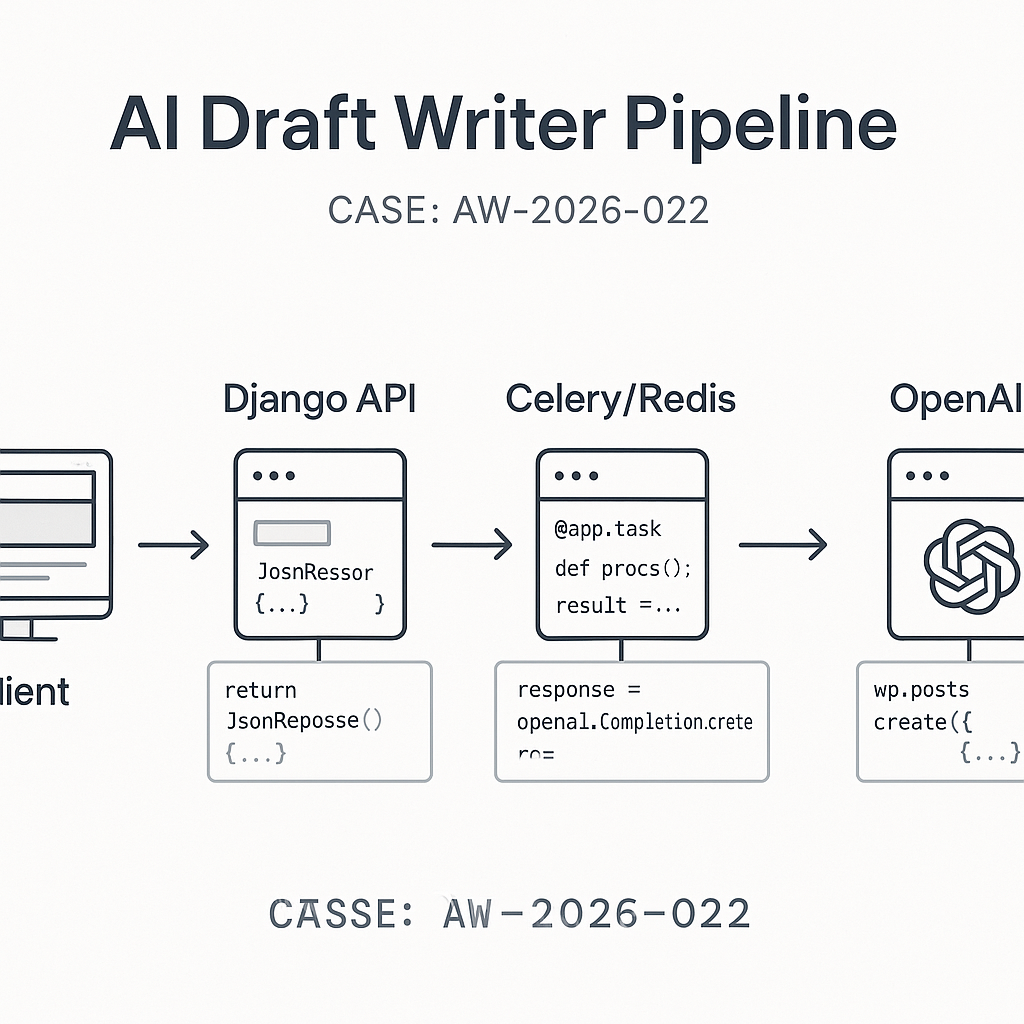
Architecture
– Client calls Django endpoint /api/drafts (JWT or token) with topic + options.
– Django enqueues Celery task draft_writer.generate_draft.
– Task calls OpenAI, sanitizes HTML/markdown, converts to WP blocks (optional), and posts draft to WordPress via wp-json/wp/v2/posts.
– Task stores run metadata and handles retries with exponential backoff.
– Optional callback/webhook to notify the client.
Prerequisites
– Python 3.10+, Django 4+, Celery 5+, Redis
– WordPress 6.x with REST enabled
– OpenAI API key
– WordPress auth: Application Passwords (fast) or OAuth2 (recommended for production)
Environment variables
Add to your .env (use a vault/secret manager in prod):
OPENAI_API_KEY=sk-…
WP_BASE_URL=https://your-site.com
WP_USER=automation-user
WP_APP_PASSWORD=abcd xyz… (from WordPress Application Passwords)
DJANGO_SECRET_KEY=…
ALLOWED_HOSTS=your-api.yourdomain.com
REDIS_URL=redis://localhost:6379/0
Django setup
Create project and app
django-admin startproject aidrafts
cd aidrafts
python manage.py startapp drafts
Install packages
pip install django djangorestframework python-dotenv requests openai==1.* celery redis bleach markdown
settings.py (key parts)
INSTALLED_APPS = [
“django.contrib.admin”,
“django.contrib.auth”,
“django.contrib.contenttypes”,
“django.contrib.sessions”,
“django.contrib.messages”,
“django.contrib.staticfiles”,
“rest_framework”,
“drafts”,
]
REST_FRAMEWORK = {
“DEFAULT_AUTHENTICATION_CLASSES”: [
“rest_framework.authentication.TokenAuthentication”,
],
“DEFAULT_PERMISSION_CLASSES”: [
“rest_framework.permissions.IsAuthenticated”,
],
}
CELERY_BROKER_URL = os.getenv(“REDIS_URL”)
CELERY_RESULT_BACKEND = os.getenv(“REDIS_URL”)
OpenAI client init (drafts/openai_client.py)
import os
from openai import OpenAI
client = OpenAI(api_key=os.getenv(“OPENAI_API_KEY”))
def generate_article(topic: str, outline: list[str] | None = None, tone: str = “concise”, words: int = 900) -> dict:
system = “You are a technical writer. Produce clean, factual content for a business/engineering audience.”
user = f”Topic: {topic}nTone: {tone}nTarget length: {words} words.nInclude short intro, clear sections with H2/H3, bullets where useful, and a practical checklist.nAvoid hype.”
if outline:
user += “nFollow this outline:n” + “n”.join(f”- {h}” for h in outline)
resp = client.chat.completions.create(
model=”gpt-4o-mini”,
messages=[{“role”:”system”,”content”:system},{“role”:”user”,”content”:user}],
temperature=0.4
)
content = resp.choices[0].message.content
return {“content”: content}
Sanitization and format helpers (drafts/format.py)
import bleach
import markdown as md
ALLOWED_TAGS = bleach.sanitizer.ALLOWED_TAGS.union({“p”,”h2″,”h3″,”h4″,”ul”,”ol”,”li”,”pre”,”code”,”strong”,”em”,”a”,”blockquote”})
ALLOWED_ATTRS = {“a”: [“href”,”title”,”rel”,”target”], “code”: [“class”]}
def to_html(text: str) -> str:
if text.strip().startswith(” str:
plain = bleach.clean(html, tags=[], strip=True)
return (plain[:chars] + “…”) if len(plain) > chars else plain
WordPress client (drafts/wp_client.py)
import os, base64, requests
WP_BASE = os.getenv(“WP_BASE_URL”).rstrip(“/”)
WP_USER = os.getenv(“WP_USER”)
WP_APP_PASS = os.getenv(“WP_APP_PASSWORD”)
def _auth_header():
token = base64.b64encode(f”{WP_USER}:{WP_APP_PASS}”.encode()).decode()
return {“Authorization”: f”Basic {token}”}
def create_draft(title: str, content_html: str, excerpt: str = “”, categories=None, tags=None) -> dict:
url = f”{WP_BASE}/wp-json/wp/v2/posts”
payload = {
“title”: title,
“content”: content_html,
“excerpt”: excerpt,
“status”: “draft”,
}
if categories: payload[“categories”] = categories
if tags: payload[“tags”] = tags
r = requests.post(url, json=payload, headers=_auth_header(), timeout=20)
r.raise_for_status()
return r.json()
Models (drafts/models.py)
from django.db import models
from django.contrib.auth import get_user_model
User = get_user_model()
class DraftJob(models.Model):
STATUS_CHOICES = [
(“queued”,”queued”),
(“running”,”running”),
(“succeeded”,”succeeded”),
(“failed”,”failed”),
]
user = models.ForeignKey(User, on_delete=models.SET_NULL, null=True)
topic = models.CharField(max_length=300)
outline = models.JSONField(null=True, blank=True)
tone = models.CharField(max_length=40, default=”concise”)
words = models.PositiveIntegerField(default=900)
wp_post_id = models.PositiveIntegerField(null=True, blank=True)
status = models.CharField(max_length=16, choices=STATUS_CHOICES, default=”queued”)
error = models.TextField(blank=True, default=””)
created_at = models.DateTimeField(auto_now_add=True)
updated_at = models.DateTimeField(auto_now=True)
Celery config (aidrafts/celery.py)
import os
from celery import Celery
os.environ.setdefault(“DJANGO_SETTINGS_MODULE”, “aidrafts.settings”)
app = Celery(“aidrafts”)
app.config_from_object(“django.conf:settings”, namespace=”CELERY”)
app.autodiscover_tasks()
__init__.py in project (aidrafts/__init__.py)
from .celery import app as celery_app
__all__ = (“celery_app”,)
Celery task (drafts/tasks.py)
import time
from celery import shared_task
from django.db import transaction
from .models import DraftJob
from .openai_client import generate_article
from .format import to_html, to_excerpt
from .wp_client import create_draft
@shared_task(bind=True, max_retries=3, default_retry_delay=30)
def generate_draft(self, job_id: int):
job = DraftJob.objects.get(id=job_id)
try:
with transaction.atomic():
job.status = “running”
job.save(update_fields=[“status”,”updated_at”])
ai = generate_article(job.topic, job.outline, job.tone, job.words)
html = to_html(ai[“content”])
excerpt = to_excerpt(html)
wp = create_draft(title=job.topic, content_html=html, excerpt=excerpt)
job.wp_post_id = wp.get(“id”)
job.status = “succeeded”
job.save(update_fields=[“wp_post_id”,”status”,”updated_at”])
return {“wp_post_id”: job.wp_post_id}
except Exception as e:
try:
self.retry(exc=e, countdown=min(300, 30*(self.request.retries+1)**2))
except self.MaxRetriesExceededError:
job.status = “failed”
job.error = str(e)
job.save(update_fields=[“status”,”error”,”updated_at”])
raise
API views (drafts/views.py)
from rest_framework import serializers, permissions, status
from rest_framework.views import APIView
from rest_framework.response import Response
from .models import DraftJob
from .tasks import generate_draft
class DraftRequestSerializer(serializers.Serializer):
topic = serializers.CharField(max_length=300)
outline = serializers.ListField(child=serializers.CharField(), required=False)
tone = serializers.CharField(required=False, default=”concise”)
words = serializers.IntegerField(required=False, min_value=200, max_value=2000, default=900)
class DraftJobSerializer(serializers.ModelSerializer):
class Meta:
model = DraftJob
fields = [“id”,”topic”,”status”,”wp_post_id”,”error”,”created_at”,”updated_at”]
class DraftsView(APIView):
permission_classes = [permissions.IsAuthenticated]
def post(self, request):
s = DraftRequestSerializer(data=request.data)
s.is_valid(raise_exception=True)
job = DraftJob.objects.create(user=request.user, **s.validated_data)
generate_draft.delay(job.id)
return Response(DraftJobSerializer(job).data, status=status.HTTP_202_ACCEPTED)
def get(self, request):
jobs = DraftJob.objects.filter(user=request.user).order_by(“-created_at”)[:50]
return Response(DraftJobSerializer(jobs, many=True).data)
URLs (aidrafts/urls.py)
from django.contrib import admin
from django.urls import path
from drafts.views import DraftsView
urlpatterns = [
path(“admin/”, admin.site.urls),
path(“api/drafts”, DraftsView.as_view()),
]
Run services
– Start Redis
redis-server
– Start Celery worker
celery -A aidrafts worker -l info –concurrency=4
– Start Django
python manage.py runserver 0.0.0.0:8000
WordPress setup
– Create a dedicated user with Editor role (or Author).
– Generate an Application Password in the user profile. Copy it once.
– Ensure permalinks and REST are enabled.
– Optional: lock down WP REST with application firewall rules for your IPs.
Testing the flow
1) Create a user/token in Django (e.g., via DRF authtoken or your auth).
2) POST to /api/drafts with Authorization: Token .
Example JSON:
{
“topic”: “Automating invoice data extraction with Django + DocAI”,
“outline”: [“Overview”,”Pipeline design”,”Parsing edge cases”,”Deployment”],
“tone”: “practical”,
“words”: 1000
}
3) Check GET /api/drafts for status. When succeeded, log into WordPress and find the new draft.
Production notes
– Auth: Prefer OAuth2 or a service account bearer gateway to avoid Basic Auth in WP. If you must use Application Passwords, restrict capabilities and IPs.
– Timeouts: OpenAI and WP requests use short timeouts; Celery handles retries with backoff.
– Observability: Add request IDs, structure logs (JSON), and push Celery metrics to Prometheus.
– Security: Store secrets in a secrets manager. Enforce HTTPS everywhere and CORS off by default.
– Content safety: Apply a server-side allowlist/denylist scan before pushing to WP.
– Rate limits: Celery queue per-tenant and add leaky-bucket throttling if many users.
– Idempotency: Add a de-dup key on (user, topic hash) to prevent duplicate drafts.
– Block editor: If you want block-level control, convert markdown to blocks server-side before posting.
Simple block conversion example (optional)
def md_to_blocks(html: str):
# Minimal example: wrap as a single HTML block
return f”{html}”
Then call create_draft with content_html=md_to_blocks(html).
Cleanup tasks (optional)
– Nightly task to purge failed jobs older than 30 days.
– Sync WP post status back to Django for analytics.
Next steps
– Add title generation separate from topic, with keyword constraints.
– Add media support: upload images to WP media endpoint, then embed in content.
– Add a review checklist to the draft footer, visible only in editor.
You now have a robust, background-processed AI draft writer that safely publishes to WordPress as drafts and scales in production.

This is an excellent, practical guide; the architecture using Celery for background jobs and retries is a great production-focused choice. Did you encounter any specific challenges with converting the generated markdown into the WordPress block editor format?
Yes—Markdown → Gutenberg is usually where the sharp edges show up. The most common pitfalls are: (1) unsupported block patterns (Markdown that doesn’t map cleanly to core blocks, so you end up with generic “HTML” blocks), (2) HTML sanitization stripping attributes/tags you expected to survive (especially around tables, embeds, and inline styles), and (3) shortcodes/embeds that look fine in Markdown but need explicit block markup or whitelisting to render correctly. Whitespace/newline handling can also cause unexpected paragraph breaks when serialized into blocks.
What converter were you using (e.g., a Markdown→HTML library plus a block serializer, or something like wp-block-parser / a custom mapping layer)?
Thanks for detailing those pitfalls; we were using a standard Markdown-to-HTML library plus a custom serializer, which confirms why we saw those exact sanitization and block-mapping errors.