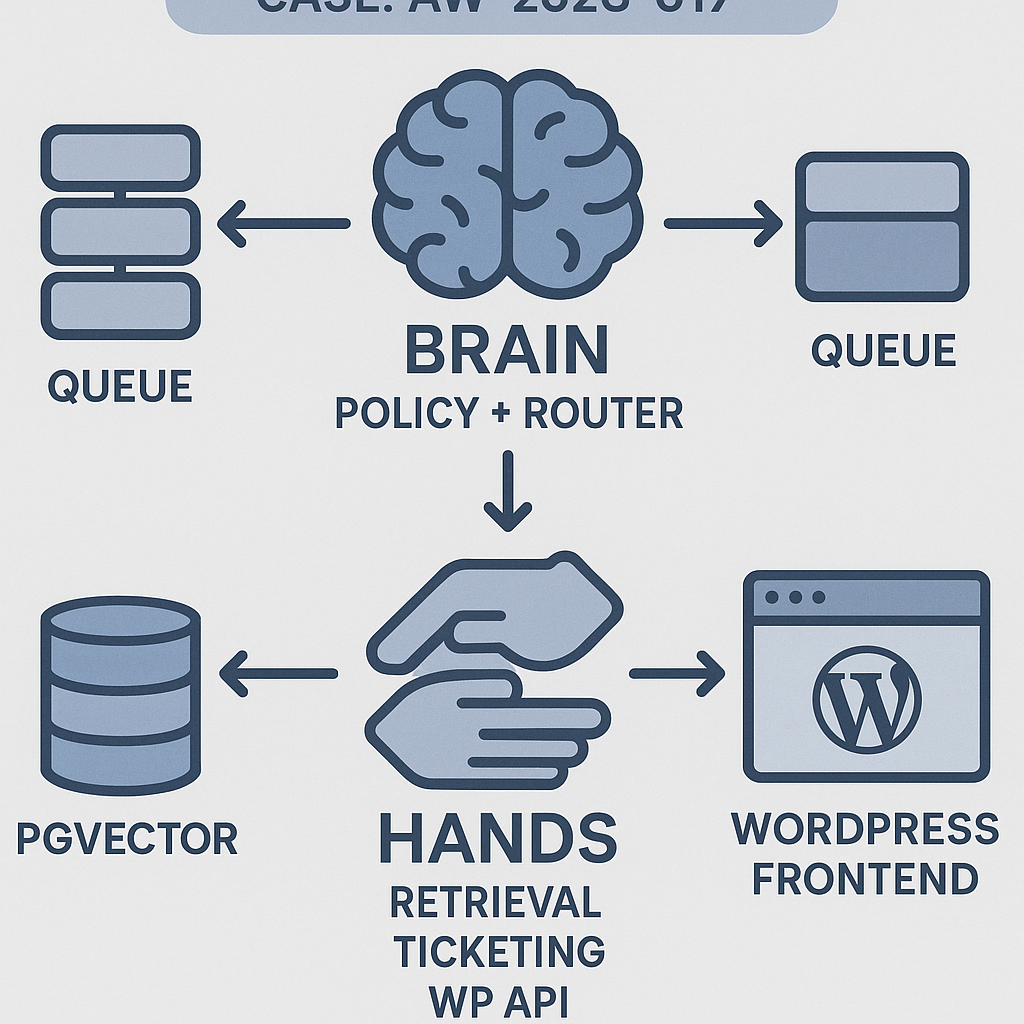
This post walks through building a production-grade support agent that runs on your WordPress site. It uses a Brain + Hands architecture, retrieval grounding, safe tool execution, and an ops-friendly deployment you can ship today.
Use case
– 24/7 support on a WordPress site
– Answers grounded in your docs, knowledge base, and order/ticket data
– Creates tickets, fetches order status, and escalates when needed
– Auditable, rate-limited, cost-capped, and safe by default
Architecture (Brain + Hands)
– Brain: Router and policy LLM. Decides intent, plans steps, calls tools, composes final answer.
– Hands: Strict tools with input/output schemas and timeouts. Examples:
– retrieve_kb(query) → list[doc]
– get_order_status(order_id) → status
– create_ticket(subject, body, user_id) → ticket_id
– wp_lookup_user(email) → user_id
– Memory:
– Short-term: rolling chat window + compact summaries
– Long-term: vector store (pgvector) with namespaces (public docs, private org, tickets)
– Orchestration:
– API service (FastAPI)
– Worker (Celery) for tool calls and long tasks
– Message bus (Redis) + idempotency keys
– Retries with jitter, circuit breakers, dead-letter queue
– Guardrails:
– Tool allowlist by tenant and role
– PII redaction before logging
– Spend caps per session
– Audit log of prompts, tool I/O, and final answer
– Deployment:
– Docker Compose: api, worker, postgres+pgvector, redis, nginx
– Horizontal scale on api/worker
– Observability via OpenTelemetry, Prometheus, and dashboards
Minimal data flow
1) Frontend (WP) posts user_message to /chat.create.
2) Brain classifies intent and selects tools.
3) Worker executes tools with timeouts and idempotency.
4) Brain composes grounded answer, returns JSON.
5) Logs, metrics, and cost counters are flushed asynchronously.
Prompts (policy + tool primer)
System (policy):
– You are a support agent. Only answer using verified sources and allowed tools.
– If retrieval returns low confidence, ask a clarifying question or escalate via create_ticket.
– Never invent order or account details. Use wp_lookup_user and get_order_status.
– Keep answers under 150 words. Provide exact steps when relevant.
– Stop after you complete the task or create a ticket with a summary.
Tool primer (append once at session start):
– Tools are authoritative. Handle errors gracefully. On tool failure: retry once with backoff; otherwise escalate.
– Sensitive data: do not echo PII. Replace with [redacted] in responses.
Memory plan
– Short-term:
– Keep last 8 turns + rolling summary capped to 1,200 tokens.
– Long-term:
– pgvector schema: docs(id, tenant, chunk, embedding, metadata, updated_at)
– Namespace by tenant. Tag privacy: public | internal.
– Retrieval:
– Hybrid search: BM25 + cosine. Rerank top 50 → top 8 with a small reranker or LLM scoring.
– Attach citations (url/title) to the Brain context. Include only top 3.
API skeleton (FastAPI, Python)
– Uses any function-calling LLM client. Replace llm.* with your provider.
from fastapi import FastAPI, HTTPException
from pydantic import BaseModel
import uuid, time
app = FastAPI()
class ChatIn(BaseModel):
session_id: str
user_id: str | None = None
message: str
tenant: str
class ToolError(Exception): pass
def retrieve_kb(tenant: str, query: str) -> list[dict]:
# 1) embed query 2) pgvector ANN search 3) BM25 4) rerank
# return [{title, url, text, score}]
…
def wp_lookup_user(email: str) -> dict | None: …
def get_order_status(order_id: str) -> dict: …
def create_ticket(subject: str, body: str, user_id: str | None) -> dict: …
TOOL_REGISTRY = {
“retrieve_kb”: retrieve_kb,
“wp_lookup_user”: wp_lookup_user,
“get_order_status”: get_order_status,
“create_ticket”: create_ticket,
}
def call_tool(name, args, idempotency_key: str):
# enforce allowlist, timeouts, and idempotency
# store result keyed by (name, idempotency_key) to avoid duplicates
…
def brain_policy(state):
# state: {messages, tenant, memory_summary, budget_left}
# 1) classify intent 2) plan 3) decide tools 4) compose answer
# Use LLM function-calling with tool schema mirroring TOOL_REGISTRY
…
@app.post(“/chat.create”)
def chat_create(inp: ChatIn):
session = hydrate_session(inp.session_id, inp.tenant) # memory + budget
plan = brain_policy(session | {“latest_user”: inp.message})
tool_calls = plan.get(“tool_calls”, [])
results = []
for tc in tool_calls:
key = f”{inp.session_id}:{tc[‘name’]}:{uuid.uuid4()}”
try:
res = call_tool(tc[“name”], tc[“arguments”], key)
results.append({“name”: tc[“name”], “result”: res})
except Exception as e:
results.append({“name”: tc[“name”], “error”: str(e)})
answer = brain_compose(session, inp.message, results) # grounded final
log_audit(inp, plan, results, answer)
return {“answer”: answer[“text”], “citations”: answer.get(“citations”, [])}
Retries and timeouts
– Default tool timeout: 4s (short I/O) and 15s (ticketing).
– Retries: 1 retry with exponential backoff (200–1200ms jitter).
– Circuit breaker: open after 5 failures/min per tool; auto half-open after 60s.
– Dead-letter: push failed jobs with payload and reason.
WordPress integration (minimal plugin)
– Adds a secure endpoint that proxies chat to the API with user/session info.
– Uses WP nonce + JWT for auth. Stores session_id in user meta.
add_action(‘rest_api_init’, function () {
register_rest_route(‘aiguy/v1’, ‘/chat’, [
‘methods’ => ‘POST’,
‘callback’ => function ($req) {
$user_id = get_current_user_id();
$session_id = get_user_meta($user_id, ‘agent_session’, true);
if (!$session_id) { $session_id = wp_generate_uuid4(); update_user_meta($user_id, ‘agent_session’, $session_id); }
$body = [
‘session_id’ => $session_id,
‘user_id’ => $user_id ?: null,
‘tenant’ => get_bloginfo(‘url’),
‘message’ => sanitize_text_field($req->get_param(‘message’)),
];
$resp = wp_remote_post(‘https://api.yourdomain.com/chat.create’, [‘headers’=>[‘Authorization’=>’Bearer ‘.YOUR_JWT],’body’=>wp_json_encode($body),’timeout’=>10]);
return rest_ensure_response(json_decode(wp_remote_retrieve_body($resp), true));
},
‘permission_callback’ => ‘__return_true’
]);
});
Guardrails and policies
– Tool allowlist per tenant and role. Example: guests cannot call get_order_status.
– PII handling: mask emails, phone numbers in logs; hash user IDs.
– Cost guard: $0.50 per session default cap; block further LLM calls and ask for escalation.
– Content policy: refuse medical/financial advice; offer handoff.
Observability
– OpenTelemetry traces: chat.create → brain_policy → tool_calls → compose.
– Events:
– agent.tokens_prompt, agent.tokens_completion
– tool.duration_ms, tool.error_rate
– retrieval.latency_ms, retrieval.disjointness_score
– Dashboards:
– Answer accuracy vs. retrieval overlap
– Ticket creation rate
– Cost per conversation and per tenant
Scalability playbook
– API: uvicorn workers = CPU cores * 2; keep-alive 60s.
– Worker: concurrency tuned to I/O bound tasks; start with 2x CPU.
– Cache: L2 cache embeddings and retrieval via Redis; TTL 10m.
– Rate limit: 10 req/min per IP, 60/min per tenant burst with token bucket.
– Batch embeddings and precompute doc chunk vectors in ingestion jobs.
Testing checklist
– Golden set of Q&A with expected citations (pass@1 ≥ 0.75)
– Tool chaos tests: 20% forced 500s on get_order_status; verify backoff/handoff
– Latency SLO: p95 ≤ 2.5s without tool calls, ≤ 4.5s with retrieval
– Cost SLO: ≤ $0.03 per turn on average
– Security: ensure tools cannot reach arbitrary URLs; static allowlist only
Costs and performance tips
– Use a small reasoning model for policy and a cheaper model for drafting; only upgrade on ambiguity.
– Compress context with structured summaries of past steps.
– Limit retrieval to 8 chunks max, 800 tokens cap.
– Cache rewritten queries and last 3 answers per session.
Deployment (Docker Compose)
– Services: api, worker, redis, postgres(pgvector), nginx
– Environment:
– LLM_API_KEY, OPENAI_API_BASE or other provider
– PG_DSN, REDIS_URL
– ALLOWED_TOOLS, COST_CAP_USD
– Rolling updates with zero downtime; keep migrations backward compatible.
What to ship first (MVP)
– One tool: retrieve_kb
– One action: create_ticket on low confidence
– Short-term memory
– Token/cost logging
– WordPress proxy endpoint
Then iterate:
– Add account/order tools
– Introduce allowlists and spend caps
– Add hybrid retrieval and reranking
– Harden retries and circuit breakers
If you want the reference repo with the minimal stack (FastAPI + Celery + pgvector + WP plugin scaffold), reply with “Send the repo link.”

This is a fantastic breakdown; the “Brain + Hands” architecture is a very clear and robust model for building reliable agents. How does the Brain handle a scenario where one of the “Hands” tools fails or times out during execution?
Good question — in your setup, what failure policy do you want the Brain to follow by default when a Hand times out or returns an error: retry (with backoff/jitter), switch to a fallback tool/source, give a partial answer with a clear “couldn’t complete X” note, or escalate to a human/ticket?
A few safe patterns I’ve seen work: classify errors as retryable vs non-retryable (timeouts/429s vs schema/permission issues), cap retries with exponential backoff and a hard deadline, and always return a user-safe response that’s explicit about what was and wasn’t verified. For critical actions (like “create_ticket” or refunds), do you prefer “fail closed” (no action unless confirmed) with an escalation path, or “best effort” with an audit log and user confirmation? Also, should the Brain continue with other steps if one tool fails, or abort the whole plan to avoid inconsistent state?
Thanks for outlining those patterns; I agree that for critical actions, a “fail closed” policy with an escalation path is the safest and most robust approach.